Start by choosing a monitor that fits your available space, makes clues easy to see and offers a suitable headphone connection. A QHD IPS model is a versatile choice; VA with Mini LED is worth considering if dark scenes are a priority, while OLED requires you to weigh picture quality against the extra care involved. Compare each model’s connections and stand, and check the care guidance for OLED screens.
Who is this monitor right for?
Considerate gamers
If you share a bedroom, you’ll want to listen through headphones and adjust the brightness and footprint to suit the room. ASUS Germany lists a headphone socket for the ASUS VG27AQ3A; whether audio plays through it also depends on the audio connection. LG Germany explains that audio can be transmitted via HDMI or DisplayPort.
Clue hunters
If you read dialogue and inspect small details on screen, consider screen size and resolution alongside your viewing distance and available space. ASUS Germany lists the VG27AQ3A as 27 inches with a resolution of 2560 × 1440 pixels; that particular combination won’t suit every desk.
Fans of dark scenes
If how dark scenes look is especially important to you, compare specific VA Mini LED and OLED models. AOC lists Mini LED with 336 zones for the Q27G3XMN/BK; MSI also notes that bright static images displayed for long periods can cause uneven wear on OLED pixels.
What matters when buying?
Start by comparing available space, how easy details are to see and a quiet way to listen to audio. Then weigh up the display technology based on the games you play and any extra care it requires.
| Consideration |
What to check before buying |
Who is it important to? |
| Being considerate in a shared room |
Headphone socket and suitable audio output from your gaming device; brightness and footprint. |
If I play in a shared bedroom, I want to listen through headphones and adjust the screen to suit the room. Around 36% of consumers put being considerate of others in the room first. |
| Making clues and text easy to see |
Compare screen size and resolution alongside viewing distance, available space and your gaming device. |
If you want to read dialogue and small clues clearly, choose a screen size and resolution that suit where you sit. Around 29% of consumers say that being able to see details clearly is their top priority. |
| Dark scenes in games |
Compare specific IPS, VA Mini LED and OLED models; check OLED care guidance. |
If dark scenes matter most to me, I want to weigh up how specific models display them and consider any OLED care requirements. Around 21% of consumers put the display of dark scenes first. |
| Energy use and care |
Compare the EU energy label’s SDR and HDR figures; check OLED care and warranty terms. |
If you also want to factor in energy use and ongoing care, compare each model’s specifications and care guidance before choosing. Around 14% of consumers prioritise energy use and maintenance. |
Common buying mistakes
-
Choosing based only on the maximum refresh rate
A high refresh rate doesn’t tell you whether clues will be easy to see, whether the monitor will fit your room or whether you can listen privately. For example, the MSI MPG 271QRXDE QD-OLED is listed at 360 Hz; that feature alone doesn’t determine whether it’s suitable for detective games.
Start by considering your shared room and gaming device. Then treat refresh rate as just one of several features to compare.
-
Assuming HDR or a panel type guarantees visible clues
Claims about dimming zones or HDR don’t prove that every small detail will be equally visible in every gaming situation. AOC describes these features for one specific VA Mini LED model, not as a general promise for all games or devices.
Compare specific models and their settings in the kinds of scenes you typically play, rather than assuming a technical term guarantees performance across the board.
-
Leaving the stand and audio connection until after you buy
ASUS Germany lists a headphone socket for the ASUS VG27AQ3A, but the stand isn’t height-adjustable. The monitor also needs a suitable audio input for sound to play through it.
Measure your available space and check the height, VESA mount, connections and audio output against your devices.
You may need a different audio connection or a suitable mount, which can mean extra set-up work.
Key brands at a glance
ASUS
The TUF Gaming VG27AQ3A is a specific QHD IPS model to consider when comparing connections and positioning.
- ASUS Germany lists an anti-glare screen, a headphone socket and a 100 × 100 mm VESA mount for this model.
- The stand supplied with this model isn’t height-adjustable.
AOC
The Q27G3XMN/BK is a specific VA Mini LED model to compare for dark scenes in games.
- AOC lists QHD, 180 Hz and 336 dimming zones for this model.
- The manufacturer’s figures for dimming zones don’t prove that every detail will be easier to see in every game.
MSI
The MPG 271QRXDE QD-OLED is a specific OLED model for anyone weighing up picture quality against the care involved.
- MSI lists 26.5 inches, WQHD and 360 Hz for this model.
- MSI notes that bright static images displayed for long periods can cause uneven wear on OLED pixels. A care feature doesn’t prove that this risk has been eliminated.
LG
The 27GP850P-B is a specific QHD IPS model to compare for positioning.
- LG Germany lists height adjustment and a refresh rate of 165 Hz, or 180 Hz with overclocking, for this model.
- LG Germany marks the 27GP850P-B as no longer available.
Gaming monitors at Joybuy
The Joybuy models below include QD-OLED, Mini LED and IPS options for comparing detail, dark scenes in games and positioning.
 No image available
MSI MAG 272QPDE QD-OLED X24
A QD-OLED option for anyone weighing up detail and dark scenes in games, while also considering the care involved.
27 inches, QHD (2560 × 1440), 240 Hz, Adaptive-Sync and USB-C. Bright static elements displayed for long periods can cause uneven pixel wear on OLED screens.
Joybuy
 No image available
INNOCN 2751S PLUS
An IPS Mini LED option for anyone who values QHD detail and adjustable positioning.
27 inches, QHD, IPS, Mini LED with 1,152 zones and 275 Hz.
Joybuy
 No image available
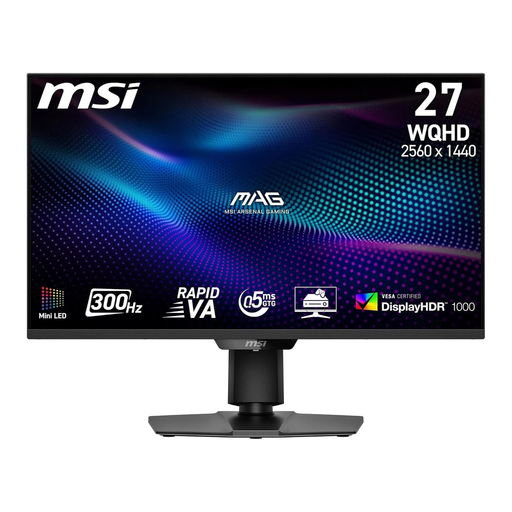
MSI MAG 274QPF X30MV
A VA Mini LED option for anyone who puts dark scenes in games high on their list.
27 inches, WQHD (2560 × 1440), Rapid VA, Mini LED with 1,152 local dimming zones and 300 Hz. The stand is listed as height-adjustable and tiltable.
Joybuy
 No image available
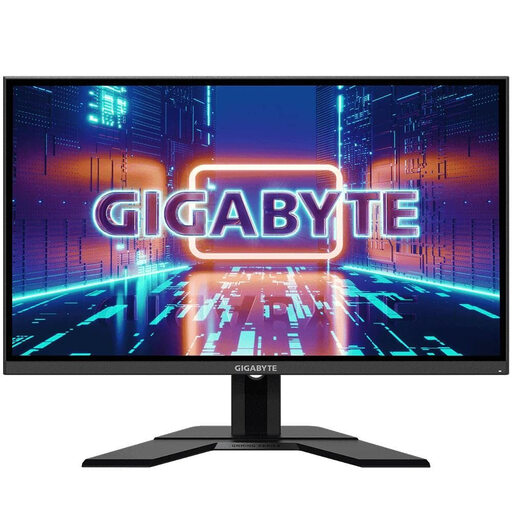
GIGABYTE GS27QA
A QHD IPS option for anyone comparing how easy clues and text are to see alongside screen size.
27 inches, QHD (2560 × 1440), IPS, 165 Hz and 1 ms; listed with HDR and AMD FreeSync Premium.
Joybuy
 No image available
GIGABYTE G27Q20
A QHD option with a headphone output for anyone who wants to see details clearly and listen privately.
27 inches, QHD, SS-IPS, 200 Hz, or 210 Hz with overclocking, and 0.5 ms. The stand is listed as height-adjustable.
Joybuy
Frequently asked questions
How can I play with headphones without relying on the monitor’s audio features?
First, check the audio output on your gaming device and the connections on the specific monitor. ASUS lists a headphone socket for the VG27AQ3A. LG Germany explains that audio output through the monitor depends on a suitable input via HDMI or DisplayPort, and that some models require you to select an audio source.
What should I bear in mind when choosing an OLED monitor?
Follow the care guidance for the specific model and avoid leaving bright static elements on screen for longer than necessary. MSI explains that static images displayed at high brightness for long periods can cause uneven wear on OLED pixels; care features don’t prove that this risk has been eliminated.
Which energy-use figures are helpful for comparing monitors, and what rights apply when ordering online?
For monitors covered by the scheme, the EU energy label includes efficiency figures and information for SDR and HDR; the European Commission includes electronic displays in this labelling system. For online orders in Germany, the Verbraucherzentrale says consumers generally have a 14-day right to cancel from the date the contract is made or the goods are received, depending on the type of contract. The right to cancel, voluntary returns policies and claims for faulty goods are separate matters.
How should I dispose of an old monitor?
Don’t put an old monitor in your household rubbish. The German Environment Agency advises that electrical equipment should be disposed of separately.


