For slower-paced detective games, choose a monitor by first checking how audio will reach your headphones and how easy the screen is to read from your seat, rather than focusing on the highest refresh rate. For dark scenes, VA LCD and OLED are both options: RTINGS says VA typically offers higher contrast than IPS, while OLED’s risk of burn-in is worth considering if you display static content for long periods. IPS may be a good choice if you often view the screen from different angles; RTINGS says IPS typically has wider viewing angles than VA.
Who is this monitor guide for?
Headphone users
If you switch between a PC and a console, check how the game audio will reach your headphones before you buy. LG and MSI point out that the right audio output and selecting the correct audio source can be important, depending on the monitor.
Fans of dark, puzzle-filled worlds
If you often play in a dimly lit room, weigh black levels and motion handling against how you use your monitor. RTINGS explains the typical differences between LCD panel types and notes that OLED carries a risk of burn-in if static elements are displayed for long periods.
Players who want to read clues clearly
If you read small text and menus in games and also use the same screen for longer desktop sessions, make sure the resolution, screen size and viewing distance work well together. Dell’s model specifications show different Full HD and QHD combinations at 27 inches.
What should you look for when buying?
First, check the audio connection and how easy the screen is to read from your usual seat. Then choose a panel type to suit your room and how long you use the monitor.
| What matters |
What to check before you buy |
Who will benefit most? |
| Headphone audio |
Check your headphone type, the audio output on the specific monitor, the audio source and the volume controls in your setup. |
If I want to send game audio from the monitor to my headphones, I need to make sure the connections work. Around 31% of consumers put headphone audio first. |
| Dark scenes |
Compare the panel type and how the specific model displays images, taking your room and ambient light into account. |
If I usually play puzzles in a dark room, how dark areas look matters a lot to me. Around 25% of consumers prioritise contrast in dark scenes. |
| Clues and menus |
Consider the screen size, native resolution, viewing distance and the display mode supported by your gaming device together. |
If I want to read small clues easily from my seat, the resolution and viewing distance need to suit how I use the screen. Around 25% of consumers prioritise the readability of clues and menus. |
| Mixed use |
Consider how you use static displays, the warranty terms for the specific model and its EU energy label. |
If I use the same screen for gaming and desktop work over long periods, I want to take static content into account when choosing a panel. Around 19% of consumers prioritise mixed use and longer sessions. |
Which mistakes should you avoid?
-
Assuming an HDMI connection guarantees headphone audio
A video connection alone doesn’t tell you whether the monitor can send audio to your headphones. Depending on the model, you may also need to select the right audio source.
Before you buy, trace the audio route from your PC or console to your headphones and check the connections on the specific model.
-
Assuming similarly named OLED monitors are identical
MSI lists the MPG 272URX and MPG 272URXDE with different part numbers. GIGABYTE MO27Q28G and MO27Q2A ICE are also different model names, with different stated panel types.
Compare the full model name and the specifications that matter to you on the individual product listing.
-
Choosing OLED based on black levels alone
RTINGS describes a risk of burn-in if the same static elements are displayed continuously. This doesn’t tell you the expected lifespan of any individual device.
Take your use of desktop windows and fixed in-game displays into account, and check the care guidance and warranty terms for the specific model.
-
Comparing refresh rates without checking the connection
Dell lists different maximum refresh rates for the S2722DGM at QHD over DisplayPort and HDMI: 165 Hz and 144 Hz respectively.
Check which display mode your gaming device supports over the specific connection you plan to use.
Which brands and product ranges are worth considering?
GIGABYTE
The MO27Q28G is an example of a QHD WOLED option with a headphone output, for players who want to connect both video and audio through their monitor.
- GIGABYTE lists a resolution of 2560 × 1440, a maximum refresh rate of 280 Hz and a headphone socket for this model.
- These specifications apply to this model and shouldn’t be assumed to apply to every GIGABYTE listing.
Dell
The S2722DGM and G2722HS show two different LCD combinations for gaming monitors.
- Dell lists the S2722DGM with QHD and a VA panel, and the G2722HS with Full HD and an IPS panel. Both models have a headphone socket.
- The resolution and panel type differ, so check which combination suits your viewing distance and preferred picture quality.
MSI
The MPG 272URX QD-OLED is an example of a 4K QD-OLED option for players who want high resolution and a high refresh rate for games beyond adventure titles.
- MSI lists the MPG 272URX and MPG 272URXDE as different part numbers.
- Similar picture specifications don’t prove that different part numbers refer to the same product version.
LG
The UltraGear 27GS95QE-B is an example of a QHD OLED option for players who prioritise dark image quality.
- LG lists a resolution of 2560 × 1440 and a refresh rate of 240 Hz for this model.
- Check that the specific model has the headphone socket and other connections you need, rather than assuming they’re included because of the brand name.
Joybuy monitors for this type of use
Depending on the model, these monitors combine gaming features with qualities that may matter for headphone audio, dark scenes or easy-to-read clues.
 No image available
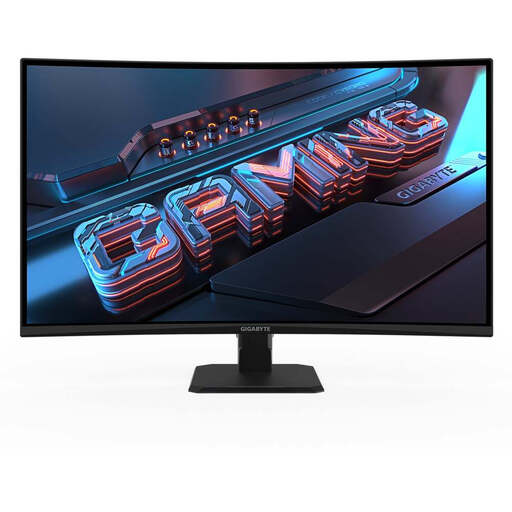
GIGABYTE GS32QCA 31.5-inch QHD curved VA gaming monitor
The VA panel and headphone output listed in the description may be useful if you’re considering dark game scenes and routing audio through the monitor.
2560 × 1440; 1500R; VA; 165 Hz; 1 ms; HDR; FreeSync Premium. The description lists height adjustment, tilt and swivel.
Joybuy
 No image available
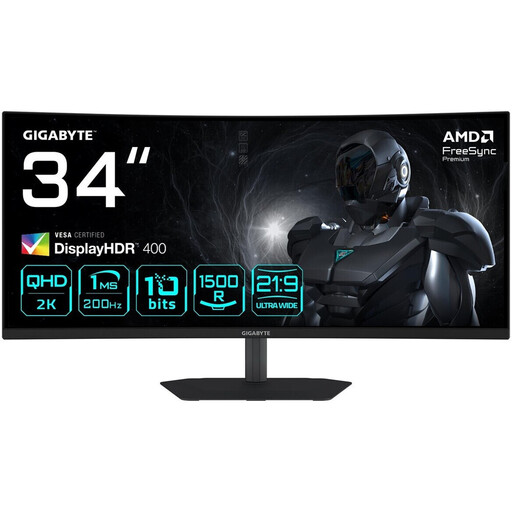
GIGABYTE G34WQC2 34-inch WQHD curved gaming monitor
The product description lists a VA panel and a headphone output. Check that the screen size and resolution suit your viewing distance and gaming device.
3440 × 1440; 1500R; VA; 200 Hz; 1 ms; 450 cd/m²; AMD FreeSync Premium; DisplayHDR 400; HDMI 2.0; DisplayPort 1.4. The contrast ratio is listed as 4000:1.
Joybuy
 No image available
MSI MAG 272QPDE QD-OLED X24 27-inch QHD gaming monitor
The QD-OLED screen and audio output may be useful for dark game scenes and connecting headphones to the monitor. If you have long sessions with the same content on screen, consider the risk of OLED burn-in described by RTINGS.
2560 × 1440; 240 Hz; 0.03 ms; Adaptive-Sync; USB-C; 3.5 mm audio output.
Joybuy
 No image available
ASUS ROG Swift OLED PG32UCDMR 32-inch 4K UHD gaming monitor
The headphone output listed in the description could let you route audio through the monitor. If you have long desktop sessions with static elements on screen, consider the risk of OLED burn-in described by RTINGS.
QD-OLED; 3840 × 2160; 240 Hz; 0.03 ms; 10-bit; DisplayHDR 400; DisplayPort 2.1; HDMI 2.1; USB-C with 90 W; USB hub.
Joybuy
 No image available
GIGABYTE G27Q26 27-inch QHD gaming monitor
The description lists a 3.5 mm headphone socket and QHD resolution. According to RTINGS, IPS LCD typically offers lower contrast than VA, which may be worth bearing in mind for dark scenes.
2560 × 1440; SuperSpeed IPS; 260 Hz, overclocked 275 Hz; 1 ms GTG.
Joybuy
Frequently asked questions
Do I need a headphone socket on my monitor?
No, not if your headphones already connect to your PC or gaming device in the right way. If you want the audio coming in over HDMI or DisplayPort to play through the monitor, check that the specific model has a headphone output and that you’ve selected the right audio source.
What should I check if my headphones connected to the monitor have no sound?
First, check whether the model has a headphone output. Then check the audio source, output device and volume. LG notes that, depending on the model, you may also need to select the audio source in the monitor menu.
Is OLED safe to use for long sessions with fixed displays?
It’s not possible to rule out any risk: RTINGS describes a risk of OLED burn-in if the same static elements remain on screen for long periods. Check the care guidance and warranty terms for the specific model; a panel comparison can’t tell you the expected lifespan of an individual product.
Which details can help me compare energy use?
Compare the EU energy label and EPREL information for the specific models. The European Commission uses an A to G efficiency scale for electronic displays; actual costs also depend on how you use the monitor and your electricity price.


