If rich contrast in dark scenes is a priority for your exploration games, OLED is one option; Mini-LED LCD is worth considering if you’d rather avoid OLED. You’ll also need to check the signal from your PC or console and how you plan to connect your headphones. ASUS lists a headphone socket on the PG32UCDM3, while RTINGS.com found no audio jack on the Alienware AW3425DW it tested.
Who this monitor-buying guide is for
Explorers of game worlds
If you look out for detail and dark scenes in exploration games, you can compare OLED and Mini-LED LCD based on your picture priorities. RTINGS.com comments on both the picture quality of the Alienware AW3425DW it tested in dark rooms and VRR flicker in dark scenes.
Players who connect headphones to their monitor
If you want to plug your headphones straight into the monitor, the socket on the exact model matters. ASUS ROG Germany and MSI list a headphone output on their respective models; RTINGS.com found no audio jack on the AW3425DW.
Players who switch between PC and console
If you play on more than one device, check the resolution, refresh rate and connections for each one. PlayStation Support describes a test on PS5 for 1440p output at 60 or 120 Hz with VRR.
What to look for when buying
First, check where you want to connect your headphones and what signal your gaming device outputs. Then weigh up the display technology, size and service terms against your priorities.
| Buying priority |
What to look for |
Who it matters most to |
| Picture quality in detailed and dark worlds |
Consider resolution and screen size together; don’t assume HDR specifications tell you exactly how the picture will look. |
If I want to see landscapes and dark areas in detail, I compare picture quality rather than looking only at HDR specifications. Around 33% of consumers put picture quality first. |
| Headphone connection |
Decide whether you’ll connect your headphones to the monitor, PC or console. If you’ll connect them to the monitor, check the full model code. |
If you want to connect your headphones straight to the monitor, the specific model needs a suitable audio output. This connection is a priority for around 25% of consumers. |
| Gaming device and video signal |
Check that your gaming device, video input, resolution and aspect ratio are compatible. For PS5, you can also use the 1440p output test. |
If I switch between PC and console, I want to know which video signal combination each device outputs. Around 25% of consumers put this compatibility first. |
| Usage and service life |
Check the care and warranty terms for the exact model; compare the stated power consumption on the EU energy label. |
If you plan to use your monitor for a long time, care guidance and service terms are particularly important. Around 17% of consumers put these points first. |
The European Commission includes monitors among the electronic displays covered by energy-labelling requirements. The EU energy label includes information such as power consumption.
Common misconceptions
-
Playing with headphones doesn’t automatically mean your monitor needs a headphone socket
According to RTINGS.com, the AW3425DW has no audio jack, while ASUS and MSI list a headphone output on the respective models mentioned. If you connect your headphones directly to your PC or console, a socket on the monitor isn’t necessarily part of your audio setup.
Before buying, decide where you’ll connect your headphones. If you plan to connect them to the monitor, check the sockets on the full model code.
-
The maximum Hz rating doesn’t automatically mean every game will run at that frame rate
The resolution and refresh rate you actually get also depend on your gaming device, the input and the signal it outputs. The monitor’s maximum rating alone won’t tell you what to expect.
Check the signal you want to use with your device and the relevant input. PlayStation Support describes the PS5 1440p output test as a way to check supported SDR or HDR signals at 60 or 120 Hz with VRR.
-
Don’t choose an ultrawide without checking game support and audio
A wider aspect ratio is only suitable if your games support it. When testing the Alienware AW3425DW, RTINGS.com observed VRR flicker in dark scenes and found that it has no audio jack.
Check that your most-played games support the aspect ratio you want, and plan to connect your headphones to your gaming device with this model.
-
Don’t confuse the manufacturer’s warranty with your statutory rights for faulty goods
A manufacturer’s warranty is subject to its own terms; your statutory rights for faulty goods apply against the seller. The Verbraucherzentrale explicitly distinguishes between a voluntary warranty and statutory consumer rights.
Read the warranty terms for the specific model and keep your proof of purchase and any related documents.
Notable brands and model ranges
ASUS ROG
The ROG Swift OLED PG32UCDM3 is a 16:9 OLED model with a headphone output.
- ASUS ROG Germany lists a 31.5-inch screen, 3840 × 2160 pixels, a maximum refresh rate of 240 Hz and an audio jack for this model.
- The monitor’s refresh rate doesn’t guarantee that every game will output at that rate. ASUS lists a three-year warranty that includes panel burn-in; the specific warranty terms apply.
MSI
The MPG 272URX QD-OLED combines a more compact 4K OLED format with a listed headphone output.
- MSI lists a 26.5-inch visible diagonal, 240 Hz and a headphone output for this model.
- The specification page available is global. For a German listing, check the exact version and the warranty terms that apply to it.
Dell Alienware
The AW3425DW is a tested ultrawide option for PC gamers considering a wider aspect ratio.
- RTINGS.com gives a positive assessment of the picture quality of the AW3425DW it tested in dark rooms.
- RTINGS.com reports VRR flicker in dark scenes on this model and notes that it has no audio jack.
Samsung Odyssey
The Odyssey OLED G8 G80SH LS27HG800SUXEN is a 27-inch option with a 16:9 aspect ratio and 4K resolution.
- Samsung Germany lists QD-OLED, 240 Hz and an anti-reflection surface for this version.
- If you want to connect your headphones to the monitor, check the audio output on the exact version.
KTC
The M27P6 is a Mini-LED LCD alternative to the OLED models covered here.
- KTC lists a 27-inch screen, 4K at 160 Hz and 1,152 dimming zones for this model.
- These details come from a US product description. If you’re ordering in Germany, check the exact version, service terms and audio output you need.
Joybuy product selection
This selection includes 4K gaming monitors with OLED and Mini-LED LCD displays. If you want to connect your headphones to the monitor, check the audio output on the specific version.
 No image available
TCL 32x3A OLED monitor
An option if you’re looking for an OLED display for detailed game worlds.
The product title lists 4K UHD at 3840 × 2160 pixels, 240 Hz at 4K and 480 Hz in FHD mode.
The title also mentions AMD FreeSync Premium and an anti-glare display. If you want to connect your headphones to the monitor, check the audio output on the specific version.
Joybuy
 No image available
MSI MAG 274UPDFDE E16M
A Mini-LED LCD option if you’d rather avoid OLED and want to choose between 4K and FHD modes.
The product title lists a 27-inch screen, UHD at 160 Hz and FHD at 320 Hz, as well as a Rapid IPS panel.
If you want to connect your headphones to the monitor, check the audio output on the exact version.
Joybuy
 No image available
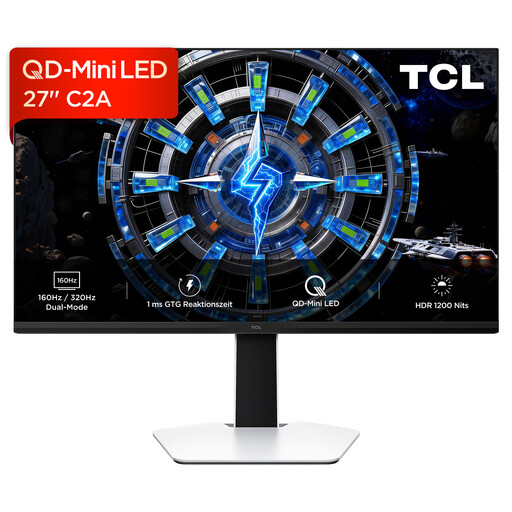
TCL 27C2A QD-Mini-LED monitor
A Mini-LED LCD option if you’re considering a 4K display instead of an OLED panel.
The product title lists 4K UHD, 160 Hz and an FHD mode at 320 Hz.
If you want to connect your headphones directly to the monitor, check the audio output on the specific version.
Joybuy
 No image available
MSI MPG 322URXDE QD-OLED
A 4K OLED option if you’re looking for a larger display for detailed game worlds.
The product title lists a 32-inch screen, 3840 × 2160 pixels and 240 Hz. It also lists HDMI 2.1, DP 2.1a and USB-C with 98 W Power Delivery as connections.
If you want to connect your headphones to the monitor, check the audio output on this exact version.
Joybuy
 No image available
KTC M27P6 Mini-LED gaming monitor
An LCD alternative if you want 4K for detailed games but don’t want an OLED panel.
The product title lists a 27-inch screen, 4K at 160 Hz and an FHD mode at 320 Hz. It also lists Fast IPS, HDR1400 and USB-C with 65 W.
Check the audio output on the specific version to make sure it works with your headphones.
Joybuy
Frequently asked questions
Does a gaming monitor need its own headphone socket?
Only if you want to connect your headphones directly to the monitor. ASUS and MSI list a headphone output on the respective models covered here; RTINGS.com found no audio jack on the Alienware AW3425DW it tested. Check the full model code and decide how you plan to connect your audio.
How do I check 1440p and VRR on a PS5?
According to PlayStation Support, you can view the current HDMI signal and test 1440p output under Screen and Video in Settings. On a supported display, the test checks SDR or HDR at 60 or 120 Hz with VRR. Compare the result with the specific monitor and input.
What should I know about OLED care and the warranty?
Read the care and warranty terms for the exact model variant. ASUS lists a three-year warranty for the ROG Swift OLED PG32UCDM3 that includes panel burn-in. As the Verbraucherzentrale explains, a voluntary manufacturer’s warranty is separate from your statutory rights for faulty goods against the seller.
What does the EU energy label tell me about a monitor?
The European Commission includes computer monitors among the electronic displays covered by energy-labelling requirements. The energy label includes information such as the efficiency class and HDR; it doesn’t replace comparing picture quality in the games you play.
Can I return a monitor bought online?
For an online purchase by a consumer in Germany, you generally have a 14-day right of withdrawal. The Verbraucherzentrale says the period starts when the contract is made or when you receive the goods. You must notify the retailer that you’re withdrawing from the purchase. This is separate from your rights if the product is faulty.


