Explorers of dark game worlds
If you pay attention to shadows and contrast in historical adventures, don’t judge HDR by a logo alone.


Start by choosing a resolution and connections that suit your PC or console, then plan your headphone audio separately. OLED is worth considering for dark scenes; WQHD IPS is an alternative if you’re weighing up image detail and smooth performance. RTINGS points out that 4K can show more detail, but places greater demands on your gaming system. Also check the monitor’s actual HDR performance and the picture modes it supports.
If you pay attention to shadows and contrast in historical adventures, don’t judge HDR by a logo alone.
You want to see landscapes and text clearly, and match the resolution and frame rate to what your gaming device can handle.
You want to be able to hear game audio through your headphones. Check the audio route on your gaming device or the specific monitor.
A good fit if: dark scenes and contrast are top priorities in your choice.
The trade-off: Check the care guidance and warranty terms for OLED. The resolution also needs to suit your gaming system.
A good fit if: you want to compare WQHD with variable refresh rates.
The trade-off: HDR10 alone doesn’t guarantee a particular HDR picture quality, so check the performance of the exact model.
A good fit if: desk space and a compact screen matter more to you than a higher resolution.
The trade-off: Full HD has fewer pixels than WQHD or 4K. Check that the level of detail is right for you, given the screen size and your viewing distance.
| What matters | What to check when buying | Who will find this especially important? |
|---|---|---|
| Dark scenes and contrast | Compare panel type, DisplayHDR tier and measurements for the specific model. For OLED, check care guidance and warranty too. | If I want to judge shadows and contrast in dark game worlds, I compare actual display performance rather than HDR labels alone. This is a key concern for around 31% of consumers. |
| Resolution and frame rate | Match the native resolution and the refresh rate supported by the input you’ll use to the output of your gaming device. | I want to choose a resolution and smooth performance that suit my PC or console, so landscapes and text look sharp. Around 25% of consumers put image detail and performance suited to their device first. |
| Headphone audio | Check the audio output on your gaming device. Only rely on a monitor connection if it’s confirmed for the exact model. | If I want to use my headphones while gaming, I want to know in advance which device will handle the audio. The headphone audio route is the main concern for around 25% of consumers. |
| Desk space and ergonomics | Measure the screen and stand, and check that the model offers the height and tilt adjustments you need. | With limited space, I want to choose a screen size and stand that suit my desk. Around 19% of consumers prioritise the setup and available space. |
HDR10 refers to a supported input signal. VESA distinguishes this from tested DisplayHDR performance tiers, so an HDR logo alone won’t tell you how convincing dark scenes will look.
Check the certification and independent measurements for the exact monitor, rather than filtering by “HDR” in the product name alone.
The stated refresh rate depends on the resolution mode you select. For example, LG lists 540 Hz at QHD and 720 Hz at HD for the 27GX790B-B; this doesn’t determine the frame rate you’ll get in a game.
Match your preferred resolution and input mode with the capabilities of your gaming device and game.
Picture and audio output are separate considerations. PlayStation explains how to set the audio output device on PS5, but that doesn’t confirm that a specific monitor has a headphone socket.
Before buying, confirm the audio route you plan to use and the connections available on the specific monitor or gaming device.
The 27-inch Odyssey OLED G8 S27FG814SU is a 4K QD-OLED option for comparing resolution and OLED contrast.
The MPG 271QRXDE QD-OLED is a WQHD OLED model. MSI lists HDMI 2.1 with 120 Hz and VRR for console use.
The UltraGear 27GX790B-B is a 27-inch WQHD OLED with an adjustable stand.
The Q27G4XF is a 27-inch WQHD IPS example, while the 24G4XE is a more compact Full HD IPS option.
The models below include 4K options, including OLED and Mini LED variants, with different resolution modes. Check the audio route for your headphones separately on the specific monitor or gaming device.
 No image available
An OLED option for detailed game worlds and dark scenes.
4K UHD with 3840 × 2160 pixels; 240 Hz at 4K or 480 Hz at FHD. The modes use different resolutions.
 No image available
A 4K option with two stated resolution and refresh rate modes.
UHD at 160 Hz or FHD at 320 Hz; Mini LED and Rapid IPS.
 No image available
A curved 4K option if you want to factor screen size and curvature into your desk setup.
VA display with 3000R curvature; UHD with 3840 × 2160 pixels and HDR10.
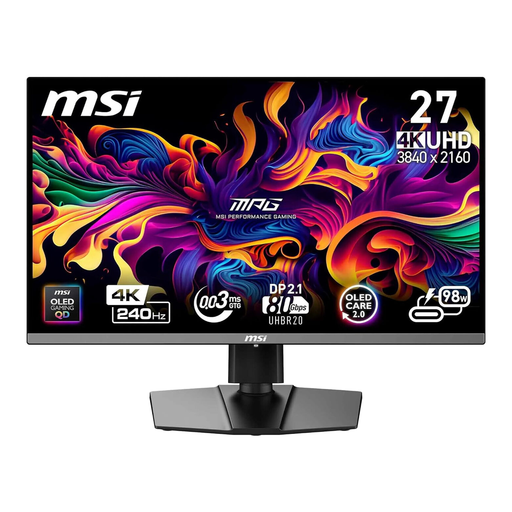 No image available
A 4K QD-OLED option for games with richly detailed landscapes.
UHD at 240 Hz; 16:9 aspect ratio.
 No image available
A 27-inch 4K option with a stated mode switch between 4K and FHD.
4K at 160 Hz or FHD at 320 Hz; Fast IPS.
No, not necessarily. On PS5, you can choose an audio output device and set audio output to compatible headphones in the console settings. Check the audio route for your own gaming device and headphones; the PlayStation guide doesn’t confirm the connections available on a specific monitor.
According to PlayStation, you can view the current signal and information about the connected HDMI device under “Settings > Screen and Video > Video Output”. PlayStation also describes a 1440p output test for SDR/HDR, 60/120 Hz and VRR. 120 Hz also requires a game that supports it.
Check the care features and warranty terms for the exact model. MSI describes OLED Care 2.0 for the MPG 271QRXDE as a way to reduce the risk of burn-in, and lists a warranty for OLED panels that includes burn-in. This is the manufacturer’s statement about this model, not a guarantee for other monitors.
According to the Verbraucherzentrale, online purchases generally come with a 14-day right to cancel. If a product is faulty, statutory consumer rights are separate from a voluntary warranty. Read the terms of any additional manufacturer’s warranty separately, and bear in mind that the conditions in force for your specific purchase will apply.