What should you look for when buying?
First decide how important clear text and work windows are to you compared with visually rich games. Then check that the stand and connections suit your desk and devices.
| Consideration |
What to look for when buying |
Who is this important to? |
| Text and work content |
Compare native resolution and screen size; check your preferred font size and scaling on your computer. |
If I read long passages of text and use work windows alongside them, I want text and content to display at a suitable size. Around 31% of consumers prioritise text and work content. |
| Desk ergonomics |
Check the stand’s height and tilt adjustments, as well as VESA mounting and the space available, if needed. |
If I use the same screen for work and gaming, I want to be able to adjust it to suit my space. Around 25% of consumers prioritise screen positioning. |
| Image quality in other games |
Check which games you actually play and what resolution and refresh rate the model supports through your connection. |
If I play visually rich or fast-moving games as well as text-based games, I want to take their image quality into account. Around 19% of consumers prioritise image quality in other games. |
| Connections for your devices |
Check your computer’s outputs, any other devices you need to connect and your cables against the connections on the exact monitor model. |
If I want to connect several devices to my shared work and gaming screen, I want to make sure it has the right inputs before buying. Around 13% of consumers prioritise device connections. |
| Long-term use and protection |
For OLED, check the terms covering burn-in and compare the information for the specific model, including its EU energy label. |
If work windows or text stay on screen unchanged for long periods, I want to understand the possible effects and the terms for my model beforehand. Around 12% of consumers prioritise long-term use and protection. |
Joybuy products for work and gaming
This selection includes monitors for text and work windows as well as gaming at the same desk, including QHD and 4K models with IPS or Mini LED specifications in their product names.
 No image available
INNOCN CB27U1 27-inch 4K UHD monitor
Could suit you if you want to combine text and work windows with gaming features on a 27-inch screen.
Listed in the product name: 27 inches, 3,840 × 2,160 pixels, IPS, 120 Hz, HDR500, FreeSync and USB-C with 90 W PD; the stand is described as height-adjustable.
View at Joybuy
 No image available
MSI MAG 274UPDFDE E16M 27-inch UHD monitor
Could suit you if you’re looking for a 27-inch monitor for work content and fast-moving games, and are considering a dual mode.
Listed in the product name: UHD, 160 Hz in UHD mode, 320 Hz in FHD mode, Mini LED and Rapid IPS. The glossy finish may cause reflections in bright surroundings.
View at Joybuy
 No image available
KTC M27P6 27-inch 4K Mini LED gaming monitor
Could suit you if you want to combine 4K work content with gaming features and connections for several devices.
Listed in the product name: 4K at 160 Hz, FHD at 320 Hz, HDR1400, Fast IPS, USB-C with 65 W and KVM. The glossy finish may cause reflections in bright surroundings.
View at Joybuy
 No image available
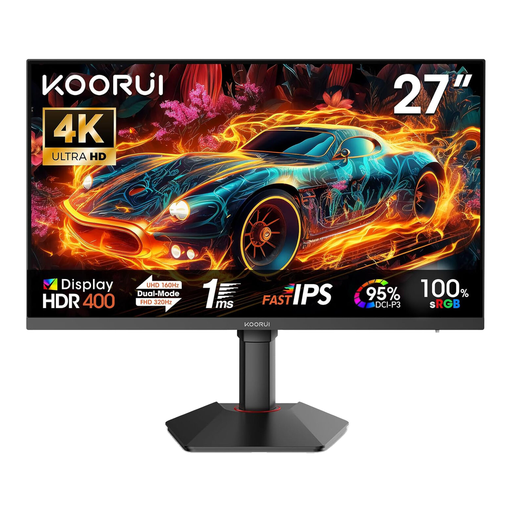
KOORUI G2741L 27-inch dual-mode gaming monitor
Could suit you if you’re looking for a 27-inch monitor for work content and games with different resolution modes.
Listed in the product name: 4K UHD at 160 Hz, FHD at 320 Hz, Fast IPS, HDR 400, two HDMI 2.1 connections and DisplayPort 1.4. The glossy finish may cause reflections in bright surroundings.
View at Joybuy
 No image available
INNOCN 2751S PLUS 27-inch QHD gaming monitor
Could suit you if you want to combine QHD for work and gaming with a high refresh rate for fast-moving content.
Listed in the product name: 27 inches, QHD, Fast IPS, up to 275 Hz, FreeSync and a height-adjustable stand.
View at Joybuy
Frequently asked questions
Do I really need 240 Hz for interactive fiction?
No. A 240 Hz specification alone doesn’t prove that mostly static text will be easier to read. Choose based on the games you actually play and check what refresh rate the specific model supports through your connection.
What should I consider when keeping text windows on an OLED screen?
LG describes burn-in caused by static images displayed for long periods as a risk that cannot be ruled out completely. Check the protective features and the current terms for your exact model; an LG statement about OLED warranty terms is not a general guarantee for other monitors.
How should I set up a monitor for a shared work and gaming space?
Check whether you can adjust the height and tilt using the supplied stand, or whether you need a suitable mount. Germany’s Federal Institute for Occupational Safety and Health applies ASR A6 to screen work within its relevant scope; it is not a blanket legal requirement for private gaming spaces.
Is a manufacturer’s warranty the same as statutory warranty rights?
No. Germany’s Verbraucherzentrale distinguishes statutory claims against the seller for faulty goods from a voluntary manufacturer’s warranty, whose terms are set by the party providing it. Section 438 of the German Civil Code (BGB) generally sets a two-year limitation period for standard claims relating to defects, starting from delivery.
What energy information should I check when buying a monitor online?
The EU energy label applies to electronic displays within its scope. The European Commission also sets out requirements for displaying label information when selling online. Check the information for the specific monitor model, not just for the product range.


