Simulation fans with room for an ultrawide
If you want more horizontal screen space, first check whether your simulation supports 21:9 and whether your desk is wide enough. Xiaomi Deutschland lists the G34WQi as 811,3 mm wide with its stand.


Start by considering how much desk space you have, then check whether your gaming device and simulation can make use of your preferred aspect ratio and resolution. An ultrawide monitor gives you more horizontal screen space, while a more compact 16:9 model is easier to fit in. OLED can be appealing for dark game scenes, but if you’ll be displaying static images for long periods, it’s worth weighing up the risks.
If you want more horizontal screen space, first check whether your simulation supports 21:9 and whether your desk is wide enough. Xiaomi Deutschland lists the G34WQi as 811,3 mm wide with its stand.
If you share the room with someone else, a setup that fits the space you have matters more than the largest possible screen. Measure the monitor with its stand and consider any light sources near where you plan to put it.
If deep blacks matter to you, you can weigh up OLED against LCD. RTINGS notes that OLED can carry a risk of burn-in; MSI presents OLED Care 2.0 as a way to reduce the risk, not eliminate it.
For the initial decision, available desk space and game compatibility matter more than choosing the biggest screen or the highest refresh rate.
A good fit if: You want more horizontal screen space and your desk and simulation support the format.
Consider: Xiaomi Deutschland lists the G34WQi as 811,3 mm wide with its stand, while LG Deutschland lists the 34GS95QE-B as 784,1 mm wide. Check the dimensions of the specific model you’re considering.
A good fit if: The width of your desk matters more than having extra horizontal screen space.
Consider: A 27-inch WQHD model and a 32-inch 4K model differ in both size and resolution. For high frame rates at 4K, your gaming device needs to be up to the task too.
| Buying priority | What to check before buying | Who should consider this? |
|---|---|---|
| Horizontal screen space | Check whether the specific game supports 21:9 and the monitor’s native resolution. | If I want more horizontal screen space in my simulation, I’ll check game compatibility and available desk space first; around 33 % of shoppers say extra horizontal screen space is their top buying priority. |
| Space in the bedroom | Compare the monitor’s width and stand depth with the space available. Also look out for potential reflections from windows or lights. | If I share my desk, the monitor and stand need to fit in the space; around 27 % of shoppers put a suitable setup first. |
| Black levels and static images | Consider the panel type alongside how you use your monitor, especially if menus or instruments stay on screen for long periods. Check the care guidance and warranty terms for the specific model. | If dark game scenes matter to me, I’ll also take long periods with static images into account; around 20 % of shoppers prioritise deep blacks. |
| Usable resolution and refresh rate | Make sure your gaming device, graphics output, cable and chosen connection all work with the resolution and refresh rate. | If I want smooth visuals, my gaming device needs to support the resolution and refresh rate I choose; around 20 % of shoppers make the refresh rate they can actually use their main priority. |
A wide monitor can take up a lot of space, stand included. Your simulation also needs to support the aspect ratio you want.
Measure the space available on your desk and check that the specific game supports the format before you buy.
The monitor’s quoted refresh rate alone doesn’t tell you what frame rate your gaming device can actually achieve at your chosen resolution.
Check the resolution and refresh rate against your gaming device and the connection you plan to use.
How you use your monitor still matters if images stay on screen for long periods. Manufacturer care features don’t guarantee that burn-in won’t happen.
Compare OLED and LCD in light of how you use your monitor, and read the care guidance and warranty terms for the specific model.
According to Xiaomi Deutschland, the Curved Gaming Monitor G34WQi is a 34-inch ultrawide model with a 3440 × 1440 resolution and a maximum refresh rate of 180 Hz.
According to ASUS Deutschland, the ROG Strix XG27ACS is a 27-inch 16:9 model with a 2560 × 1440 resolution and a refresh rate of up to 180 Hz.
According to LG Deutschland, the UltraGear 34GS95QE-B is a 34-inch OLED ultrawide with a 3440 × 1440 resolution and a refresh rate of up to 240 Hz.
According to MSI Deutschland, the MPG 271QRXDE and MPG 322URXDE offer two OLED options: WQHD at around 27 inches and 4K at around 32 inches.
According to BenQ Deutschland, the MOBIUZ EX271UZ is a 27-inch 4K QD-OLED model with a refresh rate of up to 240 Hz.
The following Joybuy models are more compact gaming monitor options, offering QHD with different panel types and refresh rates.
 No image available
A more compact QD-OLED option for dark game scenes, if you also consider how you use your monitor with static images on screen.
Resolution: 2560 × 1440
Refresh rate: 240 Hz
Connection: USB-C
 No image available
A more compact QHD option with Mini-LED, if you’re considering this panel technology instead of an ultrawide format.
Panel: Mini-LED with 1152 zones
Resolution: QHD 2K
Refresh rate: 275 Hz
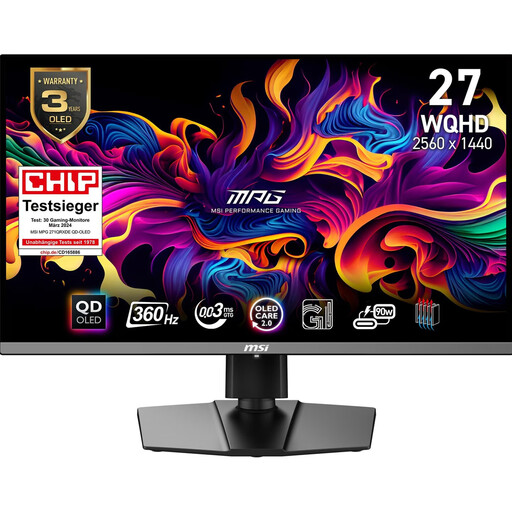 No image available
A more compact QD-OLED option if you want WQHD rather than ultrawide, and you’ve considered how static images fit into your use.
Resolution: WQHD
Format: 16:9
Refresh rate: 360 Hz
 No image available
A compact IPS option if you want QHD and a stated refresh rate of 120 Hz.
Resolution: 2560 × 1440
Panel: IPS
Refresh rate: 120 Hz
 No image available
A more compact QHD option with SS-IPS if you’re looking for a high quoted refresh rate.
Resolution: QHD
Panel: SS-IPS
Refresh rate: 200 Hz (OC 210 Hz)
No. The extra horizontal screen space is only a good reason to buy if you have enough room and the specific game supports the format. A 16:9 model is still an option for a smaller desk.
Measure the space you have, including the stand, and check whether windows or lights near the chosen spot could cause distracting reflections. The BAuA’s guidance on lighting covers how to assess lighting conditions; it isn’t a specific legal requirement for gaming at home.
Consider how long images remain unchanged on screen, and check the care guidance and warranty terms for the specific model. MSI describes OLED Care 2.0 as reducing the risk, not as a guarantee against burn-in.
The EU has energy labelling requirements for electronic displays, as explained by the European Commission. Compare the energy label and product information sheet for the specific model variant; the public EPREL database also contains model information.
The Verbraucherzentrale says that for online orders, you generally have 14 days from delivery to give notice that you’re cancelling. Check the terms of the specific purchase, and distinguish a retailer’s voluntary returns policy from your statutory rights.