What should you look for when buying?
First decide whether the extra side view is worth the more involved setup, or whether a single ultrawide monitor is a better fit for your space and PC. Then plan for audio and field-of-view settings as separate parts of your setup.
Three monitors
A good fit if: you prioritise side vision when racing in a pack and can make room for three displays, the necessary connections and sufficient graphics performance.
Consider: You’ll need to measure the screen widths, viewing distance and angles, then configure the setup in the game you’re playing. iRacing documents specific setup methods, but these won’t necessarily apply to every racing simulator.
Single 32:9 monitor
A good fit if: you want one continuous, wide image instead of three displays and have enough desk space and suitable PC performance.
Consider: A wide monitor needs a suitable position, and screen size alone doesn’t determine the right field of view.
Single 21:9 monitor
A good fit if: you want to avoid the installation work involved in a triple setup and an ultrawide monitor suits your workspace.
Consider: Whether the side view is wide enough when racing in a pack also depends on your seating position, viewing distance and game settings.
| What matters |
What to check before buying |
Who is it important to? |
| Side vision |
Measure your viewing distance, screen width and, if applicable, the angle; check that the game supports your planned setup. |
If I want to spot cars alongside me in a pack, field-of-view settings matter most. Around 36% of consumers prioritise side vision above all else. |
| Space and setup |
Check the monitor’s width and stand depth against your available space, then measure your actual viewing distance. |
If I need to keep setup simple, I want to know whether the monitor and my seating position will fit my space. Around 29% of consumers prioritise space and a straightforward setup. |
| PC performance |
Check the resolution and refresh rate for the input you’ll use; test the frame rate in your game on your own PC. |
If smooth visuals matter more to me than setup or audio, I’ll check that my PC’s output is a good match for the monitor. Around 21% of consumers cite this as their main priority. |
| Headphone audio |
Choose a headset connection type and audio output route; if needed, check whether the specific monitor has a headphone socket. |
If I want to hear my spotter and game audio through my headset, the audio output route needs to work with my gaming device. Around 14% of consumers put headphone audio first. |
Joybuy monitors for oval racing practice
The Joybuy products below are single ultrawide monitors in 21:9 and 32:9 formats. Before choosing one, measure your available space and viewing distance. Also check the frame rate your PC can achieve in your game at the monitor’s resolution.
 No image available
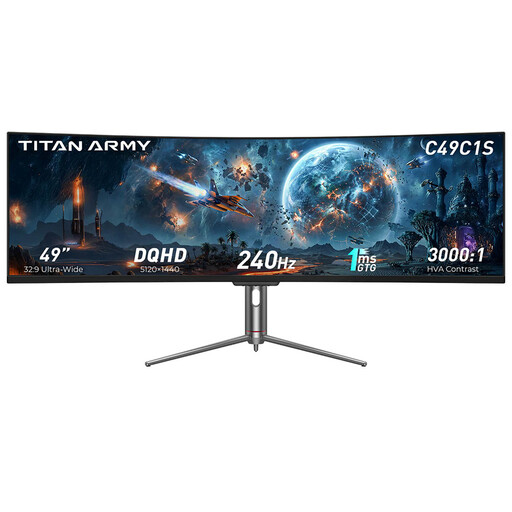
TITAN ARMY C49C1S, 49-inch 32:9 gaming monitor
This model is worth considering as a single 32:9 monitor if you’d rather have one wide display than several screens.
Specifications listed in the product title: DQHD, 240 Hz and 1800R.
Allow enough desk space and factor in your viewing distance when setting the field of view.
Joybuy
 No image available
CRUA CR340QA-H, 34-inch 21:9 gaming monitor
This single 21:9 monitor is an ultrawide option if its format and positioning suit your space.
Specifications listed in the product title: 3440 × 1440 pixels, 165 Hz and 1500R.
Measure your viewing distance and available desk space before setting the field of view.
Joybuy
 No image available
CRUA, 49-inch 32:9 DQHD gaming monitor
This single 32:9 display is an option if you prefer a wide image to a triple-monitor setup.
Specifications listed in the product title: 5120 × 1440 pixels, 165 Hz and 1500R.
The 49-inch format needs enough desk space; also measure your viewing distance to set the field of view.
Joybuy
 No image available
INNOCN E34A1R, 34-inch 21:9 gaming monitor
This model is worth considering as a single 21:9 monitor if you want an ultrawide format instead of several displays.
Specifications listed in the product title: 3440 × 1440 pixels, VA, 200 Hz and 1500R.
Check that the resolution and refresh rate are suitable for your PC and the input you’ll be using.
Joybuy
 No image available
INNOCN 40C1U, 40-inch 21:9 monitor
This single 21:9 display is an ultrawide option if its resolution and refresh rate suit your PC.
Specifications listed in the product title: 5120 × 2160 pixels, IPS and 100 Hz.
The title also lists a USB-C port with PD65W; check whether this feature is useful for your setup.
Joybuy
Frequently asked questions
How do I set the field of view for oval racing practice?
If you use iRacing, measure the distance from your eyes to the monitor surface and the screen width in your usual seated position. With three monitors, you’ll also need to account for their angles and widths. Enter these measurements in the settings rather than choosing your field of view based on screen size alone. Other racing games may have their own settings.
Do three monitors need to be the same model for iRacing?
The iRacing setup guide describes the process on the assumption that all three monitors have the same model, size and resolution. Before mixing different displays, check the requirements of your simulation software and graphics card, as well as whether you can adjust the screen geometry.
Do I need a headphone socket on my monitor for spotter calls?
No, not specifically for spotter calls, as these are provided by the simulation software. What matters is having an audio output route that works with your headset and gaming device. Gigabyte lists an Earphone Jack on the G34WQC2, but this doesn’t mean every headset or its microphone is supported.
What should I know about power consumption and energy labels?
Computer monitors covered by EU rules have an energy label from A to G, which also gives information about consumption when displaying HDR content. Compare the figures for the specific models and consider how long you’ll use them. To calculate your personal costs, you’ll also need your electricity tariff and hours of use.
What are my rights if I buy a faulty monitor online in Germany?
The Verbraucherzentrale distinguishes between your statutory consumer rights against the seller and a voluntary guarantee. If a product is faulty, you can initially request a repair or replacement. According to the Verbraucherzentrale, online purchases generally come with a 14-day right to cancel; check the terms and when the cancellation period starts for your specific purchase.


