Replay analysis and office work
You review footage and use a timeline and text on the same desk. Screen space, readability and a comfortable setup matter more to you than the highest possible refresh rate.


If you review tournament footage alongside a timeline and office windows, a 27-inch QHD IPS monitor could be a good choice, provided its screen space and positioning suit your desk. OLED and high refresh rates are more relevant if contrast or fast-paced gaming is also important to you, but they can’t add frames that aren’t in the recording. For detailed source footage, 4K may also be suitable if your viewing distance, available space and computer performance allow for it.
You review footage and use a timeline and text on the same desk. Screen space, readability and a comfortable setup matter more to you than the highest possible refresh rate.
You review gameplay and also play at high frame rates. Make sure you consider the recording’s fps, the monitor’s refresh rate and the connection mode you can actually use separately.
You often leave timelines or office windows unchanged on screen for long periods. If you’re considering OLED, include the care guidance and warranty terms for the specific model in your decision.
A good fit if: You want to view gameplay, a timeline and text together in one workspace.
Things to consider: Check the stand and connection mode; a high refresh rate alone doesn’t mean you’ll be able to analyse recordings more effectively.
A good fit if: Contrast and fast-paced gaming are also important to you alongside replay work.
Things to consider: Take long periods of static content into account, as well as the care guidance and warranty terms for the specific model.
A good fit if: You prioritise high-resolution source footage or more workspace.
Things to consider: Factor in screen size, viewing distance and your computer’s performance. Extra pixels can’t recreate details that aren’t in the source video.
| Priority | What to check when buying | Who it matters most to |
|---|---|---|
| Screen space and readability | Resolution, screen size, viewing distance and the resolution of the recordings. | If I want to keep an eye on a replay, timeline and text at the same time, I look for a screen with the right amount of space and a clear, readable display. Around 36% of consumers would put screen space and readability first. |
| Motion handling | The frame rate of the footage, the desired mode on the input you’re using and your computer’s performance. | If I also play games at high frame rates as well as analysing footage, I want to choose a monitor that suits my computer and connection. Around 29% of consumers would prioritise motion handling. |
| Panel and static content | Panel type, how long windows remain unchanged, and the care guidance and warranty terms for the specific model. | If timelines and office windows stay on screen for long periods, I want to take static content into account when choosing a panel. Around 21% of consumers would prioritise care and static content. |
| Connections and positioning | Graphics output, monitor input and cable as a combination; stand adjustment range and, where relevant, VESA size. | If my monitor, computer and desk need to work well together, I check the connections and positioning in advance. Around 14% of consumers would put this compatibility first. |
The recording’s frame rate describes the individual frames it contains. A higher monitor refresh rate won’t add frames that are missing from the source footage.
Start by considering the source footage and what you need to do with the replay. Then assess a high refresh rate separately, based on whether you also want to use the monitor for gaming.
ASUS lists different maximum refresh rates for the VG27AQ3A over DisplayPort and HDMI: up to 180 Hz and up to 144 Hz respectively.
Before settling on a connection, check that the mode you want is supported by the ports on both the monitor and your computer.
MSI notes that OLED pixels can age unevenly if static elements remain on screen for long periods, particularly at high brightness. This is not a statement about the coverage of any specific warranty.
Check the care guidance and warranty terms for the specific OLED model before choosing it for long periods of work.
Screen size and viewing distance affect how well a monitor fits on your desk. The ASUS VG27AQ3A doesn’t have a height-adjustable stand; ASUS lists a VESA mount.
Measure the space available and check the stand, adjustment range and VESA size for the specific model.
If the stand can’t reach your preferred height, you may need a compatible mount.
The TUF Gaming VG27AQ3A is a QHD Fast IPS model with published specifications for a mix of replay analysis and gaming.
The MAG 274QRFDE QD E2 is an example of a monitor with published connection and adjustment specifications for a mixed-use desk setup.
The AW2725DF is an example of a QHD QD-OLED model for anyone considering fast-paced gaming alongside replay work.
The UltraGear 27GS95QX-B is an example of a QHD OLED model for comparing panel and connection specifications.
The Joybuy models below range from 27-inch QHD gaming monitors to a 32-inch 4K option. Key factors when choosing include workspace, connectivity and whether you also play games yourself.
 No image available
For replays and office windows on the same desk, if 27 inches and QHD suit your viewing distance and workspace.
144 Hz; FreeSync; HDR10; height-adjustable stand; DisplayPort and HDMI.
 No image available
An option for replays and office windows at the same workstation, if a curved screen suits your desk.
180 Hz; 1 ms; AMD FreeSync; HDR; 122% sRGB.
 No image available
For detailed source footage and a larger workspace, if the screen size and viewing distance suit your setup.
3840 × 2160; 3000R; VA display; HDR10; Adaptive Sync; 100% sRGB.
 No image available
For replays and office windows, with gaming on the side, if you’re looking for a 27-inch QHD screen.
260 Hz, 275 Hz in OC mode; 1 ms GTG.
 No image available
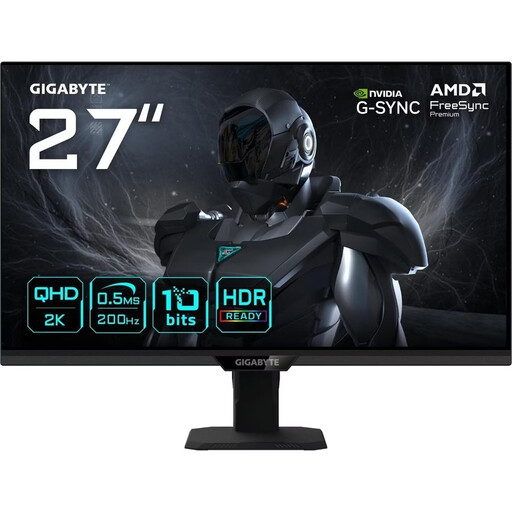
For replay analysis and office work on one screen, if you also want to use the monitor for gaming.
200 Hz, 210 Hz in OC mode; 0.5 ms GTG.
Not just because of the recording: its frame rate describes the video frames it contains. A higher monitor refresh rate won’t add recorded frames to the source footage, but it may be a separate factor to consider for gaming.
Check that the combination of resolution and refresh rate you want is supported by the monitor input and graphics output you’ll actually be using. For the ASUS VG27AQ3A, ASUS Germany lists up to 180 Hz over DisplayPort and up to 144 Hz over HDMI.
Take into account how long static content stays on screen, as well as the care guidance and warranty terms for the specific model. MSI notes that OLED pixels can age unevenly when static elements remain on screen for long periods; this doesn’t tell you what an individual warranty covers.
No. Verbraucherzentrale distinguishes statutory consumer rights against the seller from a voluntary warranty, whose scope depends on its terms. For OLED, check the terms for the specific model rather than assuming coverage based on the panel type.
Follow the instructions for your monitor model. In its general monitor help, LG recommends unplugging the power cable before cleaning and gently wiping the screen with a soft cloth. Don’t apply liquid directly to the screen.