What should you consider when buying?
First compare your video source with the display you want, then consider resolution and viewing distance. After that, check the audio connection and how the monitor will fit into your space.
| Priority |
What to check before buying |
Who is this important to? |
| Following fast motion |
Check the supported frame rate over the connection you plan to use, and consider pixel response specifications separately. |
If I want to assess fast motion in competitive replays, the video source and output mode need to match the frame rate. Around 36% of consumers put motion clarity first. |
| Making out small indicators and details |
Consider the resolution of the footage, screen size, viewing distance and available PC performance together. |
If I compare small indicators or paused frames, I make sure the resolution and viewing distance suit the screen size. Around 29% of consumers prioritise being able to make out these details. |
| Connecting headphones |
Check the audio output and connection type on the specific model. If needed, check the microphone signal path separately. |
If I want to listen to replay audio through headphones, the connection needs to suit my source device and headphones. Around 21% of consumers put the headphone audio connection first. |
| Setup and care |
Check the space the stand takes up and whether it’s height-adjustable. For OLED, also compare care guidance and the warranty terms for the specific model. |
If space is limited or replay interfaces remain static for long periods, I want to consider the setup and any panel care requirements. Around 14% of consumers prioritise these points. |
Joybuy monitors for replay analysis
The Joybuy models below include Full HD, QHD and UHD options for following fast motion and examining fine details. Check the headphone connection on the specific model you’re considering.
 No image available
MSI MAG 274UPDFDE E16M
For replays where you want to weigh up high resolution against a high refresh rate.
27-inch; UHD at 160 Hz or FHD at 320 Hz; Mini-LED; Rapid IPS.
View at Joybuy
 No image available
MSI MAG 274FDE eSports Gaming Monitor
A Full HD option to consider if a 180 Hz refresh rate is part of your decision.
27-inch; Full HD; IPS; 180 Hz; 1 ms; height-adjustable.
View at Joybuy
 No image available
INNOCN 2751S PLUS
For a combination of QHD resolution and a stated refresh rate of 275 Hz.
27-inch; QHD 2K; 275 Hz; 1 ms; IPS.
View at Joybuy
 No image available
GIGABYTE G27Q20
For checking finer image details on a 27-inch QHD model.
QHD; 200 Hz, OC 210 Hz; SS-IPS; 0.5 ms.
View at Joybuy
 No image available
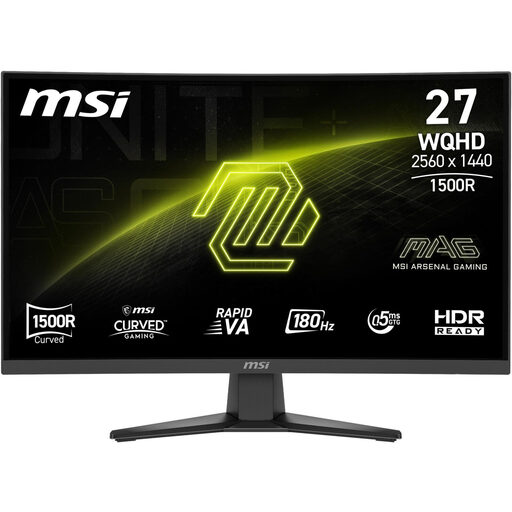
MSI MAG 275CQFDE E18
For replays where you want to compare a 27-inch QHD model with a Rapid VA panel.
27-inch; 2560 × 1440; 180 Hz; 0.5 ms; Rapid VA.
View at Joybuy
Frequently asked questions
Does my replay need to have a high frame rate?
Yes, if you want to assess the individual frames recorded in the replay: the monitor’s refresh rate won’t create extra frames in the recording. So check the recording format and output connection before prioritising a high refresh rate just for watching replays. TÜV SÜD also notes that computer performance matters when choosing a monitor.
Can I assume a headphone socket will work with my headset microphone?
No. BenQ lists a headphone socket on the MOBIUZ EX2710Q, but that doesn’t mean a headset microphone will work through it too. If you need voice chat, check the microphone connection and settings separately on the source device you plan to use.
What should I check after setting up my monitor?
Select a display mode supported by both the monitor and source device, then check that the refresh rate you want is active. Choose a screen size and viewing distance that make the game interface easy to read during replay analysis.
What statutory rights apply if a monitor is faulty in Germany?
For a consumer purchase from a trader, you have at least two years of statutory rights from the date you receive the goods. These rights are against the seller; a voluntary manufacturer’s warranty can add to them but can’t reduce them. Check the specific terms of any additional warranty separately. Your Europe, the European Union’s information portal, explains this minimum period.
How do I compare energy use and dispose of an old monitor?
Compare the information on each monitor’s EU energy label; the European Commission lists electronic displays on an efficiency scale from A to G. In Germany, an old monitor must not go in household waste. It should be taken for separate collection as waste electrical and electronic equipment, for example to a recycling centre or an appropriate take-back point. The German Environment Agency provides disposal guidance.


