Which monitor is right for you?

Replay analysis and office work at the same desk

If you view gameplay, a timeline and text on the same screen, resolution, readability and positioning matter as well as the refresh rate. The German Federal Institute for Occupational Safety and Health covers display screen work within the scope of its ASR A6 regulation.

Fast-paced gameplay and gaming yourself

If you’re reviewing fast-paced scenes and also play games at a high frame rate, it’s important to distinguish the frame rate of the replay file from the monitor’s maximum refresh rate. The display’s potential frame rate can’t replace frames missing from the recording.

Long-term use with static interfaces

If timelines, controls or office windows often stay on screen for long periods, factor panel care and the specific warranty terms into your choice. The European Commission provides energy labels for electronic displays covered by its scheme.

What should you consider when choosing?

QHD IPS for mixed use

A good fit if: You use gameplay, timelines and office documents on the same screen and prefer an LCD monitor. The 27-inch examples listed offer 2560 × 1440 pixels and a nominal 180 Hz.

Trade-off: Manufacturer specifications don’t prove that these models handle motion in the same way or make replay events easier to spot.

QHD OLED for prioritised picture quality

A good fit if: You want OLED and also use the monitor for high-frame-rate gaming. Dell lists 360 Hz for the AW2725DF; LG lists 480 Hz for the 27GX790A-B.

Trade-off: A high refresh rate won’t add extra image information to an existing replay file. If static content stays on screen for long periods, check the care guidance and warranty terms for the specific model.

Buying priority What to look for Who is it important to?
Fast motion Consider the frame rate of your files and the monitor’s refresh rate separately; check the mode and connection you want to use. If you want to assess fast-paced scenes or also play games yourself at a high frame rate, motion is your priority. Around 33% of consumers would also prioritise motion handling.
Gameplay and workspace Check the native resolution, screen size and readability of your own software from your intended seating position. If you want to keep the replay, timeline and office text in view at the same time, screen space matters to you. Around 25% of consumers would put readability and workspace first.
A setup that fits Check the adjustment options, space required and video connections on the specific model against your desk and computer. If you need to fit the screen into your home-working setup, its position and connections are key. Around 25% of consumers would focus above all on how well it fits their workspace.
Panel care and running costs For OLED, read the care guidance and specific warranty terms; compare energy information for the model you’ve chosen. If static timelines and office windows stay open for long periods, you’ll want to consider potential panel risks and running costs. Around 17% of consumers would prioritise durability and ongoing costs.

Common buying mistakes

  • Confusing replay frame rate with monitor refresh rate

    The frame rate is set when the recording is made; the monitor’s maximum refresh rate is a separate specification. A higher refresh rate won’t add frames missing from a recording.

    Check the properties of your replay files and consider whether you’ll also use the screen for high-frame-rate gaming.

    If content often stays on screen for a long time, factor the care requirements of the specific model into your routine.

  • Mixing up similarly named model generations

    Xiaomi lists 180 Hz for the G27Qi and 200 Hz for the separately named G27Qi 2026. These specifications don’t automatically apply to both versions.

    Before buying, check the full model name and the specifications of the exact device.

Key brands at a glance

Xiaomi

The G27Qi is a QHD IPS option for replay analysis and desk work.

  • Xiaomi lists a 27-inch screen, 2560 × 1440 pixels and 180 Hz for the G27Qi.
  • The separately named G27Qi 2026 is listed at 200 Hz; the two model versions shouldn’t be treated as the same.

MSI

The G274QPF E2 is a 27-inch QHD IPS option.

  • MSI lists 180 Hz and Adaptive-Sync.
  • Manufacturer claims of a competitive advantage don’t prove independently measured results for replay analysis.

ASUS

The TUF Gaming VG27AQ3A is a 27-inch QHD IPS option.

  • ASUS lists 180 Hz and ELMB Sync for this model.
  • The sRGB coverage figures differ between the product page and the datasheet, so they’re not a reliable basis for comparison.

Dell Alienware

The AW2725DF is a QHD QD-OLED option with a high refresh rate.

  • Dell lists 360 Hz and documents pixel shifting as a measure to help prevent image retention.
  • This protective feature doesn’t prove that the risk disappears when static office content is displayed continuously.

LG

The UltraGear 27GX790A-B is a QHD OLED option with a high refresh rate.

  • LG lists 480 Hz for this model.
  • The manufacturer’s specification doesn’t prove that previously recorded replays are easier to review.

Joybuy products for replays and desk work

This selection includes QHD gaming monitors with different screen sizes, panel types and refresh rates, for analysing replays and working at the same desk.
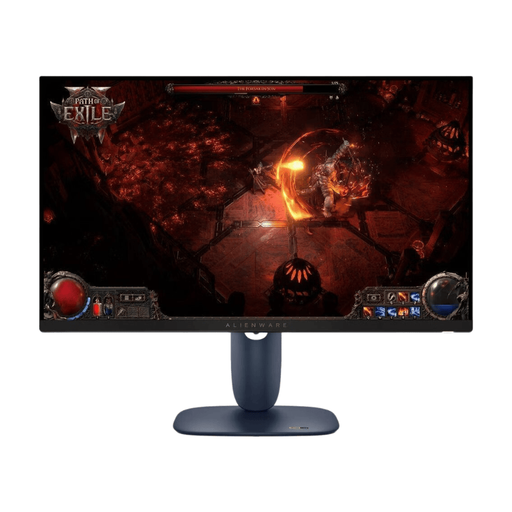
Dell Alienware AW2725DM, 27-inch WQHD IPS gaming monitor

Dell Alienware AW2725DM, 27-inch, WQHD, IPS, 180 Hz

A QHD IPS option if you use replays and office windows on a 27-inch screen.

The product specifications list 2560 × 1440 pixels, 180 Hz, Adaptive Sync and a height-adjustable stand.

View at Joybuy

Samsung Odyssey G5 G50F, 32-inch QHD IPS gaming monitor

Samsung Odyssey G5 G50F, 32-inch, QHD, IPS, 180 Hz

The 32-inch version could be a good fit if you want to view replays and your workspace on a large screen.

The product specifications list 2560 × 1440 pixels, 180 Hz, FreeSync and an adjustable stand.

View at Joybuy

INNOCN E34A1R, 34-inch UWQHD curved gaming monitor

INNOCN E34A1R, 34-inch, UWQHD, 21:9, 200 Hz

The wide 21:9 format is worth considering if you want to arrange replay elements and office windows side by side.

The product specifications list 3440 × 1440 pixels, a VA panel, 200 Hz and a height-adjustable stand.

View at Joybuy

INNOCN 2751S PLUS, 27-inch QHD Mini-LED gaming monitor

INNOCN 2751S PLUS, 27-inch, QHD, Mini-LED, 275 Hz

A 27-inch QHD option if you view replays and office content at the same workstation and want a high refresh rate.

The product specifications list a Fast IPS panel, 2560 × 1440 pixels, 275 Hz and a height-adjustable stand.

View at Joybuy

KTC H27E6S, 27-inch QHD Fast IPS gaming monitor

KTC H27E6S, 27-inch, QHD, Fast IPS, 240 Hz

A 27-inch QHD model if you want to combine replay content and office work on the same screen.

The product specifications list 2560 × 1440 pixels, 240 Hz native and up to 275 Hz overclocked, as well as a height-adjustable stand.

View at Joybuy

Frequently asked questions

Will a 360 Hz monitor make an existing replay more detailed?

No, not in terms of the images stored in the file: monitor refresh rate and recording frame rate are different specifications. Check the frame rate of your replay footage first; a high refresh rate may matter more if you also want to play games yourself.

What should I adjust after connecting the monitor?

Set your preferred resolution and refresh rate on your computer, then check which values are actually active. For longer periods of screen work, make sure the setup suits your workspace too. The ASR A6 issued by the German Federal Institute for Occupational Safety and Health applies to workplaces within its scope; it doesn’t automatically apply to every home gaming setup.

How should I use an OLED monitor if I often have timelines open?

Read the care and protection guidance for the specific model, and consider how long static content stays on your screen. Dell documents pixel shifting on the AW2725DF to help prevent image retention; this feature isn’t a guarantee that continuously displayed static content is risk-free.

What are my rights when shopping online in Germany?

For an online purchase covered by the right to cancel, the EU generally provides a 14-day cancellation period from the date of delivery. This is separate from the statutory guarantee: according to Your Europe, faulty goods are covered by a minimum two-year guarantee from the seller, starting when you receive them. A voluntary manufacturer’s warranty is separate.

Where can I compare energy information for monitors?

The European Commission provides energy labels and model-specific information for electronic displays covered by its scheme. Compare the information for the exact model you’re considering; without knowing how long you’ll use it and your electricity tariff, it’s not possible to work out your individual costs.