Which monitor is right for you?

Map and text readers

If you spend a lot of time reading unit labels, menus and work documents, compare native resolution, how text looks and scaling rather than focusing only on the maximum refresh rate. RTINGS points out that text clarity is subjective, as well as being affected by resolution and pixel density.

Gamers with limited desk space

If you use the same space for work and gaming, check the stand’s depth and adjustability, as well as possible reflections, before choosing a larger screen. The German Social Accident Insurance (DGUV) notes that poorly arranged lighting at screen-based workstations can cause glare.

Fans of wide map views

If you want to arrange maps or work windows horizontally, first check that your desk can accommodate a wide display and that the games you play support the aspect ratio. The fact that a monitor is 34 inches alone doesn’t tell you how an individual game will display its image.

What should you look for when buying?

27-inch, QHD and IPS

A good fit if: You want map labels and work windows to fit on a medium-sized desk. ASUS lists a resolution of 2560 × 1440 pixels and an anti-glare IPS panel for the VG27AQ3A.

Trade-off: QHD has fewer pixels than 4K; the stand on the ASUS model mentioned here isn’t height-adjustable.

27-inch, 4K and IPS

A good fit if: Fine details on maps and in work documents are a priority, and your computer can output your chosen resolution at the desired refresh rate.

Trade-off: Dell lists separate modes for the AW2725QF: 4K at 180 Hz or Full HD at 360 Hz, not 4K at 360 Hz.

34-inch, 21:9 ultrawide and IPS

A good fit if: You want a wide view of maps or windows, have enough desk space and your games display 21:9 effectively.

Trade-off: LG lists 160 Hz as an overclocked figure for the 34GN850P-B. The wider format needs space and doesn’t guarantee that you’ll see more useful information in your games.

OLED with a high refresh rate

A good fit if: Contrast and motion clarity are particularly important to you, and you’ve considered how long maps, menus and work documents will remain on screen. ASUS lists a 4K QD-OLED panel with a maximum refresh rate of 240 Hz for the PG27UCDM.

Trade-off: LG describes burn-in from OLED images left unchanged for long periods as a risk that can’t be fully ruled out. Warranty terms vary by model.

Buying priority What to check Who is it important for?
Map and text readability Compare native resolution with screen size; check your preferred text size and scaling. If I want to read small map labels, menus and work documents comfortably, I look at how text appears and how it scales. Around 36% of consumers prioritise readable maps and text.
Space and setup Check the width and depth, including the stand, height adjustment and lighting conditions at your workstation. If I use the same desk for work and gaming, I want to position the screen appropriately and account for reflections. Around 29% of consumers prioritise their workstation setup.
Wide view of maps and windows Check available desk space, native resolution and 21:9 support in the games you actually play. If I want to see maps or several work windows side by side, I need enough horizontal screen space and room on my desk. Around 21% of consumers prioritise this wider view.
Motion handling Check the refresh rate at your chosen resolution and with your chosen connection; pay attention to how response times are measured. If I want smooth visuals during camera pans and fast-paced battles, I check the refresh rate and how the pixels actually perform. Around 14% of consumers mainly focus on moving scenes in games.

Avoid common selection mistakes

  • Comparing maximum refresh rates without checking the connection and resolution

    A monitor can have different maximum refresh rates depending on the input or operating mode.

    Check the combination of resolution, refresh rate and connection. ASUS lists different maximum figures for HDMI and DisplayPort on the VG27AQ3A; Dell distinguishes between 4K and Full HD modes on the AW2725QF.

  • Assuming different types of “1 ms” measurement are equivalent

    Samsung explicitly describes the figure for the G55C as MPRT under its own test conditions. A single millisecond figure doesn’t give you the full picture of motion handling.

    Compare the measurement methods and, where available, look at results for the refresh rates that matter to you.

  • Choosing ultrawide just for the larger map area

    A 34-inch 21:9 display needs enough room; the monitor specifications alone don’t tell you whether you’ll see more useful information in your games.

    Measure your workspace and check the aspect ratio options in the games you play before making a decision.

  • Choosing OLED without considering long periods of static content

    LG says that images left unchanged for long periods can leave marks; the scope of any voluntary warranty depends on the terms and conditions.

    Weigh the picture quality benefits against how long you actually spend viewing maps and work windows, and read the warranty terms for the specific model.

Key brands and product ranges

ASUS

The TUF Gaming VG27AQ3A and ROG Swift OLED PG27UCDM ranges offer two different 27-inch options: QHD with IPS, or 4K with QD-OLED.

  • ASUS lists an anti-glare display for the VG27AQ3A, with a maximum refresh rate of 180 Hz via DisplayPort and 144 Hz via HDMI.
  • The VG27AQ3A’s stand isn’t height-adjustable; the connection figures apply to this model.

Dell Alienware

The AW2725QF is a 27-inch IPS option for buyers comparing 4K visuals and separate operating modes.

  • Dell lists 4K at 180 Hz or Full HD at 360 Hz, as well as a height-adjustable stand.
  • The 360 Hz figure applies to Full HD, not 4K mode.

LG UltraGear

The 34GN850P-B is a curved 34-inch IPS display in a 21:9 format.

  • The wider format may suit maps or work windows arranged side by side, if your desk and applications are up to it.
  • LG lists 160 Hz as an overclocked figure; check the space available and how your own games display before buying.

Samsung Odyssey

The G55C LS32CG554EUXEN is a 32-inch QHD option with a pronounced curve, rather than a 21:9 ultrawide display.

  • Samsung lists a refresh rate of 165 Hz and a 1000R curve for this model.
  • According to Samsung, the advertised 1 ms figure is an MPRT value measured under internal conditions in Extreme mode, so it isn’t directly comparable with a general GtG figure.

Joybuy monitors for gaming and working from home

This selection from Joybuy includes 27-inch QHD and 4K monitors, as well as a 34-inch ultrawide model. With wider displays, check that the format suits your desk and the games you play.

Z-Edge AGEX 27-inch QHD gaming monitor

Z-Edge AGEX 27-inch QHD gaming monitor

For a compact QHD setup in a shared gaming and work space; according to the product details, the stand is height-adjustable.

Fast IPS panel, 144 Hz, FreeSync and 1 ms MPRT. According to the product description, DisplayPort is required for 144 Hz at QHD.

Joybuy

MSI MAG 274UPDFDE E16M 27-inch monitor

MSI MAG 274UPDFDE E16M 27-inch monitor

A 4K option for map and work details, provided your computer can output the resolution and refresh rate you want.

Mini LED and Rapid IPS panel; 4K UHD at 160 Hz or Full HD at 320 Hz. These refresh rates apply to different operating modes.

Joybuy
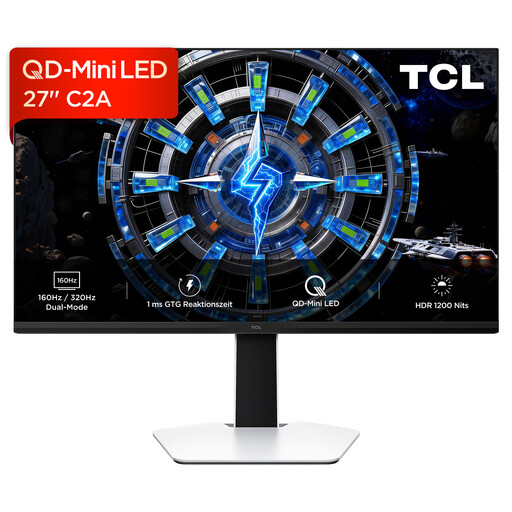
TCL 27C2A 27-inch QD Mini LED monitor

TCL 27C2A 27-inch QD Mini LED monitor

A 27-inch setup for checking the listed refresh rate modes against your computer’s output capabilities.

QD Mini LED and HFS IPS; listed refresh rates are 160 Hz and 320 Hz in Full HD mode. Check the exact resolution in the product details before buying.

Joybuy

TCL 27P2A 27-inch QHD Mini LED monitor

TCL 27P2A 27-inch QHD Mini LED monitor

For maps and work content on a 27-inch QHD screen; the product description says the stand can be adjusted in multiple directions.

QHD with 2560 × 1440 pixels, HFS IPS panel and 200 Hz.

Joybuy

CRUA CR340QA-H 34-inch ultrawide gaming monitor

CRUA CR340QA-H 34-inch ultrawide gaming monitor

For a wide view of maps or windows, if you have enough desk space and the games you play support the 21:9 format.

3440 × 1440 pixels, 21:9, 1500R curve and 165 Hz. The listed 1 ms response time is MPRT; VESA wall-mount compatibility is specified as 75 × 75 mm.

Joybuy

Frequently asked questions

Do I need a 240 Hz monitor for historical war games?

Not just because of the type of game. First check that you can read maps and menus comfortably. For faster-paced scenes, pixel response, your computer’s refresh rate and the connection you use also matter. A manufacturer’s maximum refresh rate doesn’t automatically apply to every operating mode.

What should I adjust after connecting the monitor?

Select the native resolution, check the refresh rate you want using the input you’ll actually use, and set text scaling to a level you can read comfortably. The documented maximum refresh rates for the ASUS VG27AQ3A differ between HDMI and DisplayPort; these figures don’t automatically apply to other models.

What should I bear in mind when using an OLED monitor for long office and strategy gaming sessions?

Bear in mind that static content left unchanged for long periods can contribute to burn-in. Follow the care guidance and warranty terms for the specific model; LG says the risk can’t be fully ruled out, even with proper use. This doesn’t apply to every OLED model.

Where can I find comparable information about power consumption?

The European Commission describes an EU energy label for electronic displays, including computer monitors, with ratings from A to G. Compare the label for the specific model.

What rights apply when buying online in Germany?

Consumers generally have a 14-day right to cancel a distance contract, though statutory exceptions and the start of the cancellation period should be considered in each case. If a product is faulty, statutory rights against the seller are separate from a voluntary warranty. The Verbraucherzentrale explains that new goods are generally covered by two-year statutory warranty rights.