What to consider when buying
TÜV SÜD recommends considering screen size, viewing distance and computer performance together. For working from home, you’ll also want to think about text clarity and static work windows.
| What matters to you |
What to check before buying |
Who is this important to? |
| Image quality in dark scenes |
Panel type, room lighting and reflections; for OLED, also check the care guidance and warranty terms for the specific model. |
If I mainly want to enjoy atmospheric, dark game worlds in the evening, image quality matters most to me; around 31 % of consumers put it first. |
| Readable text and work windows |
Text clarity on the specific model and resolution relative to screen size; with OLED, consider how you use elements that stay on screen. |
For long days working with documents and fixed windows, readable text matters more to me than gaming effects; around 31 % of consumers prioritise readability for work. |
| Space and aspect ratio |
Dimensions, including the stand, and your seating position; for ultrawide screens, also check whether the game supports the format and how it lays out the HUD. |
If my desk is short on space or a wide format doesn’t suit the game, I want to work out how it will fit first; around 25 % of consumers put space and screen format first. |
| Resolution and frame rate |
Your preferred gaming resolution, the frame rate your computer can actually achieve and the refresh rate supported by the relevant connection. |
If I want smooth gameplay without pushing my computer too hard with an unsuitable resolution, the balance between resolution and frame rate matters to me; around 13 % of consumers prioritise getting this balance right. |
Brands and model ranges to help you choose
The features below apply to the specific models and product ranges mentioned, not to every monitor from each brand.
Samsung
The Odyssey OLED G8 G81SF is one example, with a 27-inch screen, 4K resolution and 240 Hz refresh rate.
- Samsung lists an anti-reflective surface and OLED protection technology for the LS27FG814SUXEN model.
- These manufacturer claims don’t mean that reflections or burn-in are impossible.
MSI
The MPG 271QRXDE QD-OLED is a QHD model with a manufacturer-stated refresh rate of 360 Hz.
- For this model, MSI lists USB-C, OLED Care 2.0 and three years of OLED coverage, including burn-in.
- These details apply to this model; protection features don’t prove that burn-in is impossible.
LG
The UltraGear 27GX790B-B is a QHD OLED model with dual-mode refresh rate specifications.
- LG lists 540 Hz at QHD and 720 Hz at HD.
- These two refresh rates don’t apply at the same time or at the same resolution.
LC-Power
The LC-M32UCO and LC-M49QCO models offer different screen sizes and formats.
- LC-Power lists the LC-M32UCO at 31.5 inches and 3840 × 2160 pixels, and the LC-M49QCO at 49 inches and 5120 × 1440 pixels.
- With the wider model, how well it fits and how useful it is depend on the space available and the game you play.
AOC
The 24G4XE is a compact IPS model with Full HD resolution.
- AOC lists a 23.8-inch screen, 1920 × 1080 pixels and 180 Hz.
- Whether Full HD is right for you depends, among other things, on your viewing distance and preferred screen size.
Joybuy monitors for gaming and work
This selection includes LCD models, including a Mini-LED monitor, an ultrawide model and OLED monitors. If you’re considering OLED, think about how long fixed work windows will stay on screen.
 No image available
TCL 27P2A Pro Mini-LED monitor
An option if you’re looking for a QHD monitor for gaming and everyday computer work.
The product name lists 27 inches, QHD (2560 × 1440), 320 Hz, HFS (IPS), VESA DisplayHDR 600 and 1 ms GTG.
AMD FreeSync Premium is also listed in the product name.
View at Joybuy
 No image available
Xiaomi G34WQi ultrawide gaming monitor
The wide format could be a good fit if your desk has enough space and your RPG makes good use of ultrawide.
The product name lists 34 inches, WQHD, VA and 180 Hz.
Before buying, check the space it’ll take up, as well as the aspect ratio and HUD in the game you play.
View at Joybuy
 No image available
MSI MAG 244F Full HD Rapid IPS gaming monitor
Its compact size could be a good choice if you have limited desk space.
The product name lists 23.8 inches, Full HD, Rapid IPS, 200 Hz and 16:9.
The product name lists DP and HDMI connections.
View at Joybuy
 No image available
MSI MPG 322URXDE QD-OLED monitor
An OLED option for richly detailed RPG worlds. If you work long days with fixed windows, though, remember to factor in the risk of burn-in.
The product name lists 32 inches, 4K UHD (3840 × 2160) and 240 Hz.
The product name lists HDMI 2.1, DisplayPort 2.1a and USB-C with 98 W Power Delivery.
View at Joybuy
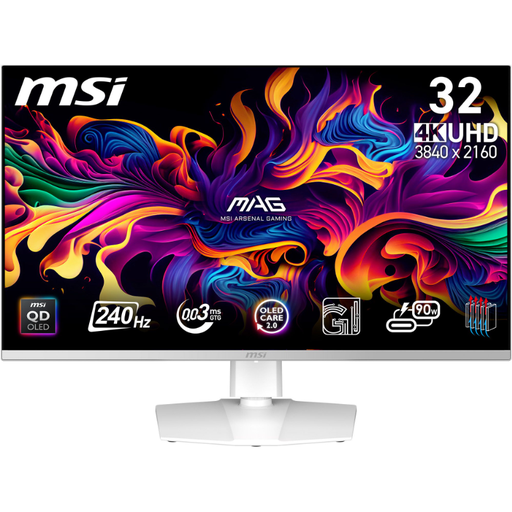 No image available
MSI MPG 321URXWDE QD-OLED monitor
This OLED model could be a good fit for detailed games. If you regularly use static work windows, remember to factor in the risk of burn-in.
The product name lists 31.5 inches, UHD 4K and 240 Hz.
View at Joybuy
Frequently asked questions
Do I need 240 Hz or more for RPGs?
No, not just because of the genre. First check what frame rate your computer can achieve at your preferred resolution, and whether you care more about image detail, contrast or motion clarity. TÜV SÜD notes that high refresh rates require a computer with sufficient performance.
What should I check when setting up a monitor for work and gaming?
Measure the space available, including the stand, and consider your viewing distance and reflections. The BAuA rule ASR A6 covers screen-based work in workplaces and at teleworking locations within its scope; it doesn’t apply across the board to every home gaming setup.
How can I use an OLED monitor for regular office work?
Follow the care guidance for the specific model and avoid leaving unchanged images on screen for unnecessarily long periods. Repeatedly displaying static content remains a burn-in risk; MSI describes OLED Care 2.0 for the model mentioned as reducing the risk, not eliminating it.
What are my rights if a product is faulty or I buy online in Germany?
The seller is responsible for your statutory rights when goods are faulty, which are separate from a voluntary manufacturer’s warranty, as explained by the Verbraucherzentrale. Many online purchases generally come with a 14-day right to cancel; the terms of the specific purchase apply.
Does a gaming monitor need an energy label in Germany?
EU energy-labelling rules generally cover computer monitors too. For electronic displays covered by the rules, the label shows an efficiency class from A to G, among other details. When comparing specific offers, check the energy label and product information sheet. The European Commission describes these requirements as labelling and product information rules for products within scope.


