What should you look for in a monitor for a shared bedroom?
First, compare the frame rate your PC can actually achieve through the connection you’ll use, then check the monitor’s footprint and stand. If you share a room, brightness controls and private audio should also be part of your decision.
| What matters |
What to check before buying |
Who should consider it? |
| Motion handling |
Frame rate at your chosen resolution and through the input you’ll use; compatibility with your PC and cable. |
If I play fast-paced matches, I want to know what frame rate my system can actually output. Around 33% of consumers put achievable frame rate first. |
| Light and sound |
Brightness settings, screen coating and a connection for your audio setup. |
If someone else in the room is sleeping or working, I want to adjust the light and game audio to suit sharing the space. Around 27% of consumers prioritise being considerate in a shared room. |
| Desk space and positioning |
Width and depth, including the stand, plus height adjustment or a suitable alternative setup. |
If I need to leave room on my desk for mouse movements, the monitor and stand must fit the space available. Around 20% of consumers put footprint and positioning first. |
| Resolution and other tasks |
Resolution, screen size and achievable frame rate in the combination you want; if you often work with text, consider how clearly it’s displayed. |
If I use my screen for tasks beyond gaming, I want to choose a resolution and size that suit my space. Around 20% of consumers prioritise resolution and versatility. |
Joybuy products for fast-paced games and shared rooms
This selection includes QHD models for gaming and other screen-based tasks, as well as Full HD options with a high specified refresh rate. For the 27-inch models, check that the footprint, including the stand, fits your desk.
 No image available
MSI MAG 272QPDE QD-OLED X24 27-inch
A QHD option if you want to combine fast-paced gaming with other screen-based tasks at a higher resolution.
QD-OLED; 2560 × 1440 pixels; 240 Hz; anti-glare surface; height-adjustable stand.
The 27-inch class takes up more desk space than the compact models mentioned above.
View at Joybuy
 No image available
INNOCN 2751S PLUS 27-inch Mini LED
A QHD option for fast-paced gaming, if a 27-inch screen fits the space available.
QHD; 275 Hz; IPS; FreeSync; height-adjustable stand.
The 27-inch class takes up more desk space than the compact models mentioned above.
View at Joybuy
 No image available
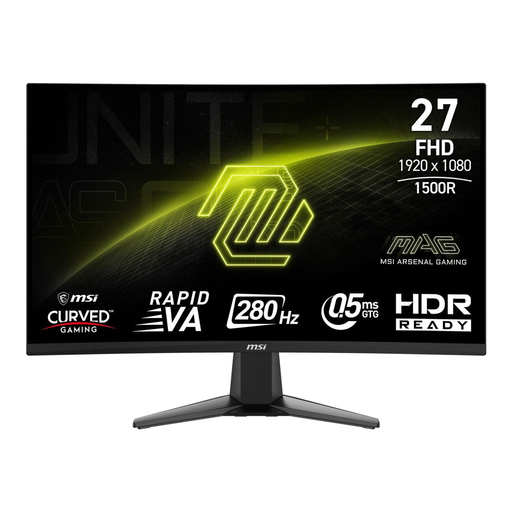
MSI MAG 276CXFDE 27-inch
A Full HD option with a high specified refresh rate, if you have room for a 27-inch curved display.
Full HD; Rapid VA; curved; 280 Hz.
The 27-inch class takes up more desk space than the compact models mentioned above.
View at Joybuy
 No image available
KTC H27E6S 27-inch
A QHD option for fast-paced gaming if you want to use its native 240 Hz refresh rate.
2560 × 1440 pixels; Fast IPS; 240 Hz native; 275 Hz overclocked; height-adjustable stand.
The 275 Hz figure is specified as an overclocked rate; the native rate is listed as 240 Hz. The 27-inch class takes up more desk space than the compact models mentioned above.
View at Joybuy
 No image available
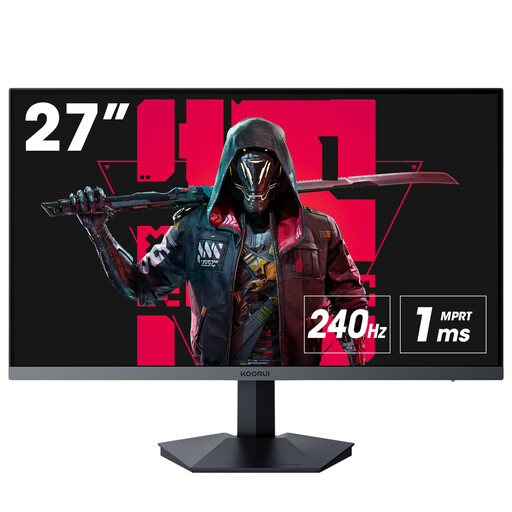
KOORUI GN02 27-inch
A Full HD option for fast-paced gaming, with an audio output for connecting headphones.
VA; Full HD; 240 Hz; 2 × HDMI 2.0; DisplayPort 1.4; audio output.
DisplayPort is recommended to achieve the full specified refresh rate of 240 Hz. The 27-inch class takes up more desk space than the compact models mentioned above.
View at Joybuy
Frequently asked questions about gaming monitors
Why doesn’t my new monitor display the advertised maximum refresh rate?
First, check which video input you’re using and the refresh rate specified for it. Dell lists up to 320 Hz at Full HD via DisplayPort and 255 Hz via HDMI for the AW2525HM. BenQ’s ZOWIE guide also recommends checking your cable, graphics card, drivers and operating system settings.
How can I be less disruptive to other people in the room while gaming?
Check the audio connections on your devices and use headphones instead of the monitor speakers if needed. The BenQ EX2510S has a headphone jack, and you can also adjust the brightness and picture mode on the monitor.
What should I know about energy consumption and energy labels?
The European Commission includes computer monitors under EU energy labelling and ecodesign rules. For the specific model, compare the energy label and consumption figures, including for HDR mode if that matters to you.
What happens if a monitor develops a fault in Germany?
Your statutory rights are not the same as a voluntary manufacturer’s warranty, and they apply against the seller. Consumer purchases in the EU are generally covered by a minimum two-year statutory guarantee; specific claims depend on the purchase and the fault. Verbraucherzentrale explains the difference between statutory rights and a guarantee.
Can I put an old monitor in household rubbish?
No. Germany’s Federal Environment Agency advises that electrical and electronic waste must be collected separately in Germany. You can dispose of it at a recycling centre and, subject to certain conditions, through retailers.


