Racing gamer with limited desk space
If you share a room, the screen and stand need to fit the space you have. ASUS lists the VG27AQL3A as 61,50 cm wide; MSI gives the 34-inch MAG 342CQR E2 a width of 808,60 mm including the stand.


If desk space is limited or your room has to serve several purposes, it’s worth starting with a suitable 16:9 monitor. Check that the stand fits, and compare the headphone socket and picture mode available on the input you plan to use. A 34-inch ultrawide is a better fit if you mainly play racing games on PC and have room for the extra width. With OLED, you should also consider long periods of static content and the warranty terms for the specific model.
If you share a room, the screen and stand need to fit the space you have. ASUS lists the VG27AQL3A as 61,50 cm wide; MSI gives the 34-inch MAG 342CQR E2 a width of 808,60 mm including the stand.
If you want to play racing games in 21:9, consider the desk space, connection and support for the format in the game you’re playing. MSI lists the MAG 342CQR E2 as 3440 × 1440, with up to 180 Hz over DisplayPort.
If you play on a console and don’t want to disturb anyone else, choosing the right HDMI mode and a personal audio connection are important. ASUS lists a headphone socket for the VG27AQL3A; the refresh rate you can use depends on the input and connected console.
A good fit if: You want to save desk space in a shared room and use the screen for other tasks too.
The trade-off: The picture isn’t as wide as 21:9. ASUS lists up to 180 Hz over DisplayPort for the VG27AQL3A, but up to 144 Hz in the specified HDMI signal range.
A good fit if: You mainly race on PC, want a wider picture and have enough room for the monitor.
The trade-off: The MSI MAG 342CQR E2 measures 808,60 mm wide with the stand. MSI lists up to 180 Hz over DisplayPort, but up to 100 Hz at UWQHD over HDMI 2.0b.
A good fit if: You’re considering an OLED model and want to check its usage and warranty terms before buying.
The trade-off: Dell lists the AW2725D at 2560 × 1440 and 280 Hz. LG warns generally about possible OLED burn-in; this doesn’t tell you what warranty terms Dell offers.
| Buying criterion | What to check | Who is it important to? |
|---|---|---|
| Space and consideration for others | Compare the dimensions, including the stand, adjustment options and headphone socket of the specific model. | If I share a desk, the monitor and stand need to fit my space, and the sound shouldn’t disturb anyone else. Around 29% of consumers prioritise space and consideration for others. |
| Smooth visuals | Check the maximum refresh rate for the input you’ll use, and whether VRR is supported with your connection. | If I want a high refresh rate for fast racing games, my gaming device, cable and input all need to support the mode I want. Around 23% of consumers put smooth motion first. |
| Wider field of view | Check your available desk width, whether your games support 21:9 and that you have a suitable graphics output. | If I prefer a wider racing view on PC, the game needs to support the format and the monitor needs to fit on my desk. Around 18% of consumers prioritise an ultrawide picture. |
| Console and quiet audio | Check the supported HDMI resolution and refresh rate, and whether there’s a headphone socket or another personal audio connection. | If I play on a console in a shared room, I need the right HDMI mode and want to listen through my own audio connection. Around 18% of consumers put these connection and audio requirements first. |
| Energy use and long sessions | Compare the EU energy label for the exact model and, for OLED, check its usage and warranty terms. | If my monitor is on for long periods or often displays static content, I want to take its energy information and OLED usage terms into account. Around 12% of consumers prioritise energy use and long-term ownership. |
Manufacturers’ specifications vary by connection. ASUS lists up to 180 Hz over DisplayPort and up to 144 Hz in the specified HDMI signal range for the VG27AQL3A. For the MSI MAG 342CQR E2, UWQHD over HDMI 2.0b supports up to 100 Hz.
Check the resolution and maximum refresh rate for the exact input you plan to connect your PC or console to.
The extra width can be a deciding factor on a shared desk. MSI lists the MAG 342CQR E2 as 808,60 mm wide, including the stand.
Measure the space available and check that your racing games support 21:9 before choosing this format.
Audio features vary by model: LG says the 27GS75QX-B has no speakers. LG also warns generally about possible OLED burn-in; this doesn’t confirm what another manufacturer’s warranty covers.
Check the audio connections and warranty terms for the specific model separately.
The TUF Gaming VG27AQL3A is a documented example of a flat 27-inch QHD IPS monitor with an adjustable stand.
The MAG 342CQR E2 is a 34-inch curved ultrawide for PC setups with enough desk space.
The UltraGear 27GS75QX-B is another example of a flat 27-inch QHD IPS monitor.
The AW2725D is a QHD QD-OLED model in an approximately 27-inch format.
The H27S17 is another 27-inch QHD curved option, sitting between a flat 16:9 monitor and a larger ultrawide.
This selection features gaming monitors for racing games at a shared desk, including compact 27-inch QHD models.
 No image available
The 27-inch format is an option if there’s less room for a wide monitor on your shared desk.
QHD 1440p; 144 Hz; 1 ms MPRT; Fast IPS; height-adjustable stand; DisplayPort and HDMI.
 No image available
This flat 27-inch format is worth considering if you’re looking for a monitor for a space-saving setup.
QHD 2K; 1.152 dimming zones; 275 Hz; 1 ms; IPS.
 No image available
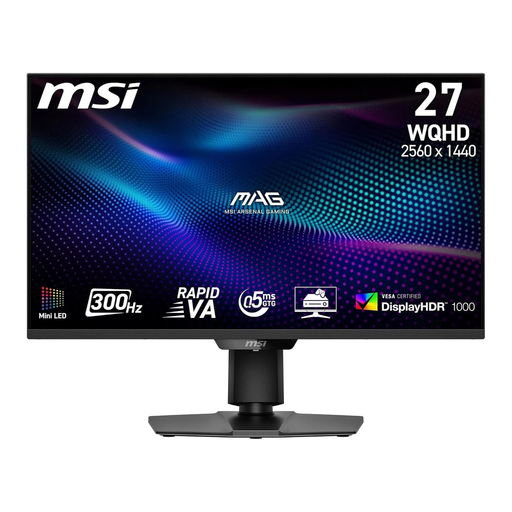
This 27-inch WQHD monitor is a more compact alternative if you don’t want to make room for an ultrawide.
2560 × 1440; Rapid VA Mini LED; 300 Hz; 0,5 ms; HDMI 2.1 and DisplayPort 1.4a; tilting, height-adjustable stand.
 No image available
The 27-inch format and height-adjustable stand are useful if you want to adapt the setup to your desk.
2560 × 1440; Fast IPS; 240 Hz, overclocked to 275 Hz; HDR400; HDMI 2.0 and DisplayPort 1.4; VESA 100 × 100.
 No image available
The headphone output is useful if you want to listen privately while gaming in a shared room.
SS-IPS; 200 Hz, overclocked to 210 Hz; DisplayPort 1.4; height-adjustable stand.
On your PS5, go to ‘Screen and Video’ to check the output signal and test 1440p. PlayStation Support lists tests for 60 Hz, 120 Hz and VRR; the game must also support 120 Hz. Check that the HDMI input on your specific monitor supports the mode you want.
Check whether the specific model has a headphone socket or another personal audio output, and measure the space you have, including the stand. If you’re using a monitor arm, check that its VESA size and compatibility match the monitor. ASUS lists 100 × 100 mm for the VG27AQL3A.
Compare the EU energy label for the exact model rather than estimating power consumption from screen size alone. For an ordinary consumer purchase in Germany, statutory rights relating to faulty goods are separate from a voluntary manufacturer’s warranty. Distance contracts generally come with a right to cancel; the standard period is 14 days, subject to statutory exceptions.
The European Commission classifies computer monitors as electronic displays subject to ecodesign and energy labelling requirements. For a device that requires CE marking, the manufacturer declares that it meets the applicable requirements; CE marking isn’t an independent gaming performance test. Check the documentation for the exact model on offer.