When space is limited, a compact Full HD monitor is an obvious choice, as long as the screen and stand fit on your desk. If small map details matter more and you have enough room, a larger QHD model could be a better fit. For fast-paced multiplayer sessions, also check which refresh rate your computer can actually output through the connection you plan to use.
Who are the different types of monitor suited to?
Gamers with limited desk space
If you’re sharing a room and studying maps at your desk, measure the space needed for the screen and stand together. COMPUTER BILD notes that the stand on the AOC 24G4XE it tested can only be tilted; Dell lists the G2724D as a larger 27-inch model.
Gamers who want to read map text clearly
If small routes, symbols and labels matter, compare the resolution and screen size with your seating position and available space. AOC lists the 24G4XE as Full HD on a 23.8-inch screen; Dell specifies QHD on 27 inches for the G2724D.
Gamers who play fast-paced multiplayer games
If the view is constantly moving, check the refresh rate of the specific model against your graphics output and connection. AOC, Dell and ZOWIE list different specifications for their respective models and connections.
What should you look for when buying?
Compact Full HD monitor
A good choice when: You want the screen and stand to take up little space, and can read the map comfortably from your usual seating position.
The trade-off: Full HD has fewer pixels than QHD; COMPUTER BILD notes that the stand on the AOC 24G4XE can only be tilted.
27-inch QHD monitor
A good choice when: The screen and stand fit on your desk and you want more pixels for the map and user interface. Dell specifies 2560 × 1440 pixels on 27 inches for the G2724D.
The trade-off: The larger screen needs more desk space. Dell lists a refresh rate of 165 Hz over DisplayPort and 144 Hz over HDMI at QHD for the G2724D.
Monitor for particularly fast movement
A good choice when: Fast movement is your clear priority and your computer can output correspondingly high frame rates; ZOWIE specifies 240 Hz for the XL2546X.
The trade-off: A particularly high refresh rate isn’t essential for studying a map. ZOWIE’s claims about the benefits over IPS are manufacturer claims, not an independent comparison.
| Buying priority |
What to look for |
Who is it important to? |
| Space and positioning |
Compare the width and depth, including the stand, with the available desk space; check the height and adjustability of the specific model. |
If I share my desk, I measure the free space, including the stand, rather than relying on the screen size alone. Fit is the top priority for around 36% of consumers. |
| Map and user interface readability |
Consider screen size and resolution together with your viewing distance and available space; check how the game looks at the resolution you intend to use. |
If I want small map symbols and labels to be easy to make out, I compare the display from my usual seating position. Readable map details are the main priority for around 29% of consumers. |
| Motion clarity and connection |
Check the resolution and refresh rate for the input you’ll use, as well as your graphics output and adaptive sync. GTG and MBR figures measure different things. |
For fast-paced sessions, I check the Hz figure against my graphics output and connection. Motion clarity is the top priority for around 21% of consumers. |
| Consideration for others and running costs |
Check the speakers and headphone output on the specific model; use the EU energy label and model information to compare efficiency. |
If I share a bedroom, I look for suitable audio output and clear energy information. Considerate use and running costs are the main priorities for around 14% of consumers. |
Which buying decisions could cause problems?
-
Choosing based on screen size alone
The stand’s dimensions and adjustability also affect how easily you can position the monitor. COMPUTER BILD describes the stand on the AOC 24G4XE it tested as tilt-only.
Measure the available space and compare it with the full dimensions of the specific model before choosing between compact Full HD and a larger QHD screen.
If the stand doesn’t suit your setup, you may need a separate mount.
-
Expecting the highest Hz figure on every connection
For the Dell G2724D, Dell lists different refresh rates over DisplayPort and HDMI at QHD.
Check the resolution and Hz combination for the input you’ll actually use, and make sure it’s compatible with your computer.
-
Assuming it has speakers or uses little power
Features vary by model: COMPUTER BILD lists speakers on the Philips Evnia 24M2N3200A it tested, while Dell doesn’t list integrated speakers for the G2724D. You can’t judge efficiency from screen size alone.
Check the audio outputs and EU energy label for the exact model. Plan your audio setup to suit a shared room.
Depending on the equipment you already have, you may need external speakers or headphones.
Which brands are worth considering?
AOC
The 24G4XE and 24G4X are compact Full HD Fast IPS monitors.
- AOC lists a 23.8-inch screen, 1920 × 1080 pixels, 180 Hz and Adaptive Sync for the 24G4XE.
- COMPUTER BILD praises the refresh rate of the 24G4XE it tested and notes that the stand can only be tilted. This limitation applies to this model.
Philips Evnia
The 24M2N3200A/01 is a compact Full HD Fast IPS option.
- Philips specifies a 23.8-inch screen, 1920 × 1080 pixels and 180 Hz for this model.
- The manufacturer’s claim that the display makes aiming easier is not evidence of an advantage when studying maps.
Dell
The G2724D is a larger QHD option with an adjustable stand.
- Dell specifies 2560 × 1440 pixels and lists 165 Hz over DisplayPort or 144 Hz over HDMI for the G2724D.
- Dell doesn’t list integrated speakers for this model. The refresh rate depends on the input you use.
ASUS TUF Gaming
The VG249Q3R is a 23.8-inch Full HD Fast IPS monitor marketed in Germany.
- ASUS lists 180 Hz, FreeSync and Shadow Boost for this model.
- Manufacturer claims about ghosting or dark areas of the image don’t prove an independent comparison; check the display on the specific model for yourself.
ZOWIE
The XL2546X is a Fast TN option designed for fast-paced esports visuals.
- ZOWIE lists 240 Hz, DyAc 2 and height adjustment for this model.
- The claimed advantage in motion clarity over typical IPS monitors is a manufacturer claim, not an independently verified comparison.
Gaming monitors at Joybuy
These models are mainly for anyone looking for a Full HD monitor for a desk with limited space. When choosing, check the dimensions including the stand, as well as the refresh rate available through the connection you plan to use.
 No image available
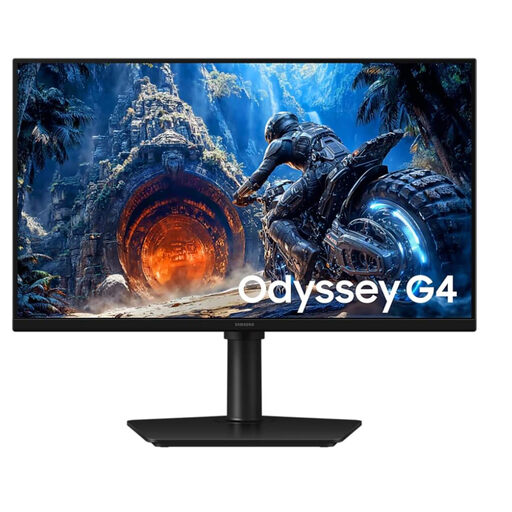
Samsung Odyssey G4 LS25HG402EUXEN, 25 inches
The 25-inch Full HD format could suit a desk with limited space; check the stand’s footprint against your desk.
Full HD and IPS; up to 300 Hz over DisplayPort or 240 Hz over HDMI; Adaptive Sync. The listed footprint is 55.8 × 25 cm, and the stand can be adjusted for height, tilt and swivel.
Joybuy
 No image available
KOORUI MB24V29FS4, 24 inches
The 24-inch format could suit a desk with limited space; check the dimensions, including the tilting stand.
Full HD, IPS and 120 Hz; HDMI and VGA. Listed dimensions: 541.9 × 185.1 × 424.7 mm; VESA mounting is listed. According to the product description, there are no integrated speakers.
Joybuy
 No image available
TCL Gaming Monitor 25G54, 25 inches
The 25-inch Full HD format is an option if you’re looking for a compact gaming monitor; compare its dimensions with your available space.
Mini LED, IPS, 144 Hz and FreeSync are listed for this model. The stated dimensions are 18.2 × 55.6 × 43.9 cm.
Joybuy
 No image available
KTC H24B9S, 24 inches
The 24-inch Full HD format could suit a desk with limited space; check how it can be positioned and the tilt range.
IPS, 144 Hz and Adaptive Sync; HDMI and DisplayPort. According to the product description, the stand tilts from −5° to 15° and VESA compatibility is listed.
Joybuy
 No image available
MSI MAG 244F, 23.8 inches
At 23.8 inches with Full HD resolution, this model is a compact option; a headphone output is listed for listening in a shared room.
Rapid IPS, 200 Hz and Adaptive Sync; HDMI and DisplayPort. To reach the maximum refresh rate of 200 Hz, the product description says you’ll need DisplayPort and a compatible graphics card.
Joybuy
Frequently asked questions
What refresh rate can I actually set once the monitor is connected?
It depends on the monitor, the input you use and your computer. For the G2724D at QHD, Dell lists 165 Hz over DisplayPort and 144 Hz over HDMI; these figures don’t automatically apply to other models. Then check your computer’s display settings.
Can the advertised response times of different monitors be compared directly?
Not without taking the measurement labels and their testing conditions into account. AOC lists GTG for the 24G4XE, while Philips advertises Smart MBR for the 24M2N3200A/01. Don’t compare these figures on milliseconds alone.
What should I look for when it comes to sound in a shared room?
Check the audio outputs on the specific monitor and your gaming platform. COMPUTER BILD lists speakers on the Philips Evnia 24M2N3200A it tested; Dell doesn’t list integrated speakers for the G2724D. Make sure any headphones you use are compatible with your devices.
How can I compare the power consumption of different monitors?
Compare the EU energy labels for the specific models. The European Commission describes an A-to-G efficiency scale for electronic displays. Your usage time and electricity tariff also affect your individual running costs.
What are my rights when buying online in Germany?
According to Verbraucherzentrale, an online consumer contract of this kind generally comes with a 14-day right to cancel. If a product is faulty, statutory rights against the seller are separate from a voluntary guarantee. Check the terms and guarantee conditions for your specific purchase.


