For historical adventures in a shared bedroom, start by considering your desk space, room lighting and gaming device. A compact IPS monitor saves space, while a VA model’s stated contrast ratio may appeal if you often play in dark scenes. OLED is worth considering if deep blacks matter to you and you’re happy to follow the care guidance. RTINGS notes that OLED screens can suffer burn-in from displaying the same content for long periods. You should also check the resolution and refresh rate supported by the specific model and connection you plan to use.
Which monitor is right for you?
Players of dark adventures
If you often play in low light, you may be particularly keen to see detail in darker settings. With OLED, you should also follow the guidance on leaving static images on screen for long periods; RTINGS notes that this can cause burn-in.
Players sharing a desk
When you share a workspace, it’s important that the screen and stand fit the available space and can be adjusted to suit your setup. AOC and ASUS offer different sizes and positioning options across their monitor ranges.
Casual players who love the details
If you want to see landscapes and game menus clearly, consider screen size and resolution alongside the output from your gaming device. AOC, ASUS and Dell list different resolutions and sizes for their models.
What to look for when buying
Compact IPS LCD
A good fit if: You’re short on desk space and want a compact screen. The AOC 24G4XE is a 23.8-inch Full HD example.
The trade-off: It has fewer pixels than QHD. Also check how much room the stand takes up.
QHD IPS or VA LCD
A good fit if: You want more detail for landscapes and menus on a screen of around 27 inches. If you often play in a dark room, the stated contrast ratio of a VA model could also help you choose.
The trade-off: Your gaming device needs to support the resolution you choose. Dell lists a native contrast ratio of 3000:1 for the S2722DGM. This is a manufacturer specification, not a direct measured comparison with the ASUS model.
OLED for dark scenes
A good fit if: Deep blacks are a priority for you, and you won’t leave static images on screen unchanged for long periods.
The trade-off: RTINGS notes that displaying the same content for long periods can cause burn-in. MSI lists care features and three-year OLED cover, including burn-in, for the MPG 271QRXDE QD-OLED. Check the full warranty terms before buying.
| Buying priority |
What to check before buying |
Who it matters most to |
| Contrast in dark scenes |
Check the panel type, native contrast ratio or a specific HDR certification, as well as the care and warranty terms. |
If I want to see subtle details in dark game worlds in the evening, I pay particular attention to black levels and possible OLED care requirements. Around 28% of consumers are likely to prioritise contrast. |
| Space and positioning |
Check the width and depth, including the stand, as well as adjustment options and, where relevant, VESA mounting for the specific model. |
If I share a desk, the monitor needs to fit the available space and be adjustable to suit my setup. Around 22% of consumers are likely to prioritise space and positioning. |
| Image detail and resolution |
Match the native resolution and screen size to your gaming device’s output and check that menus will be easy to read. |
If I want to see landscapes and menus as clearly as possible, I match the resolution to my gaming device. Around 22% of consumers are likely to prioritise detail. |
| Smooth motion |
Check the refresh rate for each input and the output your gaming device can actually support. |
If I also play games with fast-moving action, I care about the frame rate I can actually achieve. Around 11% of consumers are likely to make motion their top buying priority. |
| Running costs and energy use |
Compare the EU energy label for the specific model. For OLED, read the guidance on care, static images and warranty cover. |
If I use the screen for other tasks too, I want to keep an eye on energy use and day-to-day care. Around 17% of consumers are likely to prioritise running costs and upkeep. |
Common buying mistakes
-
Comparing only the highest refresh rate
The refresh rate you can achieve may vary depending on the input. For historical adventures, the highest possible refresh rate isn’t automatically the most important factor.
Compare resolution and refresh rate for the connection you’ll actually use.
-
Assuming HDR10 guarantees measured HDR contrast
A monitor may accept an HDR signal without looking noticeably different from SDR. VESA Certified DisplayHDR notes that a display without a DisplayHDR logo may still support HDR, but the visible difference from SDR may not be significant.
Check the specific model’s DisplayHDR tier and panel characteristics rather than relying on an HDR10 logo alone.
-
Leaving OLED care and energy use until after you buy
Displaying the same content on an OLED screen for long periods can cause burn-in. The EU energy label rates the energy use of a specific model within its scope on a scale from A to G.
Compare the energy label and the relevant model details in EPREL. For OLED, also read the care and warranty terms for the model you’re considering.
Care guidance and energy use, which vary by model and usage, should both be part of your plans for day-to-day use.
Key brands at a glance
AOC
The 24G4XE is a compact Full HD IPS monitor.
- AOC lists a 23.8-inch screen, 1920 × 1080 pixels and a maximum refresh rate of 180 Hz for this model.
- It has fewer pixels than the QHD models mentioned here. These specifications apply to the 24G4XE.
ASUS
The TUF Gaming VG27AQL3A is an example of an adjustable 27-inch QHD IPS monitor.
- ASUS lists height adjustment and VESA 100 × 100 mm support.
- According to ASUS, this model supports refresh rates of up to 144 Hz over HDMI and up to 180 Hz over DisplayPort.
Dell
The curved S2722DGM is an example of a 27-inch QHD VA model.
- Dell lists a native contrast ratio of 3000:1 for the S2722DGM.
- Dell lists a maximum refresh rate of 165 Hz over DisplayPort and 144 Hz over HDMI. This is a manufacturer specification, not an independent comparison of image quality.
MSI
The MPG 271QRXDE QD-OLED is a QHD OLED option with a high refresh rate.
- MSI lists a maximum refresh rate of 360 Hz and OLED Care 2.0 for this model.
- Care features don’t guarantee protection against burn-in. MSI’s three-year OLED cover, including burn-in, is subject to the relevant warranty terms.
Samsung
The Odyssey OLED G81SF (S27FG814SU) is a 27-inch 4K OLED monitor.
- Samsung Germany lists 4K and 240 Hz for this model variant.
- Before buying, check that the resolution and refresh rate are suitable for your gaming device.
Related products at Joybuy
This selection includes monitors for detailed game worlds and dark scenes, including QHD and UHD models, plus VA, IPS, Mini-LED and OLED options.
 No image available
MSI MAG 274UPDFDE E16M, 27-inch
For anyone looking for high resolution in game worlds and the option to switch between UHD and FHD output.
Mini-LED display with Rapid IPS; UHD at 160 Hz or FHD at 320 Hz, according to the product name.
View at Joybuy
 No image available
Gigabyte GS27QCA, 27-inch
For anyone looking for a curved 27-inch display with QHD resolution for game worlds and menus.
QHD, 180 Hz and AMD FreeSync, according to the product name.
View at Joybuy
 No image available
INNOCN 2751S PLUS, 27-inch
For anyone looking for QHD resolution and an IPS display for detailed game worlds.
Mini-LED, QHD, IPS and 275 Hz, according to the product name.
View at Joybuy
 No image available
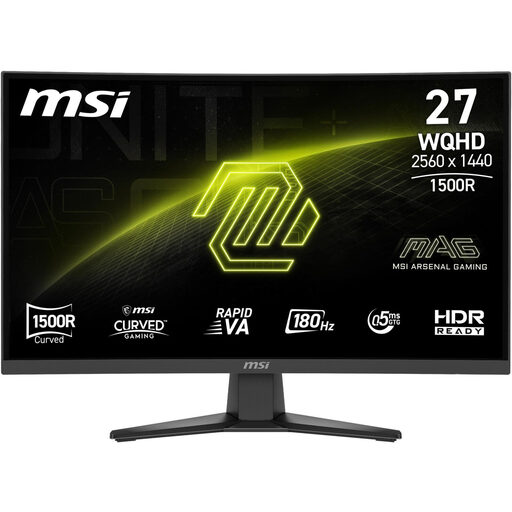
MSI MAG 275CQFDE E18, 27-inch
For anyone comparing QHD and a VA panel for game worlds on a 27-inch monitor.
2560 × 1440 pixels, Rapid VA, DisplayPort and HDMI, according to the product name.
View at Joybuy
 No image available
MSI MAG 272QPDE QD-OLED X24, 27-inch
For anyone considering OLED for dark game scenes and looking for QHD resolution for detailed game worlds.
QD-OLED, 2560 × 1440 pixels, 240 Hz and USB-C, according to the product name. RTINGS notes that OLED screens can suffer burn-in from displaying the same content for long periods.
View at Joybuy
Frequently asked questions
Does HDR10 alone guarantee a great picture in dark game scenes?
No. Accepting an HDR10 signal and having DisplayHDR certification are two different things. Check the specific model’s certification tier and the contrast and black-level performance that matter to you.
How can I set up a monitor on a shared desk?
Measure the available space, including the stand, and check the adjustment options for the specific model. ASUS lists height adjustment and VESA 100 × 100 mm support for the TUF Gaming VG27AQL3A. Any mount you choose also needs to be suitable for both the monitor and the desk.
What should I bear in mind when using an OLED monitor day to day?
Avoid leaving static images on screen unchanged for longer than necessary, and follow the manufacturer’s care guidance. RTINGS notes that displaying the same content for long periods can cause burn-in. MSI describes OLED Care 2.0 as a way to reduce risk, not as proof that there is no risk.
What energy information and consumer rights apply when buying online in Germany?
For monitors covered by EU rules, the energy label shows an efficiency rating from A to G. You can find further model details through the QR code in EPREL. For a typical online purchase from a trader, you generally have a 14-day right to cancel from the date of delivery. Faulty goods are covered by statutory consumer rights for at least two years; manufacturer or additional warranties do not replace these rights.


