When space is limited, a compact Full HD monitor of up to around 24 inches is a sensible starting point: TÜV SÜD recommends this combination for small desks. For team chat, set up and test the microphone and audio output separately on your PC or gaming device, as Microsoft Support explains. A 27-inch WQHD model is an option if you have enough desk space and graphics performance; the maximum refresh rate alone doesn’t determine whether a monitor is right for you.
Which monitor is right for you?
Team players who are considerate of their housemates
If you play games in a shared bedroom, look for private audio output and set up the microphone separately for team chat. Microsoft Support recommends choosing and testing the input and output devices individually in Windows.
Gamers with a small desk
As well as measuring the screen diagonal, check the width of the monitor and the depth of its stand, so there’s still room for your keyboard, mouse or controller. TÜV SÜD recommends Full HD at up to around 24 inches as a suitable combination for small desks.
Gamers focused on speed
Choose a refresh rate that suits your gaming device, connection and the frame rate you can actually achieve, rather than focusing solely on the highest stated number of hertz.
What should you look for when buying?
In a shared bedroom, you’ll need to find the right balance between desk space, private audio, microphone input and your gaming device’s performance.
Compact Full HD monitor
A good fit if: desk space is limited; TÜV SÜD recommends Full HD at up to around 24 inches as a suitable combination for small desks.
The trade-off: You get less screen space and fewer pixels than with WQHD.
27-inch WQHD monitor
A good fit if: you have enough space and your PC can achieve the desired frame rate at 2560 × 1440 pixels.
The trade-off: The larger screen takes up more desk space and demands more graphics performance than Full HD.
| What matters to you |
What to check |
Who prioritises it? |
| Private audio and team chat |
Test the monitor’s audio output, as well as the microphone, mute settings and app permissions on your PC or gaming device, separately. |
If I want to hear game audio privately and speak clearly in team chat, I’ll set up playback and the microphone separately; around 36% of consumers are likely to focus mainly on this audio and chat setup. |
| Desk space |
Compare the available width and depth with the dimensions of the monitor and stand. |
If you need room for a mouse, keyboard or controller alongside your screen, remember to allow for the full footprint; around 29% of consumers are likely to prioritise how well a monitor fits on their desk. |
| Smooth motion |
Match the refresh rate to the frame rate your gaming device and connection can achieve; check how response times are measured. |
If fast-paced games are your priority, you’ll need a refresh rate that suits your gaming device; around 21% of consumers are likely to put this first. |
| Larger WQHD screen |
Check the available space, viewing distance and achievable frame rate at 2560 × 1440 pixels. |
If you want more screen space and a higher resolution, you’ll need to allow for a larger footprint and enough graphics performance; around 14% of consumers are likely to prioritise WQHD. |
Avoid common buying mistakes
-
Assuming built-in speakers are all you need for team chat
Speakers play audio, but you’ll also need a working microphone input for voice chat.
Set up audio output and microphone input separately, and test both before you start playing.
If you don’t already have a suitable microphone or headset, you may need to buy extra equipment.
-
Choosing based on screen size alone
A wide stand can take up a lot of room on a small desk, even if the screen size seems right.
Measure the space you have and compare the monitor’s full dimensions, including the stand.
-
Comparing response time figures as if they were the same
BenQ lists both 1 ms MPRT and 4 ms GtG for the EX240N. These figures aren’t directly comparable because they use different measurement methods.
Check the measurement method and also take the refresh rate and gaming device into account.
Monitor brands to consider
BenQ
The EX240N is a compact 23.8-inch Full HD option.
- BenQ Germany lists a 165 Hz refresh rate, built-in speakers and a headphone socket for the EX240N.
- The listed 1 ms MPRT and 4 ms GtG figures use different measurement methods; audio features don’t confirm that there’s a microphone input.
MSI
The German product page for the G274QPFDE E2 features a 27-inch WQHD option with an adjustable stand.
- MSI Germany lists a headphone output and up to 130 mm of height adjustment for the version shown there.
- The G274QPF E2 and G274QPFDE E2 are different model numbers. Before buying, make sure the specifications apply to the exact version on offer.
ASUS
The TUF Gaming VG249Q3A is a compact Full HD monitor with a high refresh rate.
- ASUS lists a 23.8-inch screen, 1920 × 1080 pixels and up to 180 Hz for this model.
- The global product page doesn’t confirm a particular version for Germany or its availability there.
AOC
The 24G4X is an example of a compact Fast IPS Full HD monitor.
- AOC lists a 23.8-inch screen and 180 Hz for this model.
- The manufacturer’s page is for the UK region, so it doesn’t confirm availability in Germany or the specifications of any different regional version.
Dell
The S2722DGM is a curved 27-inch WQHD alternative.
- Dell Germany lists a 165 Hz refresh rate and a 1500R display for this model.
- A larger curved screen won’t necessarily fit on a small desk; the space it takes up and your viewing distance still matter.
Joybuy monitors for this setup
The Joybuy models below include compact Full HD monitors and larger 27-inch QHD options. Before choosing, make sure you have enough space and that your gaming device can handle the screen size, resolution and refresh rate you want.
 Image unavailable
KTC H24B9S 24-inch Full HD gaming monitor
This compact Full HD model is worth considering if the screen and stand fit the space you have available.
24 inches, 1920 × 1080 pixels, 144 Hz and IPS; Adaptive Sync, HDMI and DisplayPort are also listed in the product name.
For team chat, set up the microphone and audio output separately on your PC or gaming device.
View on Joybuy
 Image unavailable
ASUS VY249HF-W 24-inch Full HD monitor
A compact option if you want Full HD and have enough room for the screen and stand on your desk.
24 inches, 1920 × 1080 pixels, 100 Hz, IPS and AdaptiveSync; the product name also lists HDMI and VESA 100 × 100.
The stated response time is 1 ms MPRT; set up the microphone separately for team chat.
View on Joybuy
 Image unavailable
THUNDEROBOT CF25F300L 24.5-inch FHD gaming monitor
The high stated refresh rate is most relevant if your gaming device and connection can actually deliver the frame rate you want.
24.5 inches, Full HD and 320 Hz; the product name also lists a stand that tilts and swivels.
View on Joybuy
 Image unavailable
INNOCN 2751S PLUS 27-inch QHD Mini LED gaming monitor
This larger QHD option is a good fit if you have enough desk space and your gaming device can achieve the frame rate you want at this resolution.
27 inches, QHD, 275 Hz, built-in speakers and a height-adjustable stand, according to the product name.
An audio output doesn’t replace a microphone input for team chat.
View on Joybuy
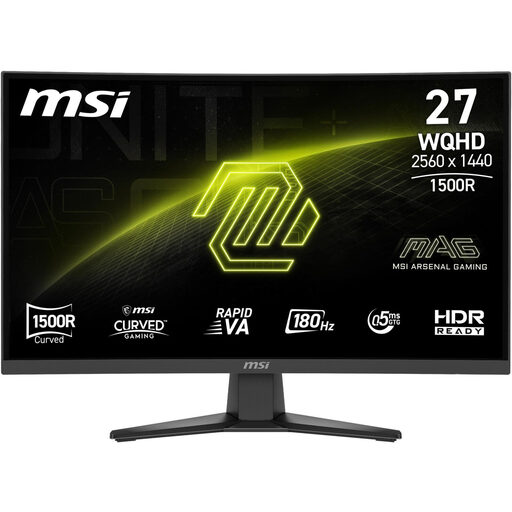 Image unavailable
MSI MAG 275CQFDE E18 27-inch QHD gaming monitor
This 27-inch model needs more desk space than a compact monitor, so check your desk dimensions and viewing distance before choosing.
2560 × 1440 pixels, 180 Hz and Rapid VA; the product name also lists DisplayPort and HDMI.
The headphone output alone doesn’t provide a microphone input for team chat.
View on Joybuy
Frequently asked questions
Can a monitor’s headphone socket also handle a headset microphone for team chat?
Not simply because it’s labelled a ‘headphone socket’. Check the microphone connection on your PC or gaming device, then test the input and output separately in your chat app.
How do I set up voice chat on a Windows PC?
Connect your microphone or headset and select it as the input device in Windows sound settings. Microsoft Support also recommends choosing an output device. If you have any problems, check the mute setting and the app’s microphone permission as well.
What are my rights in Germany if an online monitor doesn’t fit or has a fault?
For online consumer contracts, you generally have a 14-day right to cancel; you must notify the retailer that you wish to cancel. If the monitor is faulty, statutory consumer rights against the seller are separate from any voluntary guarantee, as explained by Verbraucherzentrale.
What should I know about energy labels and disposing of an old monitor?
The European Commission’s EPREL database lists electronic displays such as monitors, so check the entry for the exact model. In Germany, you must not put an old monitor in household waste. The Umweltbundesamt lists recycling centres as a free return option.


