Who is this monitor for?

Sim racers with a permanent rig

If you want to judge corner entry from the same seating position every time, measure the distance from your eyes to the screen and its width in your usual driving posture. iRacing describes this measurement as the basis for setting the field of view in the simulator.

Drivers short on space

At a desk or on a compact rig, you’ll need to balance the screen width you want against the space available for the display and its setup. A smaller single screen takes up space differently from a wide ultrawide display.

Drivers with long HUD sessions

If your rev counter or other racing HUD elements stay in the same place for long periods, factor in the care guidance for the specific model when choosing an OLED monitor. Samsung identifies fixed HUD elements as a potential burn-in risk.

What should you look for when buying?

Single 16:9 monitor

A good fit if: you have limited space or want to practise braking points and track layouts on a single screen.

The trade-off: there’s less physical screen space at the sides than with wider setups.

21:9 or 32:9 ultrawide

A good fit if: you want more screen space at the sides on your PC rig, and your game, viewing distance and available space are suitable.

The trade-off: a wide screen is no substitute for setting the field of view correctly or checking game support. OLED monitors also come with care guidance for fixed racing HUD elements.

Three monitors

A good fit if: you’re setting up a permanent PC rig with room for side screens and can configure the views in your simulator.

The trade-off: setup and alignment take more work. For AMD Eyefinity, iRacing recommends using three monitors with the same resolution.

Buying priority What to check Who should consider this?
Field of view from your seat Eye-to-screen distance in your driving position, visible screen width and the game’s field-of-view settings. If I want to judge corner entry from my fixed seating position, a cockpit view that’s set up correctly matters more than screen size alone. Around 33% of consumers put a correctly configured field of view first.
Space and setup Available width, distance from the steering wheel and mounting options; for three displays, also consider the space and alignment of the side screens. If my desk or rig has limited space, the display needs to fit the setup I already have. Around 27% of consumers prioritise space and the effort involved in setting up.
Refresh rate and system Resolution and refresh rate on the connection you plan to use, plus support from your PC and racing game. If I want to match the resolution and refresh rate to my PC, I check both for the connection I’ll actually use. Around 20% of consumers put system compatibility and motion handling first.
Panel care For OLED, check the care guidance for the exact model variant and the terms of any optional warranty. If my racing HUD stays visible for long sessions, I want to know how to care for the panel. Around 20% of consumers pay particular attention to panel care and potential follow-up costs.

Common buying pitfalls

  • Assuming a larger screen means a correctly set field of view

    A larger display alone won’t determine how the cockpit view looks from your seat. Eye-to-screen distance and screen width also matter when setting the field of view.

    First, measure your driving position and then check how wide a screen you can fit there. iRacing explains how to take measurements from your seated position in the simulator.

  • Comparing maximum refresh rates without checking the connection

    Dell states that the AW3423DWF supports up to 165 Hz over DisplayPort and 100 Hz over HDMI at 3,440 × 1,440 pixels. The connection you choose affects the maximum stated refresh rate.

    Check the refresh rate for the connection you actually plan to use with your PC.

    Depending on your setup, you may need a different compatible connection or cable.

  • Planning for three displays as if they were a single ultrawide

    iRacing describes a dedicated setup process for three monitors, including positioning and display configuration. Requirements can vary depending on the game and software you use.

    Plan for the space, graphics outputs, resolution and alignment before buying the full setup.

    Side screens may need extra mounts and cabling.

  • Assuming OLED protection features mean you’re covered against burn-in

    Samsung identifies elements that stay on screen, such as a rev counter, as a potential burn-in risk. The protection features available depend on the model and software.

    Read the care guide and optional warranty terms for the exact model variant.

Brands to consider

Samsung

Samsung lists the Odyssey OLED G9 G93SC as a 49-inch 32:9 QD-OLED display with a 240 Hz refresh rate.

  • A wide screen in a single unit.
  • Samsung warns that racing HUD elements which remain on screen may pose a burn-in risk; care features depend on the model and software.

LG

LG lists the UltraGear 34GX90SA-W as a 34-inch OLED display with 3,440 × 1,440 pixels and a 240 Hz refresh rate.

  • LG lists Adaptive-Sync support for this model.
  • The stated refresh rate doesn’t guarantee the frame rate your PC can deliver or how a particular racing game will look.

ASUS ROG

The range includes documented 49-inch 32:9 models as well as smaller ultrawides. ASUS lists a resolution of 5,120 × 1,440 pixels and up to 165 Hz in overclocked mode for the XG49WCR.

  • Different formats can suit different space requirements.
  • The XG49WCR’s overclocked maximum doesn’t automatically apply to other ROG models.

Dell Alienware

Dell lists the AW3423DWF as a 34-inch 21:9 QD-OLED monitor with 3,440 × 1,440 pixels.

  • For this specific model, Dell states a refresh rate of 165 Hz over DisplayPort.
  • Dell lists 100 Hz over HDMI, so check which connection you plan to use.

LC-Power

LC-Power lists the LC-M49QCO as a 49-inch 32:9 QD-OLED display with 5,120 × 1,440 pixels and a 144 Hz refresh rate.

  • This model gives you a wide single-screen view.
  • Whether its size and panel suit your setup depends on the space available and how you’ll use it. Manufacturer claims about ergonomics or picture quality aren’t a substitute for independent testing in a training environment.

Joybuy products

The Joybuy models below include single 16:9 monitors and 21:9 and 32:9 ultrawide options. Before buying, check that the format suits your rig and the way your game is displayed, and that the connections are compatible with your PC.
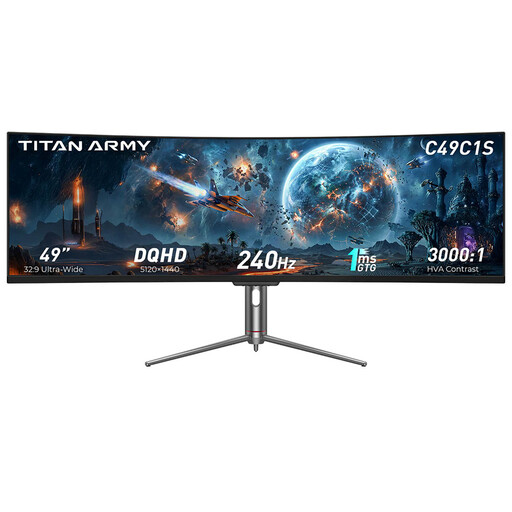
TITAN ARMY C49C1S ultrawide gaming monitor

TITAN ARMY C49C1S

An option for a wide single-screen view on a PC rig; measure the available width and your viewing distance first.

49 inches, 32:9, DQHD, HVA, 240 Hz, 1800R.

View at Joybuy
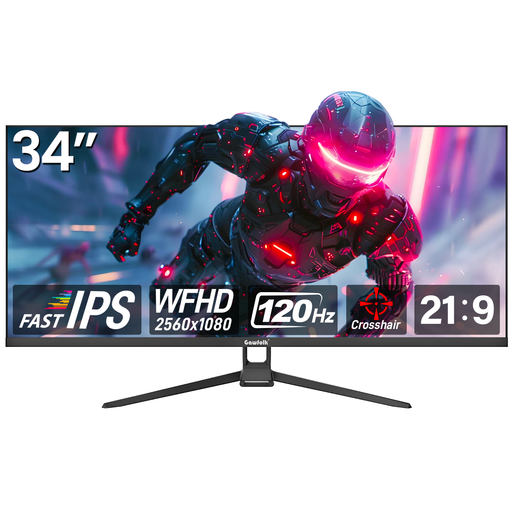
Gawfolk GF340H-H 34-inch flat gaming monitor

Gawfolk GF340H-H 34-inch Flat

Could suit a setup with a wide single-screen view; check that your racing game and PC support the format and resolution.

WFHD 2560 × 1080, 120 Hz.

View at Joybuy

Gawfolk GF340C-H curved gaming monitor

Gawfolk GF340C-H

A curved ultrawide option for a PC rig; check that your viewing distance and available space suit the screen width.

34 inches, UWQHD 3440 × 1440, 165 Hz, VA panel, DisplayPort, VESA 75 × 75 mm.

View at Joybuy

GIGABYTE G27Q26 QHD gaming monitor

GIGABYTE G27Q26

A single 16:9 monitor to consider for a more compact rig; this format gives you less physical screen space at the sides than an ultrawide.

27 inches, QHD 2560 × 1440, SuperSpeed IPS, 260 Hz (OC 275 Hz), 1 ms GTG.

View at Joybuy
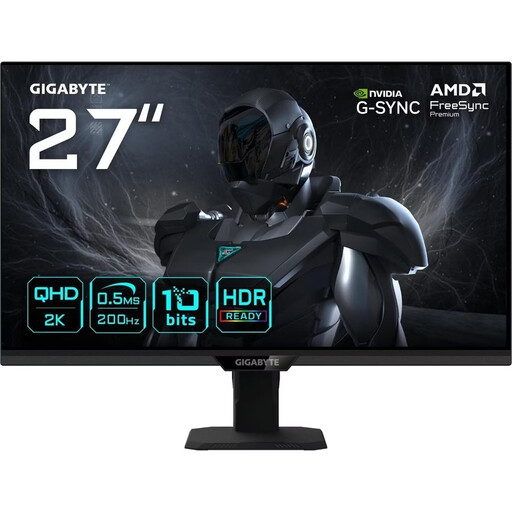
GIGABYTE G27Q20T QHD gaming monitor

GIGABYTE G27Q20T

A single 16:9 monitor for a compact setup; bear in mind that it offers less screen space at the sides than wider ultrawides.

27 inches, QHD 2560 × 1440, SuperSpeed IPS, 200 Hz (OC 210 Hz), 0.5 ms GTG.

View at Joybuy

Frequently asked questions

How do I set up the view for my fixed seating position?

In your usual driving position, measure the shortest distance from your eyes to the screen, along with the screen’s width. With three displays, you’ll also need to account for the bezel width and angle. iRacing explains how to use these measurements in its display configuration to set the field of view; other games have their own menus.

Do three monitors have to be from the same manufacturer?

Not necessarily, according to iRacing. For AMD Eyefinity, iRacing recommends three monitors with the same resolution and advises against using different sizes. It recommends, but doesn’t require, monitors from the same brand or of the same model. Also check the requirements for your graphics card and game.

What should I bear in mind when using an OLED monitor with a racing HUD that stays on screen?

Follow the care guidance for the exact model and use its recommended protection features. Samsung identifies fixed displays such as a rev counter as a potential burn-in risk; the pixel protection features available on Samsung monitors depend on the model and software version.

Are a warranty and your statutory consumer rights the same thing?

No. The Verbraucherzentrale distinguishes between your statutory rights against the seller if a product is faulty and an optional warranty with its own terms. Online purchases generally come with a right to cancel within 14 days; exceptions and the circumstances of the purchase may apply.