Gamers with a small desk
If you also need room for a keyboard, mouse and other items, the monitor’s overall dimensions, including its stand, matter more than screen size alone.


When desk space is limited, it’s worth checking the footprint of a compact monitor, including its stand, first. A larger QHD monitor could be right for you if you’d like more pixels for your build view and have enough room for its width and depth, while your device can support it. Also check the connections and the refresh rate supported by the input you’ll be using.
If you also need room for a keyboard, mouse and other items, the monitor’s overall dimensions, including its stand, matter more than screen size alone.
If you want more pixels for your build view and have room for a larger screen, consider QHD alongside the output supported by your connected device.
If you use the same desk for other tasks, check the monitor’s height, connections and potential for VESA mounting to make sure they suit your set-up.
First, measure the space available, then decide whether extra pixels or flexible positioning matters more for your zoo-building set-up.
| What to consider | What to check before buying | Who it matters most to |
|---|---|---|
| Desk space | Measure the available width and depth, then compare them with the monitor’s dimensions, including its stand. Dell lists the G2422HS at 53,78 × 18,944 cm and the G2724D at 61,19 × 20,02 cm, both with the stand at its lowest position. | If there’s barely any room left once my keyboard and mouse are on the desk, the space taken up by the set-up monitor matters most to me. Around 33 % of consumers consider desk space their top buying priority. |
| Resolution | Compare the resolution of the specific model with the output from your PC or console. Dell lists 1920 × 1080 pixels for the G2422HS and 2560 × 1440 pixels for the G2724D; MSI lists the same QHD resolution for the G274QPF E2. | If I want more pixels for building and have enough room, I check whether QHD is compatible with my device. Around 27 % of consumers put image detail first. |
| Positioning and connections | Check the height adjustment, VESA size, mount and the connections you need. Dell lists a 100 × 100 mm VESA mount for the G2422HS; ASUS describes VESA wall mounting for the VA249QG as a way to free up desk space. | If I use my desk for other things too, I want to be able to mount the screen to suit my set-up and connect it to my device. Around 20 % of consumers prioritise positioning and connections. |
| Refresh rate | Check that the refresh rate you want is supported by the connection and your device’s output. For the G2724D at QHD, Dell lists up to 165 Hz via DisplayPort and 144 Hz via HDMI. | If smooth motion is especially important to me, I check the input I’ll actually use and my device’s output. Around 20 % of consumers put refresh rate first. |
The example models listed here differ in both width and depth, including their stands.
Measure the space available and check that the monitor, keyboard and mouse will all fit on your desk before choosing.
For the Dell G2724D at QHD, Dell lists different maximum refresh rates for DisplayPort and HDMI.
Check the figures for the specific input you plan to use.
The European Commission notes that, for covered displays, the energy label also includes information about energy consumption in HDR mode.
Compare the energy information for the specific models and consider how you plan to use them.
The G2422HS and G2724D illustrate the difference between a compact Full HD set-up and a larger QHD one.
The VA249QG is a compact Full HD option, while the VG249Q3A is another 24-inch Full HD model.
The 27G640A-B is an example of a 27-inch QHD model with IPS.
The 24G4X is a compact gaming model with a 23.8-inch screen and Full HD resolution.
The G274QPF E2 is an example of a 27-inch QHD alternative.
These models are compact Full HD monitors for a space-conscious desk set-up. Before choosing, check that the connections and positioning options suit your device and desk.
 No image available
The 24-inch size is a compact option if desk space is limited.
24 inches, 1920 × 1080 pixels, IPS, 120 Hz, HDMI, VGA and VESA 100 × 100 mm.
 No image available
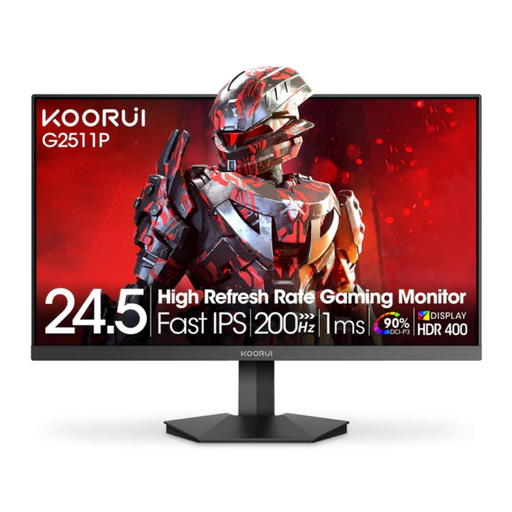
The 25-inch Full HD size is an option if you’re looking for a compact screen with several connection options.
25 inches, 1920 × 1080 pixels, Fast IPS, 200 Hz, Adaptive Sync, HDMI 2.0, DisplayPort 1.4 and VESA 75 × 75 mm.
 No image available
The 24-inch size offers a compact Full HD option for a smaller desk.
24 inches, 1920 × 1080 pixels, IPS, 144 Hz, Adaptive Sync, HDMI and DisplayPort.
 No image available
The listed VESA mount offers an alternative way to position the monitor, provided the mount and fittings are compatible with your desk.
24 inches, 1920 × 1080 pixels, IPS, 100 Hz, Adaptive Sync, HDMI 1.4 and VESA 100 × 100 mm.
 No image available
The listed adjustment options make this a choice to consider if you want to adapt the monitor to a flexible workspace.
24 inches, Full HD, IPS, 120 Hz, height adjustment up to 165 mm, tilt, swivel, pivot, DisplayPort, HDMI and VESA 100 × 100 mm.
No. Frontier lists PC, PlayStation 5 and Xbox Series X|S as platforms. If you’re playing on a console, check its output against the inputs and supported modes of the specific monitor. The platform listing doesn’t guarantee a particular combination of resolution and refresh rate.
Compare the monitor’s dimensions, including its stand, with the free space on your desk, and leave room for your keyboard and mouse. If you’re mounting it, check the VESA mount, bracket and desk fittings. ASUS lists VESA wall mounting for the VA249QG as a way to free up desk space.
QHD is an option if you want more pixels for your build view and your desk and device output can support it. Compare the resolution of the specific monitor with the modes supported by your PC or console, rather than assuming resolution alone determines gaming performance.
Not necessarily. For the Dell G2724D at QHD, Dell lists up to 165 Hz via DisplayPort and 144 Hz via HDMI. Check the figure for the connection you’ll actually use, as well as your device’s output.
When you place an online order with a business seller, you generally have 14 days from receiving the goods to withdraw from the purchase; statutory exceptions and the circumstances of each case apply. If goods are faulty, you also have statutory rights against the seller. EU consumer information specifies a minimum period of two years. Any additional manufacturer’s guarantee is separate.