Which monitor is right for you?

Gamers with a very small desk

If you need to leave room for a keyboard and mouse beside the screen, compare the monitor’s width and, above all, the depth of its stand. ASUS lists the VG249Q3R as 21.3 cm deep with the stand; MSI gives the G244F E2 a device depth of 23.19 cm with the stand.

Gamers who value clear menus and an overview

If you want hospital views and management menus to be easy to make out, consider screen size, resolution, display options and viewing distance together. The German Wood and Metal Trade Association recommends a viewing distance of at least 500 mm when working at a screen.

Gamers who play different genres

If you play faster-paced games as well as management titles, compare the frame rate your computer can actually output through the connection you plan to use with the monitor’s specifications. GameStar discusses the benefits of high refresh rates, particularly for fast-paced games and playing with a mouse and keyboard.

What should you look for when buying?

23.8 inches, Full HD

A good fit if: Desk width and depth are limited, and you can read the menus easily from your usual viewing distance.

The trade-off: You get fewer pixels and less screen space than with a 27-inch QHD monitor.

27 inches, QHD

A good fit if: You have enough desk space and viewing distance, and your computer can handle the larger display. You’d also like more pixels.

The trade-off: QHD won’t automatically make in-game menus bigger or easier to read, so check how they look in the game you play.

Buying priority What to look for Who should pay particular attention?
Desk space and viewing distance Measure the available width and depth, including the stand. ASUS lists the VG249Q3R as 21.3 cm deep with the stand, while MSI gives the G244F E2 a device depth of 23.19 cm with the stand. Also check your planned viewing distance. If you need room for a keyboard and mouse beside your monitor, I’d compare the dimensions of the complete stand first. Around 36% of consumers put available desk space first.
Readability of the game interface Compare 23.8-inch Full HD with 27-inch QHD from your usual viewing distance, and check the display options in the game you play. AOC specifies a resolution of 1920 × 1080 pixels for the 24G4X, while Dell lists 2560 × 1440 pixels for the G2725D. If you want management menus to be easy to make out, I’d assess the in-game display and viewing distance together. Around 29% of consumers put readability first.
Refresh rate and connections Check the graphics output, cable and resolution-and-refresh-rate combination for each input. Dell lists up to 180 Hz at QHD over DisplayPort and up to 144 Hz over HDMI for the G2725D; MSI lists up to 180 Hz over DisplayPort and HDMI for the G244F E2. If I want to play faster-paced games as well as management titles, I’d first check which modes my computer supports through the connection I plan to use. Around 21% of consumers prioritise versatility across different games.
Energy use and support after purchase Compare the energy label for the specific model. The European Commission describes an A to G efficiency scale for electronic displays. Distinguish your statutory consumer rights from a voluntary guarantee. If energy use and support in the event of a fault matter most to me, I’d check the energy label and guarantee terms separately. Around 14% of consumers put these ongoing costs first.

Avoid common buying mistakes

  • Comparing screen size but not stand depth

    Monitors with a similar screen size can take up different amounts of desk depth once you include the stand. ASUS lists the VG249Q3R as 21.3 cm deep with the stand; MSI gives the G244F E2 a device depth of 23.19 cm with the stand.

    Measure the space you actually have, and allow for your keyboard, mouse and viewing distance before choosing a model.

    A monitor arm may add to the cost and needs a suitable place to attach it.

  • Assuming QHD automatically makes menus easier to read

    QHD describes the resolution, not the text size in a particular game. Display options, viewing distance and the way the game interface is rendered all affect how easy menus are to read.

    Check your game’s display settings and judge readability from your usual seating position.

  • Choosing the maximum refresh rate without checking the connection

    For the Dell G2725D, Dell lists up to 180 Hz at QHD over DisplayPort, but up to 144 Hz over HDMI.

    Compare the monitor input with your computer’s output, and check the specified resolution and refresh rate for the connection you plan to use.

    Your preferred mode may require a different cable or may not work through the connection you already have.

Relevant brands and model ranges

AOC

The 24G4X is a 23.8-inch Full HD gaming monitor and a useful compact option to compare.

  • AOC specifies Fast IPS, Adaptive Sync and 180 Hz for the 24G4X.
  • These specifications don’t tell you how much desk depth the stand will take up.

ASUS

The TUF Gaming VG249Q3R is a 23.8-inch Full HD model to compare with other compact displays.

  • ASUS lists 180 Hz, a 75 × 75 mm VESA mount and a depth of 21.3 cm with the stand.
  • According to the German manufacturer’s specifications, the height can’t be adjusted using the supplied stand.

MSI

The G244F E2 is a 23.8-inch Full HD model to compare for stand dimensions, connections and arm mounting.

  • MSI lists a device depth of 23.19 cm with the stand, a 75 × 75 mm VESA mount and up to 180 Hz over HDMI or DisplayPort.
  • MSI notes that the specifications provided may vary by market.

Dell

The G2725D is a 27-inch QHD alternative for desks with enough room.

  • Dell specifies 2560 × 1440 pixels and different maximum refresh rates over DisplayPort and HDMI.
  • To compare the connections, check the mode you want to use alongside your computer’s output.

Joybuy models for compact desks

The Joybuy models below focus on compact 23.8- to 24-inch Full HD monitors. Still, compare the dimensions of the specific stand and check that the connections and adjustment options suit your desk and computer.
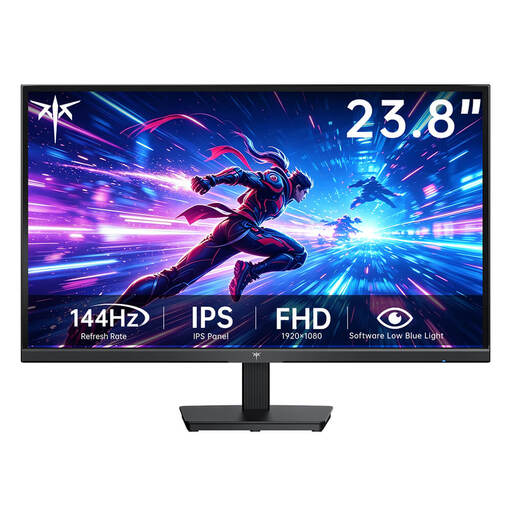
KTC H24B9S-2, 23.8-inch Full HD monitor

KTC H24B9S-2, 23.8-inch Full HD monitor

A compact screen for a desk where you still need room for your input devices.

Fast IPS, 1920 × 1080 pixels and 144 Hz according to the product name; HDMI, VGA and 75 × 75 mm VESA according to the product description.

View at Joybuy

KOORUI MB24V29FS4, 24-inch Full HD IPS monitor

KOORUI MB24V29FS4, 24-inch Full HD IPS monitor

A 24-inch option for a compact setup if you want a monitor for both gaming and everyday use.

The description lists 120 Hz, HDMI, VGA, a 100 × 100 mm VESA mount and tilt adjustment.

View at Joybuy

KTC H24B9S, 24-inch Full HD IPS gaming monitor

KTC H24B9S, 24-inch Full HD IPS gaming monitor

The 24-inch Full HD model suits a compact setup, provided the game is easy to read from your viewing distance.

The product name lists 144 Hz and an IPS panel. The description lists Adaptive Sync, HDMI, DisplayPort and tilt adjustment.

View at Joybuy

ASUS VY249HF-W, white 24-inch Full HD monitor

ASUS VY249HF-W, white 24-inch Full HD monitor

A 24-inch Full HD model for a compact setup, as long as the listed display modes work with your computer.

The product name lists 100 Hz, Adaptive-Sync, HDMI and a 100 × 100 mm VESA mount.

View at Joybuy

MSI MAG 244F, 23.8-inch Full HD gaming monitor

MSI MAG 244F, 23.8-inch Full HD gaming monitor

A compact gaming monitor to consider if you play faster-paced games as well as management titles.

The product name lists 200 Hz and Rapid IPS. The description lists Adaptive Sync, HDMI, DisplayPort and a 100 × 100 mm VESA mount.

View at Joybuy

Frequently asked questions

Should I automatically choose the monitor with the highest refresh rate for a hospital management game?

No. Check desk space and readability first. If you also play fast-paced games, compare the supported resolution and refresh rate for the connection to your computer, too. Dell lists up to 180 Hz at QHD over DisplayPort and up to 144 Hz over HDMI for the G2725D.

How can a monitor arm help on a small desk?

An articulated arm can be an alternative to a stand if your desk edge is suitable and the VESA size, load capacity and monitor weight are compatible. MSI lists a 75 × 75 mm VESA mount for the G244F E2; the German Wood and Metal Trade Association describes an articulated arm as a way to position a screen to suit your needs.

What are your rights in Germany if a new monitor is faulty?

When consumers buy new goods, they can generally exercise their statutory rights against the seller within two years of receiving them, as explained by the German Consumer Advice Centre. A manufacturer’s guarantee is separate and voluntary.

Do gaming monitors have an energy label?

EU energy labelling rules apply to electronic displays, including computer monitors. The European Commission describes a scale from A to G. Check the label for the specific model rather than assuming its energy use based on the gaming label.