First, measure the space available, including the stand and room for cables; the screen size alone won’t tell you whether a monitor will fit on your desk. For historical adventures, a 23.8- to 24-inch QHD model can display detail on a smaller screen, while 27 inches gives you more room for the game world but requires suitable desk dimensions and viewing distance. OLED may be worth considering for dark scenes, but bear in mind potential drawbacks for price and text clarity, as well as the warranty terms for the specific model.
Who are the different options suited to?
Gamers with limited desk space
If your desk is on the small side, check its width and depth against the monitor’s dimensions, including the stand, and allow room for cables. Lenovo Germany points out that the stand’s depth and space for cables can affect how close a monitor can sit to the wall.
Gamers who value detail in adventure games
If you want landscapes, maps and menus to be easy to make out, compare QHD at 23.8 or 27 inches with the space you have and the graphics output of your device. AOC and LG both offer QHD models in these size ranges.
Fans of dark game worlds
If contrast and dark scenes matter most to you, you could consider OLED, while also checking text clarity, care guidance and the warranty terms for the specific model. MSI lists three years of coverage, including burn-in, for one particular OLED model; this doesn’t apply across the brand’s entire monitor range.
What should you look for when buying?
| What matters |
What to check before buying |
Who should consider this? |
| Desk space |
Width and depth, including the stand, as well as the distance between the monitor and the wall for cables; check the VESA specifications if you’re using a mount. |
If I have limited desk space, the monitor needs to fit with its stand and cables. Around 36% of consumers put fit first. |
| Detail and readability |
Native resolution, screen size and how easy the display is to read from your planned seating position. |
If I want maps, menus and landscapes to look clear, resolution in relation to screen size matters to me. Around 29% of consumers give the highest priority to image detail and readability. |
| Atmosphere and contrast |
How the specific display performs, as well as OLED care guidance and warranty terms; HDR claims alone don’t show what the picture will look like. |
If dark gaming scenes matter most to me, I want to weigh up contrast against potential drawbacks for text clarity and care. Around 21% of consumers put atmosphere and contrast first. |
| Refresh rate and connections |
Check the refresh rate at your chosen resolution and on the input you’ll use, and make sure it works with your PC or console. |
If smooth output or a particular console connection matters to me, the game, device and connection all need to work together. Around 14% of consumers prioritise refresh rate and connection compatibility. |
Common buying mistakes
-
Comparing screen size alone
On a small desk, the stand, distance from the wall and cables can take up more room than the screen size suggests.
Measure the available width and depth, then compare them with the dimensions of the specific monitor, including its stand.
Brands worth considering
AOC
The 23.8-inch Q24G4RE and 24G4HRE offer different resolution options on a compact screen.
- AOC lists the Q24G4RE as QHD and the 24G4HRE as Full HD; both models feature a Fast IPS panel.
- The screen size alone won’t tell you whether the stand and cable space will fit on your desk.
LG
The 27GR75Q-B is a 27-inch QHD model with IPS, while the 27GX790B-B is aimed at those interested in OLED and high refresh rates.
- LG gives the 27GR75Q-B a depth of 291.2 mm with the stand attached.
- According to LG, the 27GX790B-B supports 540 Hz at QHD and 720 Hz at HD in Dual Mode; 720 Hz is therefore not available at QHD.
MSI
The MAG 274QRFDE QD E2 is a 27-inch QHD IPS model, while the MPG 271QRXDE QD-OLED is an OLED option.
- MSI lists three years of OLED coverage, including burn-in, for the MPG 271QRXDE QD-OLED.
- This manufacturer’s claim applies to the model named; check the relevant terms before buying.
Dell
The G2422HS is a 23.8-inch Full HD model with height adjustment.
- With the stand at its lowest setting, Dell lists the monitor as 537.8 mm wide and 189.44 mm deep.
- These dimensions apply to the stated stand position; check that they suit your planned setup.
Samsung
The Odyssey OLED G81SF S27FG814SU is a 27-inch QD-OLED option with UHD resolution.
- Samsung Business Germany lists UHD and 240 Hz for this model.
- Check the exact model name to avoid confusing the 27-inch version with a different size.
Joybuy products for this topic
The models below include compact Full HD options, as well as QHD and OLED versions for larger screens.
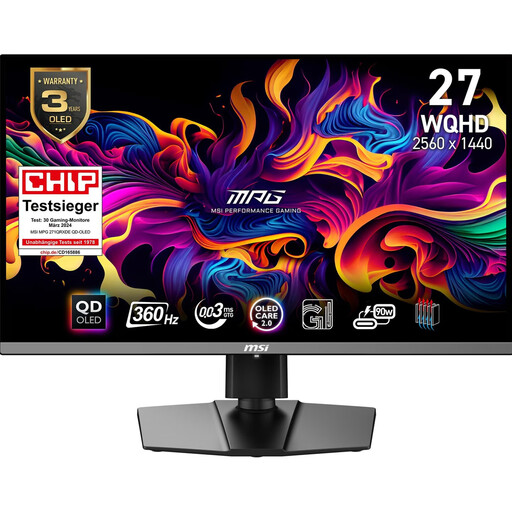 Image unavailable
MSI MPG 271QRXDE QD-OLED
An OLED option for dark gaming scenes, with QHD resolution on a larger screen.
26.5 inches, WQHD, QD-OLED, 16:9, 360 Hz.
View at Joybuy
 Image unavailable
INNOCN 2751S PLUS
A 27-inch option for QHD on a larger screen; compare its dimensions with your desk before buying.
27 inches, QHD, Mini LED, IPS, 275 Hz.
View at Joybuy
 Image unavailable
KTC H27D9
A 27-inch QHD option for detailed game worlds; check that the screen and stand will fit your space.
QHD, IPS, 120 Hz.
View at Joybuy
 Image unavailable
KOORUI MB24V29FS4
A more compact screen with Full HD; compare its actual dimensions with the space you have available.
24 inches, Full HD, IPS, 120 Hz.
View at Joybuy
 Image unavailable
TCL 25G54
A Full HD option in the 25-inch category if you’re considering a screen size between compact 24- and 27-inch models.
Mini LED, Full HD, IPS, 144 Hz.
View at Joybuy
Frequently asked questions
Is 24 inches enough for historical adventure games?
Yes, if the screen size works for you and it fits your space. There are both Full HD and QHD examples among 23.8-inch models; also consider whether menus and text will be comfortable for you to read.
How can I set up a monitor on a small desk?
Compare your desk space with the width and depth of the specific monitor, including its stand, and leave room for ports and cables. A mount is only suitable if the VESA specifications of the monitor and mount are compatible.
How can I compare gaming monitor energy use?
Compare the EU energy label details for the specific models; HDR is shown separately on the label. To work out what this means for you, you’ll also need to consider how long you use the monitor and your current electricity tariff.
What are my rights in Germany if a product is faulty or I buy online?
When you buy as a consumer, you have statutory rights against the seller if a product is faulty; the European Union’s Your Europe website states a minimum period of two years from receipt of the goods. For online purchases, you generally have a 14-day right to cancel, as explained by the Verbraucherzentrale. An additional manufacturer’s warranty doesn’t replace your statutory rights.
Is there an EU energy label for gaming monitors?
Yes. The European Commission includes computer monitors within the scope of energy labelling for electronic displays. Check the label for the specific model; an energy efficiency rating doesn’t, by itself, tell you anything about picture quality.


