If desk space and viewing distance are limited, a model around 24 inches is a sensible starting point – but the full dimensions, including the stand, are what matter. A 27-inch QHD monitor could be an option if it fits on your desk and you’d like more room for maps and menus. Check how readable they are in the game you play and what your PC can handle, rather than choosing on refresh rate alone.
What matters to different players
Players with limited desk space
If you need to leave room for a keyboard and mouse beside your monitor, compare the device’s width and stand depth, not just its screen size. Dell Germany, MSI and LG list the dimensions of their respective models, including the stand.
Keeping maps and menus in view
If you want to see lots of in-game information at once, check whether text and menus are easy to read at your chosen resolution and viewing distance. Paradox Interactive lists a setting for scaling the toolbar in Cities: Skylines II.
Players who use their monitor for different games
If you play more than management games, choose a refresh rate and connections to suit your games and PC. With an OLED model, you should also take the care guidance and panel characteristics into account.
What should you prioritise when buying for a small desk?
| Criterion |
What to look for when buying |
Who it matters most to |
| Desk space |
Compare the available desk width and depth with the monitor’s full dimensions, including the stand; leave room for cables and peripherals. |
If my desk is small, I still need room for a keyboard and mouse beside the monitor. Around 36 % of consumers give desk space the highest priority. |
| Maps and menus |
Consider screen size and native resolution together; check text size and any scaling options in the game you play. |
If I want to keep maps and menus in view at the same time, I check how readable they actually are in-game. Around 29 % of consumers prioritise being able to see maps and menus clearly. |
| Positioning |
Make sure the height and tilt adjustments, as well as the stand size, suit your desk and seating position. |
For longer gaming sessions, I want to be able to position the screen comfortably. Around 21 % of consumers prioritise a comfortable setup. |
| Connections and gaming features |
Check the supported resolution and refresh rate for the connection you plan to use, as well as your PC’s capabilities. |
If I play faster-paced games as well as management games, I check the connections and refresh rate against my setup. Around 14 % of consumers put additional gaming features first. |
Common mistakes when buying a monitor
-
Considering only the screen size
23.8-inch and 27-inch models differ not only in screen area, but also in depth once you include the stand. A monitor may therefore take up more desk space than its screen size suggests.
Measure the space available and compare it with the full dimensions of the specific model.
If you need to change your setup, an additional mount could mean extra effort.
-
Assuming QHD automatically means more readable menus
Resolution and screen size alone don’t determine how large text appears in a game. The display also depends on the game itself and its scaling options.
Check readability from your intended viewing distance and see whether the specific game offers suitable scaling.
-
Assessing the refresh rate without considering the connection
For QHD, Dell Germany lists different maximum refresh rates for the Dell G2725D over DisplayPort and HDMI.
Compare the figures for the input you plan to use with your computer’s video output.
-
Assuming OLED protection features rule out all risk of burn-in
ASUS describes the XG27AQWMG’s OLED Care features as measures to reduce the risk of burn-in. Game menus that remain on screen for long periods are therefore still worth considering.
Read the care guidance and terms for the specific OLED model before you buy.
Key brands to consider
Dell
The G2422HS and G2725D illustrate a compact Full HD option and a larger QHD option; these details apply to these specific models.
- According to Dell Germany, the G2422HS is height-adjustable and has a total depth of 18,944 cm with the stand.
- The maximum QHD refresh rates listed by Dell Germany for the G2725D vary by connection: up to 180 Hz over DisplayPort and up to 144 Hz over HDMI.
LG
The UltraGear 27GR75Q-B is a specific example of a height-adjustable 27-inch QHD IPS monitor.
- LG Germany lists the model’s resolution as 2.560 × 1.440 pixels.
- According to LG Germany, the monitor measures 613,5 mm wide and 291,2 mm deep with the stand, so check your available space carefully.
MSI
The G244F E2 is an example of a compact 23.8-inch Full HD option.
- MSI lists the model’s resolution as 1.920 × 1.080 pixels and its VESA mount as 75 × 75 mm. According to MSI, the dimensions with the stand are 541,9 × 231,9 × 424,3 mm.
- MSI notes that specifications and availability may vary by country.
ASUS
The ROG Strix OLED XG27AQWMG is a QHD OLED option for buyers who value contrast and use their monitor for other games as well as management games.
- ASUS lists the model’s visible screen size as 26,5 inches, its resolution as 2.560 × 1.440 pixels, and its OLED Care features as helping to reduce the risk of burn-in.
- For OLED monitors in general, F.A.Z. Kaufkompass notes possible colour fringing with ordinary text and higher costs than other panel technologies.
AOC
The 24G4X is another example of a 23.8-inch Full HD IPS option.
- AOC lists this model’s resolution as 1.920 × 1.080 pixels and its refresh rate as 180 Hz.
- These product details apply to the 24G4X and shouldn’t be taken to apply to all AOC monitors.
Joybuy models for small desks
The Joybuy models below are Full HD monitors measuring 24 to 24.5 inches. Before choosing, compare the full dimensions of the monitor and stand with your desk.
 No image available
KOORUI MB24V29FS4 24-inch FHD IPS monitor
As a 24-inch Full HD model, it belongs to the smaller screen category; check the stand depth against your desk.
IPS, 1.920 × 1.080 pixels, 120 Hz, 5 ms, 99 % sRGB, HDMI and VGA; VESA 100 × 100 mm and tilt-adjustable.
Joybuy
 No image available
KTC H24B9S 24-inch FHD gaming monitor
The stated 24-inch Full HD size suits the compact screen category; check the space required against the full dimensions, including the stand.
IPS, 1.080p FHD, 144 Hz, 1500:1 contrast, 116 % sRGB, Adaptive Sync, HDMI and DisplayPort.
Joybuy
 No image available
ASUS Eye Care VY249HF-W 24-inch Full HD monitor
The 24-inch Full HD size puts this model in the smaller screen category; check the dimensions of the specific monitor against your desk.
IPS, 1.920 × 1.080 pixels, 100 Hz, 1 ms MPRT, AdaptiveSync, HDMI and VESA 100 × 100 mm.
Joybuy
 No image available
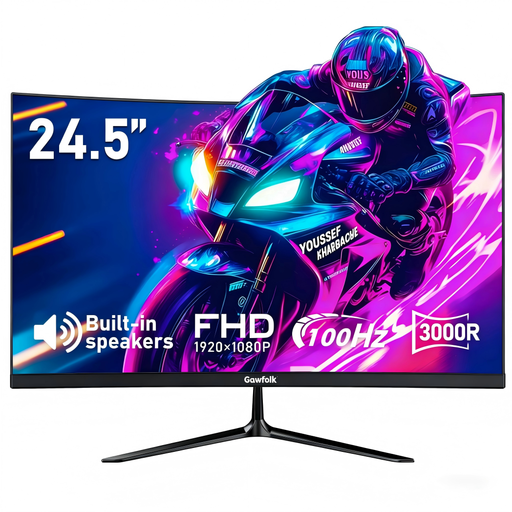
Gawfolk 24.5-inch FHD curved monitor
The 24.5-inch Full HD size offers a compact screen; measure the space available, including the stand, before choosing.
Curved, 100 Hz, 1 ms MPRT, built-in speakers, AMD FreeSync, HDMI and DisplayPort; VESA 75 × 75 mm.
Joybuy
 No image available
THUNDEROBOT CF25F300L 24.5-inch FHD gaming monitor
As a 24.5-inch Full HD model, this monitor is part of the smaller-screen selection; check that its full dimensions, including the stand, fit on your desk.
320 Hz, 1 ms, 450 Nits, with a tilt- and swivel-adjustable stand.
Joybuy
Frequently asked questions
How can I check whether a monitor will fit on my desk?
Measure the available width and depth where you plan to place it, then compare these with the dimensions of the specific monitor, including the stand. Screen size alone isn’t enough to check whether it will fit.
Does QHD automatically make maps and menus easier to read?
No. A higher resolution doesn’t guarantee larger or more readable text. The display also depends on screen size, viewing distance and the settings available in the game; QHD also places greater demands on graphics performance than Full HD.
Do I need the highest possible refresh rate for management games?
Not necessarily. Start by choosing a suitable size and a clear, readable display. Whether you can use your preferred refresh rate also depends on your PC, game and connection; Dell Germany lists different maximum QHD refresh rates for DisplayPort and HDMI on the G2725D.
Can I make the text in a game larger at QHD resolution?
It depends on the game. Paradox Interactive lists a setting for scaling the toolbar in Cities: Skylines II; check which adjustments are available in the game you actually play.
What should I consider with OLED and menus that stay on screen for a long time?
Read the care guidance and terms for the specific model. ASUS describes the XG27AQWMG’s OLED Care features as helping to reduce the risk of burn-in; this doesn’t mean burn-in is impossible.


