For a small desk, a 23.8- to 24-inch Full HD monitor is the space-saving choice. A 27-inch QHD model is worth considering if you have room for it and want more pixels for furniture, surfaces and menus. Before you buy, measure the space required, including the stand, and check that your gaming device, connection and game support your preferred resolution and refresh rate.
Which size is right for you?
Gamers with very limited desk space
If both the screen and stand need to fit into a tight space, compare the full dimensions rather than just the screen size. Germany’s Federal Institute for Occupational Safety and Health stresses that screen positioning should suit your individual needs.
Detail-focused home designers
If you want to show furniture, surfaces and menus with more pixels, consider a 27-inch QHD model – provided you have room for it and your gaming device supports it. LG lists a resolution of 2560 × 1440 pixels for the UltraGear 27GS75QX-B; check the depth using a reliable set of dimensions for the version on offer.
Gamers using multiple devices
If you switch between a gaming device and other screen-based tasks, the right video inputs matter. ASUS lists HDMI and DisplayPort for the TUF Gaming VG249Q3A; check the connections on the specific monitor and your own device.
What should you look for when buying?
| Consideration |
What to check before buying |
Who is it important to? |
| Desk space and screen positioning |
Check the available desk width and depth, as well as the full dimensions including the stand; take adjustment options into account. |
If space is limited, the monitor and stand need to fit on my desk and be easy to position. Around 36% of consumers put the space required first. |
| Image detail for rooms and menus |
Compare the native resolution and screen size, along with the resolution and scaling options offered by your game and device. |
If I want surfaces and interior details to look clear, I check the resolution and whether my gaming device supports it. Around 29% of consumers prioritise image detail. |
| Connecting to existing devices |
Check the video outputs, monitor inputs and required cable, as well as whether you need docking features. |
If I switch between a gaming device and other devices, the connections need to suit my setup. Around 21% of consumers put device compatibility first. |
| Smooth visuals |
Check that the refresh rate and adaptive sync are compatible with your game, device and connection. |
If smooth motion matters to me, I check what my gaming device can actually output rather than focusing only on a high refresh rate. Around 14% of consumers prioritise smooth visuals. |
Avoiding buying pitfalls
-
Comparing screen sizes instead of the space they take up
The screen’s diagonal measurement doesn’t tell you how much desk space the casing and stand need. LG’s product page gives conflicting depth measurements for the 27GS75QX-B.
Measure the available width and depth, then confirm the full dimensions, including the stand, for the specific version before buying.
Depending on the space available, you may need a different setup or a suitable mount.
-
Confusing the maximum refresh rate with a game’s frame rate
A monitor’s refresh rate doesn’t tell you what frame rate a particular game will achieve on an unspecified gaming device.
First check your device’s resolution, connection and output, then choose a suitable monitor refresh rate.
-
Assuming an HDR label means impressive HDR
PRAD found the advertised HDR10 feature on the Samsung ViewFinity S60UD unconvincing. This assessment applies to that specific model.
Check HDR claims for the individual model, and don’t assume that a compatibility label guarantees proven picture quality.
-
Overlooking static screen content on OLED displays
MSI highlights the risk of static elements remaining on screen for long periods on compatible OLED monitors. This does not apply across the board to IPS models.
For a specific OLED model, check its care features and warranty conditions.
Frequently displayed, unchanging menus may mean extra care is needed.
Brands and models at a glance
AOC
The 24G4X is a 23.8-inch Full HD example of a compact gaming setup, while the Q27G4SRU offers a larger QHD format.
- AOC lists IPS, Adaptive Sync and 180 Hz for the 24G4X.
- These manufacturer specifications don’t provide independent picture-quality measurements or confirm that the stand will fit on a particular desk. The 320 Hz refresh rate of the 27-inch Q27G4SRU isn’t automatically an advantage for home design.
LG
The UltraGear 27GS75QX-B is a 27-inch QHD model for anyone who values extra pixels more than a particularly narrow footprint.
- LG lists IPS, 2560 × 1440 pixels and 180 Hz.
- The product page gives conflicting information about the depth with and without the stand. Confirm the required desk depth using a reliable dimension drawing for the specific version.
ASUS
The TUF Gaming VG249Q3A is a 24-inch Full HD option to consider if you’re prioritising desk space.
- ASUS’s German website lists 180 Hz, HDMI and DisplayPort.
- ASUS notes that specifications may vary by country. Check the connections and full dimensions for the version on offer.
MSI
The G244F E2 is an example of a compact Rapid IPS Full HD setup. OLED models are a separate alternative, not part of the same product range.
- MSI lists Full HD, 180 Hz and Adaptive Sync for the G244F E2.
- MSI’s advice about static content and care features applies to compatible OLED monitors and doesn’t apply to the IPS monitor.
Samsung
The ViewFinity S60UD (LS24D600UAUXEN) is a 24-inch QHD all-round option if you use your small desk for other tasks too.
- PRAD lists a refresh rate of up to 100 Hz, USB-C docking and adjustment options for this model.
- PRAD considers the advertised HDR10 feature unconvincing. This assessment applies to the specific model and isn’t a ranking for gaming or virtual home design.
Joybuy product picks
These product picks feature compact 24- to 24.5-inch monitors for small desks, including Full HD gaming and all-round models.
 No image available
KOORUI MB24V29FS4, 24-inch
A compact Full HD option if a 24-inch screen and a tilting or VESA-mountable setup suit your desk.
IPS, Full HD, 120 Hz, 5 ms, HDMI and VGA. Tilt adjustment; VESA 100 × 100 mm. Listed dimensions with stand: 541,9 × 185,1 × 424,7 mm.
View at Joybuy
 No image available
KTC H24B9S, 24-inch gaming monitor
A compact gaming option if you’re looking for Full HD, adaptive sync and suitable video inputs.
IPS, Full HD, 144 Hz, Adaptive Sync, HDMI and DisplayPort. Tilt adjustment is listed.
View at Joybuy
 No image available
ASUS Eye Care VY249HF-W, 24-inch
A compact Full HD option if adaptive sync and the option of VESA mounting suit your setup.
IPS, 1920 × 1080 pixels, 100 Hz, AdaptiveSync and HDMI. Tilt adjustment; VESA 100 × 100 mm.
View at Joybuy
 No image available
Acer Vero B247YGbmiqprx, 24-inch
A compact all-round option if flexible positioning and multiple types of connection are important for your desk.
IPS, Full HD, 120 Hz, VGA, HDMI and DisplayPort. Listed dimensions: 540,30 × 186,1 × 350,90 mm. Height adjustment up to 165 mm, swivel, tilt and pivot.
View at Joybuy
 No image available
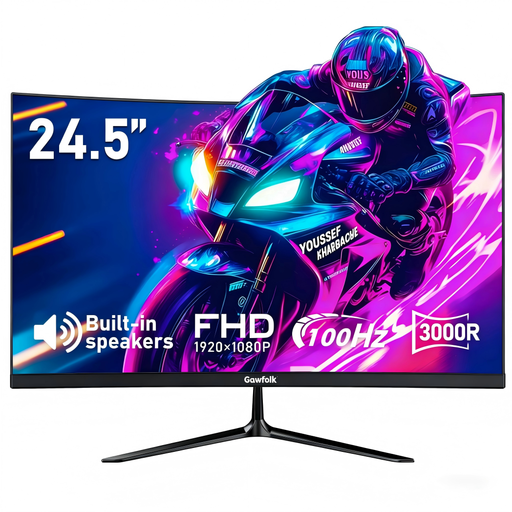
Gawfolk 24.5-inch curved monitor
A curved Full HD gaming option if a 24.5-inch screen and the listed curvature suit your desk.
100 Hz, FreeSync, HDMI and DisplayPort. 3000R curvature, tilt adjustment and VESA 75 × 75 mm.
View at Joybuy
Frequently asked questions
Is Full HD good enough for designing a virtual home?
Full HD is worth considering if a more compact setup matters more to you than extra pixels. If you want to show more detail, compare QHD and check that your desk, game and gaming device can accommodate it. Without knowing the specific game, it isn’t possible to set a minimum resolution.
What should I check before setting up and cleaning my monitor?
Compare your desk and monitor measurements, including the stand, and position the screen to suit how you sit. LG recommends unplugging the monitor before cleaning and using a soft microfibre cloth. Follow the instructions for your specific model and don’t spray liquid directly onto the screen.
How can I compare energy use and my rights after buying?
The EU energy label for electronic displays shows energy consumption in kWh per 1,000 hours; compare the figures for the specific models. When you buy from a trader in the EU, you’re generally entitled to a legal guarantee of at least two years from the date you receive the goods. Online purchases usually come with a 14-day right to cancel; this is separate from any additional manufacturer’s warranty.


