Which monitor is right for you?

Gamers short on desk space

Compare the screen width and stand depth with the usable space on your desk. BenQ Germany lists the BenQ EX240 as 252 mm deep including the stand, so a small screen size alone won’t tell you how much room the monitor needs.

Players who rely on clues and text

If dialogue and small environmental details matter to you, compare Full HD and QHD alongside screen size, viewing distance and your PC’s capabilities. The Dell G2724D is a 27-inch QHD comparison model; check that it will fit on your desk.

Fans of dark investigations

If you want to pay particular attention to dark scenes, compare the stated contrast and check the specific HDR details. VESA distinguishes HDR signal support from DisplayHDR performance levels, so an HDR logo alone doesn’t confirm any particular DisplayHDR performance.

What should you look for when buying?

Compact Full HD IPS monitor

A good fit if: you have limited desk space and want a compact display for dialogue and clues. The BenQ EX240 and AOC 24G4X are examples with 23.8-inch screens and 1,920 × 1,080 pixels.

The trade-off: Full HD has fewer pixels than QHD. Also check the full dimensions, including the stand: BenQ Germany lists the EX240 as 540 mm wide and 252 mm deep overall.

27-inch QHD IPS monitor

A good fit if: you have more desk width, a suitable viewing distance and a PC that can output QHD. The Dell G2724D is a comparison model with 2,560 × 1,440 pixels and an adjustable stand.

The trade-off: A larger monitor takes up more space, and QHD puts greater demands on your PC’s graphics output. Dell Germany currently lists the G2724D as unavailable.

Compact VA monitor for contrast-focused gaming

A good fit if: you want to pay particular attention to the stated contrast in dark game scenes. The manufacturer lists a VA panel and a static contrast ratio of 3,000:1 for the KOORUI 24E4.

The trade-off: These details come from the manufacturer’s Japanese website and don’t automatically confirm that the German version is identical. Check the exact version and specification before buying.

Priority What to check before buying Who should pay particular attention?
Desk space and viewing distance Measure the available desk width and depth; compare them with the device dimensions, including the stand. If your desk has limited space, the monitor must fit with its stand. Around 36% of consumers prioritise the space it takes up.
Text and image detail Compare 1,920 × 1,080 with 2,560 × 1,440 pixels, and check which resolution your PC can output in-game. If you want to read dialogue and small clues clearly, consider resolution, screen size and viewing distance together. Around 29% of consumers prioritise image detail.
Dark scene visibility Check the stated contrast for the specific model, and distinguish HDR support from a specific DisplayHDR performance level. If dark areas of the image matter particularly to you, check the model’s contrast and HDR details without assuming they guarantee that clues will be easy to see. Around 21% of consumers prioritise dark scene performance.
Connections and running costs Check that the inputs, resolution and refresh rate available work with your PC or console; review the energy label and warranty terms. If you mainly want to make sure your devices connect and the monitor is practical to run, check the details for the exact listing. Around 14% of consumers prioritise connections and day-to-day running.

Avoid common assumptions

  • Comparing screen size in inches instead of dimensions with the stand

    A compact screen doesn’t guarantee a shallow footprint. BenQ lists the EX240 as 252 mm deep overall, including the stand.

    Measure the usable desk space and compare it with the full dimensions of the exact model.

  • Assuming HDR10 proves DisplayHDR performance

    HDR signal support alone doesn’t prove DisplayHDR certification or a particular level of HDR performance. VESA distinguishes signal support from tested DisplayHDR performance levels.

    Look for a specific certification for the exact model rather than relying on an HDR10 logo alone.

  • Assuming you can use the highest refresh rate with any connection

    Dell lists the G2724D at 165 Hz over DisplayPort and 144 Hz over HDMI.

    Before buying, check the connection, resolution and refresh rate your device can achieve.

  • Assuming a regional product page describes the same version sold in Germany

    For the KOORUI 24E4, the weight details differ between the Japanese manufacturer’s website reviewed and the German retailer’s website.

    Check the regional version and specification in the listing before applying the manufacturer’s details to it.

Key brands at a glance

BenQ

The MOBIUZ EX240 is an example of a 23.8-inch Full HD IPS monitor.

  • BenQ Germany lists 100 mm of height adjustment, two HDMI inputs, DisplayPort and speakers for the EX240.
  • Its stated native contrast is 1,000:1, and its overall depth with the stand is 252 mm. Check that it will fit your desk.

AOC

The 24G4X is an example of a 23.8-inch Full HD Fast IPS monitor.

  • AOC Germany lists 180 Hz and Adaptive Sync for the 24G4X.
  • The advertised refresh rate alone won’t tell you whether the screen size and setup will suit your desk. Check the rate your device can achieve.

Dell

The G2724D is a 27-inch QHD comparison model for a desk with enough space.

  • Dell Germany lists an adjustable stand and 165 Hz over DisplayPort.
  • Dell lists 144 Hz over HDMI, and its German product page currently shows the G2724D as unavailable.

KOORUI

The 24E4 is a compact VA comparison model for buyers who pay particular attention to stated contrast.

  • The manufacturer’s Japanese website lists a VA panel and a static contrast ratio of 3,000:1 for the 24E4.
  • Regional details about the specification and weight don’t fully match. Don’t assume these model details apply to a German listing without checking.

LG

The UltraGear 24G411A-B is an example of a compact Full HD IPS monitor.

  • For the 24G411A-B, LG Germany distinguishes between a native 120 Hz refresh rate and 144 Hz when overclocked.
  • The product page displays “Information when available”, which doesn’t amount to a specific offer to buy.

Joybuy products for compact desks

The following Joybuy products are suited to compact Full HD setups. Check the model, connections and setup against your device and desk.

KOORUI MB24V29FS4, 24-inch Full HD IPS monitor

KOORUI MB24V29FS4, 24-inch, Full HD, IPS

This compact Full HD IPS monitor could suit a small desk; check the exact dimensions and connections before buying.

Listed in the product title: 120 Hz, 5 ms response time, 99% sRGB, HDMI and VGA, plus a 100 × 100 mm VESA mount. The title also mentions a tilt-adjustable stand.

View at Joybuy

KTC H24B9S, 24-inch Full HD IPS gaming monitor

KTC H24B9S, 24-inch, Full HD, IPS

This compact Full HD IPS monitor could work on a small desk; compare its actual footprint with the space you have available.

Listed in the product title: 144 Hz, a 1,500:1 contrast ratio, Adaptive Sync, HDMI and DisplayPort. The title also mentions tilt adjustment.

View at Joybuy

ASUS Eye Care VY249HF-W, 24-inch Full HD monitor

ASUS Eye Care VY249HF-W, 24-inch, Full HD

The compact screen size could work on a small desk; check the setup and connections you need on the exact device.

Listed in the product title: 100 Hz, 1 ms MPRT, AdaptiveSync, IPS, a 100 × 100 mm VESA mount and HDMI.

View at Joybuy

Acer Vero B247YGbmiqprx, 24-inch monitor

Acer Vero B247YGbmiqprx, 24-inch

This model is listed for compact Full HD setups. Before buying, check the exact resolution, connections and footprint to make sure it suits your desk and device.

View at Joybuy
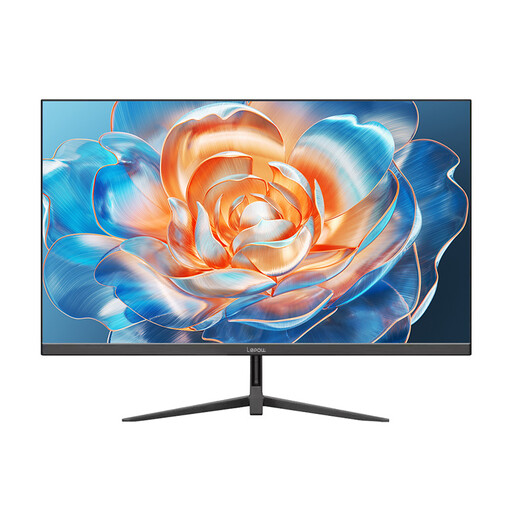
Lepow HC-24Z2, 24-inch monitor with 100 Hz

Lepow HC-24Z2, 24-inch, 100 Hz

The stated screen size makes this model suitable for a compact desk setup. Compare the full dimensions, resolution and connections with your requirements.

Listed in the product title: 100 Hz.

View at Joybuy

Frequently asked questions

Is a 24-inch Full HD monitor good enough for detective games?

If space is limited, this can be a good starting point: the BenQ EX240 and AOC 24G4X both combine a 23.8-inch screen with 1,920 × 1,080 pixels. How easy you find small text and clues to read will also depend on your games and viewing distance.

How do I set up a monitor on a small desk?

Compare the dimensions, including the stand, with the usable desk space. BenQ Germany lists the EX240 as 540 mm wide, 252 mm deep with the stand and adjustable in height by 100 mm. These figures won’t necessarily apply to other 24-inch models.

Does HDR automatically mean higher running costs?

Not necessarily by any particular amount. The EU energy label for electronic displays also includes information about HDR mode; compare the figures for the specific model. Without knowing how long you use it and your electricity tariff, you can’t work out your personal cost.

Are a warranty and statutory rights the same thing?

No. Statutory rights cover claims against the seller for faulty goods; a warranty is a voluntary undertaking with its own terms. The Verbraucherzentrale recommends treating the two separately and checking who the seller is and what additional warranty terms apply to the specific offer.

Which labels and disposal rules are relevant in Germany?

The European Commission explains the EU energy label for electronic displays. The Bundesnetzagentur explains that the CE marking is the manufacturer’s declaration that the product meets the applicable EU requirements, not a mark of origin. According to the German Federal Ministry for the Environment, end-of-life monitors count as waste electrical equipment and must not go in household rubbish.