If space is tight, start with a compact Full HD monitor and check its dimensions, including the stand. A 27-inch QHD monitor gives you more pixels for maps and on-screen controls, but takes up more room and demands more from your PC at the resolution you want to use. A high refresh rate alone doesn’t guarantee that a monitor will fit your desk or give you an edge in ranked play.
Which monitor is right for you?
For gamers short on desk space
You need a display whose casing, stand and viewing distance work with your desk; screen size alone doesn’t tell you much. The specifications published by AOC Deutschland and LG Deutschland show why it’s worth comparing the dimensions of specific models.
For gamers who want a clear view of the map
You want to display the game map and on-screen controls on a QHD monitor, and you have room for a 27-inch model. MSI Deutschland and LG Deutschland list suitable 27-inch QHD models.
For gamers who prioritise smooth visuals
You want a refresh rate that matches your PC’s output and plan to use variable sync, without losing sight of whether the monitor will fit your desk. AOC Deutschland lists Adaptive Sync for the 24G4X; actual use depends on a compatible set-up and settings.
What should you look for when buying?
| What matters |
What to check before buying |
Who is it important to? |
| Desk space |
Compare the external dimensions, including the stand, with your available desk space and viewing distance. Only plan for VESA mounting if the monitor and mount are compatible. |
If my desk is small, I want to know whether the screen and stand will actually fit. Around 36% of consumers say desk space is their main concern. |
| Map visibility |
Compare the game resolution, scaling and graphics card performance with the model’s external dimensions. |
Being able to see the map and on-screen controls clearly matters to me, provided my desk and PC can accommodate a larger QHD display. Around 29% of consumers put visibility first. |
| Smooth visuals |
Check the refresh rate for the input you’ll use, your PC’s output and support for variable sync. |
In ranked matches, I want to be able to use a refresh rate that suits my PC and settings. Around 21% of consumers prioritise smooth visuals that meet these needs. |
| Power use, care and cover |
Check the energy label and product information sheet for the specific model, as well as the seller, statutory rights and, where relevant, OLED warranty terms. |
If running costs and after-sales terms matter to me, I want to compare them in advance. Around 14% of consumers prioritise costs, care and cover. |
Common buying mistakes
-
Choosing by screen size alone
The diagonal measurement doesn’t tell you how much desk space the stand takes up. The LG 27GR75Q-B has a depth of 291.2 mm with its stand.
Compare the dimensions of the complete monitor with your desk before choosing between Full HD and QHD.
A different stand or a compatible mount may take up extra space.
-
Assuming a higher refresh rate or lower response time guarantees an edge in ranked play
Refresh rate and GtG response time describe different features. A higher refresh rate alone doesn’t prove lower input lag or better results in a particular game.
Check the resolution, connection and sync support for your PC rather than assuming that individual figures tell you how well you’ll play.
-
Overlooking static on-screen elements and warranty terms with OLED
LG describes image retention that can occur after displaying an unchanged image for a long time. This warning doesn’t apply to all IPS models.
If you’re considering OLED, compare how you plan to use it with the care instructions and warranty terms for the specific model.
Key brands at a glance
AOC
AOC Deutschland lists the 24G4X as a compact 23.8-inch Full HD IPS option with Adaptive Sync.
- The manufacturer’s specifications list 1920 × 1080, 180 Hz and 1 ms GtG.
- These specifications don’t prove an independently measured advantage in strategy games. Check the dimensions, including the stand, separately.
LG
LG Deutschland lists the 27GR75Q-B as a 27-inch QHD IPS model with a 165 Hz refresh rate.
- The published dimensions, including the stand, make it easier to check the space you’ll need; the depth is 291.2 mm.
- The image retention described for OLED doesn’t apply to this IPS model.
MSI
MSI Deutschland lists the G274QPF E2 as a 27-inch QHD model with an adjustable stand.
- The manufacturer lists 180 Hz and Adaptive Sync.
- MSI notes that specifications may vary by region. Check the details for the specific version.
Dell
Dell Deutschland lists the S2725DSM as a 27-inch QHD monitor with a height-adjustable stand.
- The German product page lists a resolution of 2560 × 1440 and a refresh rate of 144 Hz.
- Before choosing it for a small desk, check the full set-up dimensions of the specific model.
Joybuy products for compact set-ups
The Joybuy products below are compact Full HD monitors for desks with limited space. Compare their actual dimensions, including the stand, and check that your PC supports the display output.
 No image available
KOORUI MB24V29FS4, 24 inches
The 24-inch format may suit a more compact desk; check the dimensions with the stand.
Full HD (1920 × 1080), IPS and 120 Hz.
HDMI and VGA; VESA 100 × 100 mm; tilt-adjustable.
Listed dimensions: 541.9 × 185.1 × 424.7 mm.
View at Joybuy
 No image available
TCL 25G54, 25 inches
If you’re looking for a compact Full HD monitor, compare its actual set-up dimensions before buying.
Full HD (1920 × 1080), Mini LED, IPS and 144 Hz.
FreeSync; DisplayPort and HDMI.
Listed dimensions: 18.2 × 55.6 × 43.9 cm.
View at Joybuy
 No image available
KTC H24B9S, 24 inches
The 24-inch Full HD format may suit a desk with limited space; remember to check how much room the stand needs, too.
IPS, 1920 × 1080 and 144 Hz.
Adaptive Sync; HDMI and DisplayPort; tilt-adjustable.
View at Joybuy
 No image available
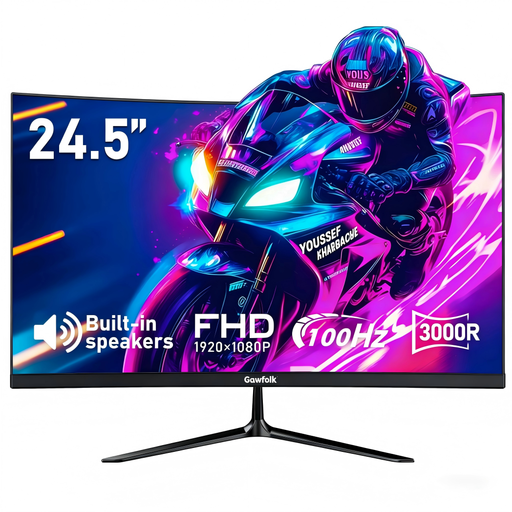
Gawfolk 24.5 inches, curved
The 24.5-inch format is a compact alternative; check that the curved design suits your available space.
Full HD (1920 × 1080), 100 Hz and AMD FreeSync.
1 ms MPRT; HDMI and DisplayPort; VESA 75 × 75 mm.
View at Joybuy
 No image available
THUNDEROBOT CF25F300L, 24.5 inches
The 24.5-inch Full HD format may work well where space is limited; check that the stand’s footprint fits your desk.
Full HD and 320 Hz.
Tilt- and swivel-adjustable stand.
View at Joybuy
Frequently asked questions
What should I measure before setting up a monitor on a small desk?
Measure the available desk width and depth, then compare them with the manufacturer’s dimensions, including the stand. Take your seating position into account, too. The screen’s diagonal measurement doesn’t tell you how much desk space it needs.
How do I use variable sync once my monitor is connected?
First, check that your graphics hardware and display are compatible, then review the settings on the specific monitor. AMD notes that some picture presets can disable FreeSync; you can check its status for the selected display in AMD Software.
Are a warranty and your statutory rights the same thing?
No. Your statutory rights for faulty goods apply against the seller; a warranty is an additional voluntary promise with its own terms. The Verbraucherzentrale also notes that online purchases generally come with a right to cancel, usually within 14 days of receiving the goods.
What energy information should a monitor sold in Germany provide?
Check the energy label and product information sheet for the specific model. The European Commission lists electronic displays among the products covered by EU energy labelling and ecodesign requirements; this alone doesn’t confirm that an individual product listing complies.


