First, measure the available width and depth of your desk, taking the stand and your viewing distance into account. If a larger monitor fits and your gaming device can make good use of QHD, the extra pixels give you more detail for park views and tools. If space is tight, a more compact Full HD model is a sensible alternative. If menus stay on screen for long periods, check the care guidance and warranty terms for the specific OLED model you’re considering.
Who are the different options best suited to?
Park builders with very little desk space
If you need room for a keyboard and mouse as well as your monitor, measure the available space and compare it with the dimensions of the whole unit, including its stand. For example, GIGABYTE publishes the G27Q20’s dimensions with the stand, while BenQ ZOWIE describes the XL2411K’s stand as space-saving.
Detail-focused builders with lots of menus
If you want to keep an eye on both the park view and your building tools, weigh the benefit of extra pixels against screen size, readability and viewing distance. Frontier Developments describes an object browser along the bottom of the screen in Planet Coaster 2, but the exact layout also depends on the game and device you use.
Players with varied gaming habits
If you play other games as well as building parks, or leave menus on screen for long periods, check the connections, refresh rate and panel type. MSI describes burn-in protection features on its OLED models; these do not prove that the risk has been eliminated.
What should you look for when buying?
Start by measuring your desk space and viewing distance. Then you can weigh up resolution, connections and panel care according to how you plan to use your monitor.
| Buying consideration |
What to check |
Who this matters most to |
| Desk space and seating position |
Compare the monitor’s width and depth, including the stand, with your desk. Check that there’s room for both the screen and your input devices. |
If I have a small desk, I want to keep enough room for my monitor, mouse and keyboard. This is the main consideration for around 36% of consumers. |
| Readability of tools and details |
Compare the screen size and native resolution. Check that menus remain easy to read at your preferred scaling setting. |
If I want to see my tools and park view at the same time, I look for enough pixels without choosing a screen that’s too large for my viewing distance. Around 29% of consumers put these display details first. |
| Smooth performance and connection |
Check that your gaming device, resolution and connection are compatible. See what refresh rate the specific model supports over HDMI or DisplayPort. |
If smooth visuals matter to me in other games too, I want to know what my device can actually output through the connection I’ve chosen. Around 21% of consumers make this their main consideration. |
| Panel care and usage |
For OLED, check the care features and warranty terms for the exact model. Also compare the EU energy label. |
If interface panels stay in the same place during long building sessions, I want to take potential care requirements and the risk of burn-in into account. Around 14% of consumers prioritise panel care and related requirements. |
These percentages are rough guides to the main considerations people prioritise; they are not a ranking of monitors.
Which buying mistakes should you avoid?
-
Comparing screen size alone
The diagonal measurement alone doesn’t tell you how much desk space the monitor takes up with its stand. Actual dimensions can vary considerably between individual models.
Before buying, compare the full dimensions of the monitor and stand with the free space on your desk.
Depending on your space, you may need a suitable monitor arm or a different desk layout.
-
Assuming the stated refresh rate is the same as your in-game frame rate
The frame rate you can achieve in a game also depends on your gaming device, the game and the connection you use. Dell lists different maximum rates for the G2724D at QHD over DisplayPort and HDMI.
Check the resolution and refresh rate supported by the connection you actually plan to use, as well as your gaming device’s requirements.
-
Assuming OLED protection means there’s no risk
MSI describes burn-in as an ongoing risk and presents its protection features as a way to reduce that risk, not eliminate it.
If you have long building sessions with toolbars constantly on screen, consider IPS LCD models too. For OLED, read the care guidance and warranty terms for the exact model.
Care guidance may mean extra work, while voluntary warranty claims are subject to the relevant terms and conditions.
Which brands are worth considering?
GIGABYTE
The G27Q20 is an example of a 27-inch QHD IPS monitor with published details on its dimensions, height adjustment and VESA mount.
- GIGABYTE lists dimensions of 612 × 517 × 192 mm with the stand, plus 130 mm of height adjustment.
- The dimensions help you plan, but they don’t confirm that the model will fit every small desk.
LG
The UltraGear range includes IPS examples in 23.8-inch Full HD and 27-inch QHD.
- The LG 27GS75QX-B is listed as a 27-inch QHD IPS monitor.
- Compare the screen size and resolution with your desk and viewing distance, rather than judging suitability by the diagonal measurement alone.
BenQ ZOWIE
The XL2411K is an example of a compact gaming design with adjustable height.
- BenQ ZOWIE describes the stand as space-saving.
- The manufacturer’s description refers to the design and doesn’t establish any particular advantage for building parks.
MSI
The MPG 271QRXDE QD-OLED is a 26.5-inch QHD OLED example for users who also want to consider OLED contrast and high refresh rates.
- MSI lists 360 Hz and OLED Care 2.0 for this model.
- Protection features don’t prove that burn-in has been ruled out. Check the care guidance and specific warranty terms for Germany.
Dell
The G2724D shows why resolution, connection and ergonomics should be considered separately.
- Dell lists QHD at up to 165 Hz over DisplayPort and 144 Hz over HDMI, plus height and pivot adjustment.
- The stated maximum rates vary by input, so check which connection you plan to use.
Joybuy monitors for building theme parks on a small desk
Here you’ll find Joybuy monitors in compact Full HD and QHD options. Check the screen size and actual stand dimensions against your desk before choosing a resolution.
 No image available
Z-Edge AGEX, 27-inch QHD gaming monitor
For park views and tools, if you have room for a 27-inch screen on your desk.
QHD at 2560 × 1440 pixels; Fast IPS; 144 Hz; 1 ms MPRT; height-adjustable stand; DisplayPort and HDMI.
A 27-inch screen may take up more desk space than a compact Full HD model.
View at Joybuy
 No image available
INNOCN 2751S PLUS, 27-inch QHD monitor
For detailed park views, if your desk space and viewing distance suit a 27-inch model.
QHD at 2560 × 1440 pixels; Mini LED; 275 Hz; Fast IPS; HDMI 2.1 and DisplayPort 1.4.
With the stand, the listed dimensions are 614.2 mm wide and 395.25 to 515.25 mm deep. Measure your available space before buying.
View at Joybuy
 No image available
TCL 25G54, 25-inch Full HD gaming monitor
A more compact Full HD option if limited desk space matters more to you than the extra pixels of QHD.
25 inches; Full HD at 1920 × 1080 pixels; Mini LED; IPS; 144 Hz; HDMI and DisplayPort.
Full HD has fewer pixels than QHD, which may be a trade-off when viewing your park and tools at the same time.
View at Joybuy
 No image available
KTC H24B9S, 24-inch Full HD gaming monitor
For a smaller screen and Full HD if you’re working with limited desk space.
24 inches; Full HD at 1920 × 1080 pixels; IPS; 144 Hz; Adaptive Sync; HDMI and DisplayPort.
Full HD has fewer pixels than QHD for park details and tools.
View at Joybuy
 No image available
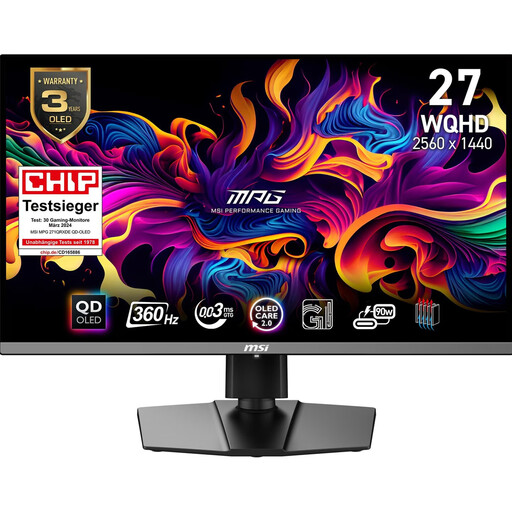
MSI MPG 271QRXDE QD-OLED, 26.5 inches
For QHD park views and users who want to include OLED contrast in their decision.
QD-OLED; WQHD at 2560 × 1440 pixels; 360 Hz; height-adjustable and tiltable stand.
Burn-in remains an OLED risk to consider if static interface panels stay visible for long periods. MSI describes OLED Care 2.0 as a way to reduce the risk; these features don’t prove that it has been eliminated.
View at Joybuy
Frequently asked questions
Is a high refresh rate enough to make a theme park game run smoothly?
No. The frame rate you can achieve in a game also depends on your gaming device and the connection you use. Dell lists different maximum rates for the G2724D at QHD over DisplayPort and HDMI; Frontier Developments’ PC requirements for Planet Coaster 2 don’t guarantee a particular frame rate.
Can I use a monitor arm instead of the stand?
Only if the monitor, arm and desk mount are compatible. GIGABYTE lists a 100 × 100 mm VESA mount for the G27Q20 and a weight of around 4.55 kg without the stand. Also check the arm’s weight capacity and whether it’s suitable for the edge of your desk.
What should I bear in mind when using an OLED monitor for long building sessions?
Check the care guide for the exact model and follow the manufacturer’s advice on its protection features. MSI describes burn-in as an ongoing risk and lists protection features and warranty benefits for certain OLED models; check the terms for the specific model and market.
What are my rights when buying a monitor online in Germany?
For distance purchases from a business seller, you generally have a 14-day right to cancel from the day you receive the goods, subject to statutory conditions and exceptions. Your statutory rights against the seller are separate from any voluntary manufacturer’s warranty; also check the terms for return postage before buying.
What do energy labels and disposal rules mean for a monitor?
The EU energy label for electronic displays lets you compare factors including energy efficiency class and resolution; check the label for the specific model. Dispose of an old monitor separately from household rubbish, for example at a local council collection point. Check the terms for retailer take-back schemes separately.


