If you play at night in a shared bedroom, start by considering adjustable brightness, reflections, lighting on the monitor and the space taken up by its stand. OLED and Mini LED LCD monitors are both options for dark space scenes, but each involves different trade-offs. With OLED, check the care guidance for games with persistent HUDs; with Mini LED, zone counts alone don’t tell you how image quality compares. The right resolution and refresh rate also depend on your gaming device and the connection you use.
Who is this monitor comparison for?
Night-time gamers in a shared room
If you play while someone else is sleeping in the room, consider brightness, reflections and distracting light from the monitor. The Federal Institute for Occupational Safety and Health covers glare and reflections in workplaces; this does not establish that gaming monitors cause a specific disturbance in the bedroom.
Fans of dark space scenes
If you want stars, shadows and bright light sources to remain clear against dark areas, you can compare OLED and Mini LED LCD as two different approaches. For OLED, care guidance for on-screen elements that stay visible for long periods should be part of your decision.
Gamers short on desk space
If you share a desk or change your sitting position, check the dimensions of the monitor itself, the depth of its stand and its adjustment options, as well as the screen size.
What should you consider when choosing?
OLED
A good fit if: dark areas of the picture are your priority and you take the care guidance for the specific model into account during long gaming sessions.
Keep in mind: ViewSonic describes burn-in as a possible OLED risk; this is not a failure rate or a warranty statement for a specific model.
Mini LED LCD
A good fit if: you’re considering an LCD with local dimming for dark gaming scenes.
Keep in mind: Xiaomi lists 1,152 dimming zones for the G Pro 27i, while AOC lists 336 for the Q27G3XMN/BK. These manufacturer figures are not an independent comparison of image quality.
WQHD IPS LCD
A good fit if: a flexible desk setup matters more to you than explicitly specified local Mini LED dimming.
Keep in mind: Dell lists 165 Hz over DisplayPort and 144 Hz over HDMI for the G2724D, so the refresh rate you can use also depends on the connection.
| Priority |
What to check before buying |
Who it matters most to |
| Light at night |
Check the brightness controls, reflections, positioning and lighting on the monitor; find out whether decorative lighting can be switched off. |
If I play while someone is sleeping, I want to be able to control the brightness and any distracting light sources. Around 31% of consumers say night-time use is their main concern. |
| Dark gaming scenes |
Compare OLED and Mini LED LCD, including care guidance and dimming features; don’t treat zone counts as a direct measure of quality. |
If stars and shadows matter more to me than the highest possible refresh rate, I compare the display technology and its limitations. Around 25% of consumers say dark scenes are their main concern. |
| Space and sitting position |
Measure your desk space and stand depth; check the height adjustment and VESA mount size for the specific model. |
At a shared desk, I need enough space and an adjustment that suits my sitting position. Around 19% of consumers prioritise the space the monitor takes up. |
| Refresh rate and connection |
Check the refresh rate for each input and compare it with your gaming device’s outputs and the game you play. |
If smooth motion matters to me, I want to know what refresh rate my gaming device can actually use through the connection I plan to use. Around 13% of consumers say motion handling is their main concern. |
| Energy use and care |
Compare the EU energy label for the specific model and, for OLED, read the care guidance and written warranty terms. |
If I’m weighing up running costs and maintenance as well as the purchase price, I check the information for the exact model. Around 12% of consumers say these ongoing considerations are their main concern. |
Which assumptions should you avoid?
-
Choosing based on the highest refresh rate alone
The refresh rate you can achieve may vary between inputs. For the Dell G2724D, Dell lists a maximum of 165 Hz over DisplayPort and 144 Hz over HDMI at WQHD resolution.
Before focusing on the highest figure, check which connection you plan to use and what your gaming device can deliver.
-
Choosing OLED without considering persistent HUDs
For long gaming sessions with static on-screen elements, it’s important to check the care guidance for the specific OLED model. ViewSonic describes burn-in as a possible risk, but this is not a statement about a particular failure rate.
Read the care guidance and warranty terms for the exact model, and compare them with a Mini LED LCD if appropriate.
-
Assuming the Mini LED monitor with the most zones has the better picture
The dimming zone figures for the Xiaomi G Pro 27i and AOC Q27G3XMN/BK come from their respective manufacturers and don’t prove how the monitors compare under the same conditions.
If picture quality will determine your choice, compare independent reviews of these exact models.
Which brands and models are worth considering?
Xiaomi
The G Pro 27i is a 27-inch WQHD Mini LED option for buyers looking to compare local dimming with LCD technology.
- Xiaomi lists 1,152 dimming zones, up to 180 Hz and an adjustable stand for the G Pro 27i.
- These are manufacturer specifications, not independent measurements in a bedroom. Xiaomi advertises RGB ambient lighting; check whether you can switch it off on the specific model.
AOC
The Q27G3XMN/BK is a WQHD Fast VA LCD with Mini LED dimming.
- AOC lists 336 dimming zones and 180 Hz for this model.
- These specifications come from the manufacturer’s Irish website; they don’t confirm availability in Germany or rule out differences between versions.
Dell
The G2724D is an example of a WQHD Fast IPS LCD without specified local Mini LED dimming.
- Dell lists several ergonomic adjustments for this model, as well as 165 Hz over DisplayPort and 144 Hz over HDMI.
- According to Dell, the G2724D has no built-in speakers. The refresh rate depends on the input.
MSI
The MPG 271QR (DE) X50 is a QD-OLED model that also appears in PRAD’s general list of 27-inch gaming monitors.
- On 29 September 2026, PRAD ranked the model first on its list and cited WQHD, QD-OLED and 500 Hz.
- Its ranking doesn’t assess its suitability for a bedroom or the value of 500 Hz for space games. PRAD also noted that its energy efficiency could be improved.
Joybuy monitors for dark scenes
This Joybuy selection includes gaming monitors for dark space scenes, with different display technologies and setup options.
 No image available
TCL 27P2A Pro 27″ Mini LED monitor, QHD, 320 Hz, HFS (IPS)
The stated QHD resolution gives you an indication of the level of detail in games; check the brightness and monitor lighting on the specific model for night-time use.
The product name also lists 320 Hz, HFS (IPS), VESA DisplayHDR 600 and 1 ms GTG.
View at Joybuy
 No image available
TCL 27P2A 27″ Mini LED monitor, QHD, 200 Hz, HFS (IPS)
Mini LED LCD and QHD are relevant when comparing dark gaming scenes; check the dimming feature and night-time settings on the model.
The product name lists 200 Hz, HFS (IPS), VESA DisplayHDR 600 and 1 ms GTG.
View at Joybuy
 No image available
MSI MAG 272QPDE QD-OLED X24, 27″, QHD, 240 Hz
The QD-OLED panel is an option for dark gaming areas. For long sessions with a persistent HUD, check the care guidance for the specific model.
The product name lists 2,560 × 1,440, 240 Hz, 0.03 ms and Adaptive-Sync.
View at Joybuy
 No image available
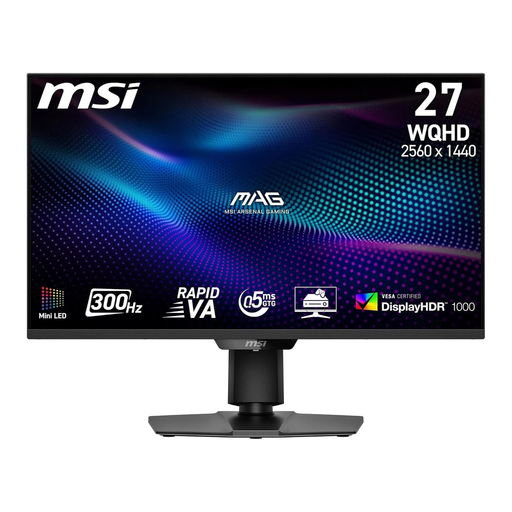
MSI MAG 274QPF X30MV, 27″ WQHD Mini LED, 300 Hz
The stated matte screen and brightness settings in the on-screen menu are worth checking when setting up in a shared bedroom.
The product name lists 2,560 × 1,440, 300 Hz, 0.5 ms, HDMI 2.1 and DisplayPort 1.4a.
View at Joybuy
 No image available
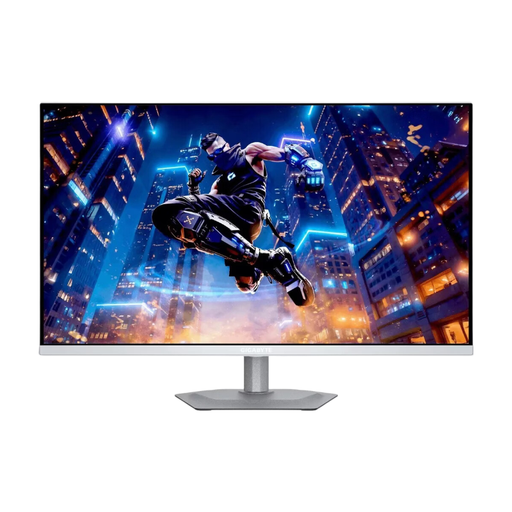
Gigabyte MO27Q2A ICE, 27″ QD-OLED, QHD, 280 Hz
The QD-OLED panel is worth considering when comparing dark gaming scenes. If you play for long periods with a static HUD, read the care guidance for the specific model.
The product name also lists 0.03 ms, G-SYNC Compatible, FreeSync Premium Pro and DisplayHDR True Black 400.
View at Joybuy
Frequently asked questions
How should I set up my monitor for gaming at night?
Position it to minimise reflections from lamps and windows, then adjust the brightness to suit the room. Check with the other person whether light from the screen or monitor is distracting; this does not establish a specific brightness level as safe for health.
Can I get 180 Hz through every connection?
Not necessarily: for the G2724D at WQHD, Dell lists 165 Hz over DisplayPort and 144 Hz over HDMI. Check the combination of monitor, connection, game and gaming device.
What should I consider with an OLED monitor and a persistent in-game HUD?
Read the care guidance and written warranty terms for the specific model. ViewSonic describes burn-in as a possible OLED risk; this general manufacturer statement is neither a failure rate nor a warranty statement for other models.
Which label should I look for when choosing a monitor?
The European Commission classifies computer monitors as electronic displays that carry an energy label on a scale from A to G. The label must also be shown online for products covered by the rules, so compare the details for the specific model on offer.


