Teams using a voice headset
If you want to hear game audio and talk to your team while training, check the headphone output and microphone connection separately. A headphone output isn’t an input for recording.


First, choose a monitor whose resolution, refresh rate and video input are compatible with your PC or console, then plan your voice connection separately from the screen. A headphone output can carry game audio, but it isn’t automatically a microphone input. For team chat, your microphone needs to work through a suitable connection on your gaming device or a compatible audio device. A higher refresh rate or resolution only matters if your setup can actually support the combination you want.
If you want to hear game audio and talk to your team while training, check the headphone output and microphone connection separately. A headphone output isn’t an input for recording.
If you train in fast-paced games, match the resolution, refresh rate and video input you use to your PC.
If you share your screen with others or have limited space, check that the stand and adjustment options suit your desk and seating position.
First, find out how your headset captures your voice, then check that the display you want is compatible with your gaming device’s connections and capabilities.
| Consideration | What to check before buying | Who is it important to? |
|---|---|---|
| Game audio and microphone | Check the headphone output and microphone connection separately. ASUS notes that the VG27AQ3A’s headphone output does not support recording. | If I want to hear game audio and talk to my team without any extra hassle during training, I need a clear, compatible microphone connection. Around 36% of consumers prioritise voice connectivity. |
| Smooth motion | Check the refresh rate and resolution against the input you’ll use. ASUS specifies up to 144 Hz over HDMI and 180 Hz over DisplayPort for the VG27AQ3A. | If I’m training in fast-paced games, I want to know what refresh rate my device can actually achieve through the connection I’ve chosen. Around 29% of consumers prioritise motion performance. |
| Resolution and device compatibility | Check whether your gaming device supports your chosen resolution and refresh rate at the same time. ASUS and Samsung list 2560 × 1440 pixels for their respective 27-inch WQHD models. | If I want a sharp picture without choosing a combination that doesn’t suit my device, I compare resolution and refresh rate together. Around 21% of consumers prioritise picture sharpness and device compatibility. |
| Space and adjustability | Compare the specific model’s stand and adjustment range with your desk and seating position. MSI specifies 0 to 110 mm of height adjustment for the MPG 271QRXDE; the ASUS VG27AQ3A’s stand isn’t height-adjustable. | If I need to set up the screen in a shared or limited workspace, I care about whether I can adjust its position. Around 14% of consumers prioritise desk space and adjustability. |
Being able to hear audio doesn’t automatically mean the monitor can also capture your voice.
Test playback and recording separately, and check whether you can connect the microphone to your PC, console or a suitable audio device.
The refresh rate you can achieve may vary depending on the video input. For the ASUS VG27AQ3A, ASUS specifies a maximum of 144 Hz over HDMI and 180 Hz over DisplayPort.
Check the specifications for the exact model and the connection you’ll actually use with your gaming device.
MSI describes OLED Care 2.0 as a measure to reduce the risk; this isn’t a guarantee that burn-in can’t happen.
Check the warranty terms for the specific version and follow the care guidance that’s appropriate for how you use it.
The TUF Gaming VG27AQ3A is a 27-inch WQHD IPS model whose maximum refresh rate varies depending on the video input.
The Odyssey G5 G50F LS27FG502EUXEN is an example of a 27-inch WQHD IPS model available in Germany.
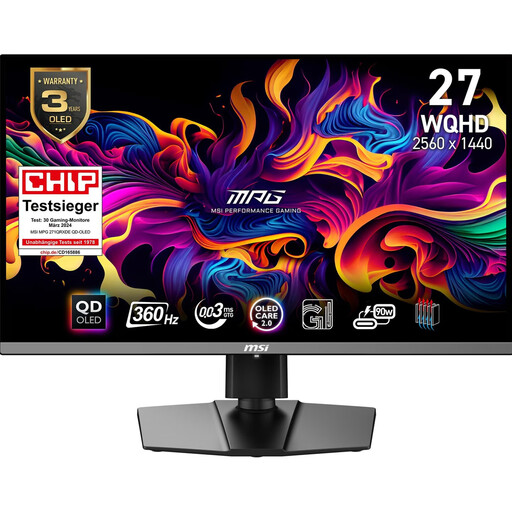
The MPG 271QRXDE QD-OLED is a 26.5-inch WQHD model for buyers who want to make the most of OLED and a high refresh rate.
The UltraGear 27GS75QX-B is an example of a 27-inch WQHD IPS monitor with a manufacturer-listed refresh rate of 180 Hz.
These models are suited to gaming setups where you can choose a display and headset connection that work with your gaming device. For team chat, plan the microphone connection separately from the monitor’s headphone output.
 No image available
A good fit if you want to choose between a higher resolution and a particularly high refresh rate.
27 inches, Mini-LED, Rapid IPS; Dual Mode with UHD at 160 Hz or FHD at 320 Hz.
For team chat, the microphone needs to be connected separately to a suitable input.
 No image available
A good fit if you’re looking for a curved 27-inch QHD display for gaming.
27 inches, curved, QHD, 180 Hz.
For team chat, the microphone needs to be connected separately to a suitable input.
 No image available
A good fit if you’re looking for a 27-inch Mini-LED monitor with a high refresh rate and an adjustable stand.
QHD, up to 275 Hz, height-adjustable stand.
 No image available
A good fit if you want to make the most of a QD-OLED display with WQHD resolution and a high refresh rate.
26.5 inches, WQHD, QD-OLED, 360 Hz; with headphone output.
The headphone output isn’t a substitute for a microphone input. MSI describes OLED Care 2.0 as reducing the risk, not eliminating the risk of burn-in.
 No image available
A good fit if you want to combine QHD resolution and a high refresh rate with a height-adjustable stand.
27 inches, QHD, 200 Hz; overclockable to 210 Hz.
The headphone output isn’t a substitute for a microphone input. Check whether your gaming device and the connection you’re using can deliver the refresh rate you want.
Not just because it has a headphone output. ASUS explicitly notes that its monitor output doesn’t support recording. Check whether you can connect your microphone to your PC, console or a suitable audio device.
Check whether the specific monitor has a headphone output, whether audio is coming through HDMI or DisplayPort, and whether the audio source and volume are set correctly. LG describes these steps for monitors with a suitable output.
No. ASUS lists a maximum of 144 Hz over HDMI and 180 Hz over DisplayPort for the VG27AQ3A. Check the specifications for your exact model, the input you’re using and the resolution you want.
In Germany, consumers can generally claim statutory warranty rights from the seller for faulty new goods within two years of receipt. This is separate from a manufacturer’s guarantee. For online purchases, you’ll generally have a 14-day right to cancel from the date you receive the item, which you need to exercise.
Waste electrical equipment should be taken to an authorised collection point. If you have a large monitor, check the appropriate return option rather than assuming the rules for small appliances apply.