Detail-checkers
You pause gameplay and compare sections of the picture. A large, sharp display can help you keep both the footage and the controls in view.


For long review sessions with a timeline and notes, a large 4K IPS monitor is a natural choice if you’d rather not factor in an OLED care routine. If dark areas of the picture and extra use for fast-paced gaming matter more, a large 4K OLED could be a good fit; for static elements, check the care guidance and warranty terms for the exact model. A high refresh rate won’t add detail to existing footage.
You pause gameplay and compare sections of the picture. A large, sharp display can help you keep both the footage and the controls in view.
You spend extended periods working with a timeline, notes and on-screen elements that stay visible. The screen layout, positioning and panel care requirements are all worth considering when choosing a monitor.
You review footage and also use the same monitor for fast-paced games. Alongside screen size, consider the refresh rate and the modes supported by your setup.
When reviewing tournament footage, the most important features depend on whether you mainly compare details, work for long periods with static elements or also use the monitor for gaming.
| Buying criterion | What to look for | Who is it important to? |
|---|---|---|
| Picture detail on a large screen | Compare the visible screen size, native resolution, aspect ratio and format of your footage. | If I want to pause scenes and compare sections, a sharp, practical workspace matters to me. Around 36% of consumers put picture detail first. |
| Long review sessions with static elements | Check the screen space and stand; for OLED, read the care guidance and warranty terms for the specific model. | If you work for long periods with a timeline or interface that stays on screen, factor in the care requirements when choosing. Around 29% of consumers prioritise long review sessions like these. |
| Fast-paced gaming as well as reviewing | Distinguish the footage’s frame rate from the monitor’s refresh rate, and check which modes are supported by the connection you use. | If I also want to use the same screen for fast-paced games, the refresh rate supported by my setup matters too. Around 21% of consumers prioritise this type of gaming use. |
| Setup and day-to-day use | Check the stand’s dimensions and adjustability, video connections, audio output and the EU energy label for the specific model. | If you want to suit the monitor to your desk and connected devices, and take running costs into account, check the connections, audio and energy label too. Around 14% of consumers put these requirements first. |
The refresh rate describes a capability of the display. When reviewing existing footage, its resolution and frame rate matter too; the monitor won’t add picture detail to the file.
Start by prioritising screen size and workspace. Give a high refresh rate more weight if you also use the same device for gaming.
MSI identifies high brightness combined with static images as a potential cause of burn-in. The manufacturer’s OLED Care features are designed to reduce the risk, but there is no evidence that they eliminate it.
Compare IPS as an alternative, and for OLED check the care guidance and warranty terms for the exact model.
A large visible screen doesn’t tell you whether the monitor has speakers, the connections you need or a suitably adjustable stand. For example, the LG 32GR93U-B doesn’t have built-in speakers.
Check the specifications for the exact model variant to confirm its audio, connections, stand and adjustability.
The features listed relate to the individual model ranges and are not a general assessment of the brands.
According to LG Germany, the LG UltraGear 32GR93U-B is a 31.5-inch 4K IPS monitor with a 144 Hz refresh rate.
BenQ Germany lists the MOBIUZ EX3210U as a 32-inch 4K IPS gaming monitor with a 144 Hz refresh rate. The PD3226G belongs to the separately positioned Creative Pro designer range.
Dell Germany lists the Alienware AW3225QF as a curved 32-inch 4K QD-OLED monitor with a 240 Hz refresh rate.
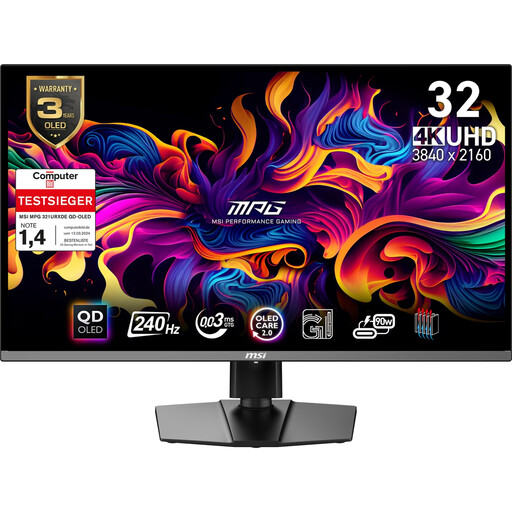
According to MSI Germany, the MPG 321URXDE is a 4K QD-OLED model with a 240 Hz refresh rate and HDMI 2.1.
LC-Power describes the LC-M32UCO as a 31.5-inch QD-OLED monitor with 4K resolution, a 165 Hz refresh rate and 1700R curvature.
This Joybuy selection features large OLED gaming monitors for reviewing footage and potentially gaming as well. If you keep timelines on screen for extended periods, take the care guidance for each model into account.
 No image available
A large OLED screen could suit reviewing footage and gaming as well; for static elements, follow the model’s care guidance.
32 inches, 4K UHD (3840 × 2160), OLED+, 240 Hz and 480 Hz in FHD mode.
 No image available
If you want to combine footage review with gaming, compare the connections and the care requirements for static on-screen elements.
31.5 inches, 4K UHD (3840 × 2160), QD-OLED.
For longer sessions with a static timeline, follow the care guidance for the specific model.
 No image available
This large QD-OLED model could suit reviewing footage and gaming as well; if you use static elements, care guidance should be part of your buying decision.
32 inches, 4K UHD (3840 × 2160), 240 Hz, HDMI 2.1.
For longer sessions with a static timeline, follow the care guidance for the specific model.
 No image available
To combine a large screen with gaming as well, check the supported connections and care requirements for static elements.
32 inches, 4K UHD (3840 × 2160), 240 Hz, USB-C with 90 W.
For longer sessions with a static timeline, follow the care guidance for the specific model.
 No image available
A flat OLED display could suit reviewing footage and gaming as well; for static on-screen elements, follow the model’s care guidance.
32 inches, 3840 × 2160, flat display, built-in speakers.
No, the monitor’s refresh rate alone isn’t the deciding factor. First check the footage’s frame rate and whether you’ll also use the monitor for gaming; 240 Hz won’t add frames to an existing file.
A large 4K IPS monitor is a good fit if you work for long periods with a timeline and notes and don’t want to factor in an OLED care routine. OLED is worth considering if dark areas of the picture and extra use for fast-paced gaming matter; for static elements, check the care guidance and warranty terms for the exact model.
With OLED, take the care features and warranty terms for the specific model into account. MSI identifies high brightness combined with static images as a burn-in risk; its OLED Care features are designed to reduce this risk, but there is no evidence that they eliminate it.
Match the video output on your source device to the connections on the specific monitor, and check the space available, height adjustment and audio. For the LG 32GR93U-B, LG Germany lists two HDMI 2.1 ports and one DisplayPort 1.4 port; it doesn’t have built-in speakers.
Compare the EU energy labels for the specific monitors. The European Commission describes an A-to-G efficiency scale for electronic displays, along with information on HDR use; for your individual electricity costs, usage time and your electricity tariff also matter.