If desk space is limited, a compact Full HD model is a sensible choice. A 27-inch QHD monitor may suit you better if you want to check more image detail and on-screen controls at once, and have enough room for it. A particularly fast OLED model is worth considering mainly if you also play fast-paced games on it: a high monitor refresh rate won’t add frames to existing footage, and you should also bear OLED care guidance and warranty terms in mind.
Which options are right for you?
Scene analysts with room for 27 inches
If you want to see image detail and on-screen controls clearly, and have room on your desk for a larger monitor, QHD could be a good choice. The connection to your playback source matters too. Dell and BenQ both offer examples of 27-inch QHD models.
Reviewers with a small shared desk
If your monitor and stand need to fit in a shared bedroom, remember to allow for cables, positioning and reflections. AOC offers both a 23.8-inch option and a 27-inch monitor with a height-adjustable stand.
Gamers who also review footage
If you use the same screen for fast-paced games and reviewing footage afterwards, the usable refresh rate and connection matter as well as image clarity. Dell and MSI offer examples of different models to consider.
What should you consider when choosing?
First, measure the available space, including room for the stand and cables. Then compare the resolution and connection with your playback source and the software you use to review footage.
| What matters |
What to check before buying |
Who this matters most to |
| Image detail and workspace |
Compare the resolution and screen size with your viewing distance and how easy the playback software is to read. |
If I want to check gameplay and the playback interface at the same time, both need to be easy to read from where I sit. Around 36% of consumers are likely to prioritise image detail. |
| Space, positioning and room lighting |
Measure the width and depth, including the stand and cables. Check the adjustment options and the monitor’s position relative to windows or lights. |
On a shared desk, I want to fit the screen, stand and cables without taking up the other person’s space. An estimated 29% of consumers prioritise limited space and sharing. |
| Usable motion performance |
Check the refresh rate supported at your chosen resolution by the specific HDMI or DisplayPort input and your gaming source. |
If I play fast-paced games as well as review footage, I want to know which refresh rate my source can actually output through the connection I’ve chosen. Around 21% of consumers are likely to prioritise this extra gaming performance. |
| Running costs and protection |
Compare the EU energy label for the specific model. For OLED, check the care guidance and warranty terms. |
During longer sessions, I want to consider the energy label, OLED care and any applicable warranty terms. Around 14% of consumers prioritise running costs and protection. |
Common buying misconceptions
-
Assuming the monitor’s refresh rate matches the footage’s frame rate
A higher monitor refresh rate won’t add image information to a scene that has already been recorded. The input you use may also limit the usable refresh rate.
First, decide whether you’ll use the monitor just for reviewing footage or for gaming too. Then check the source, resolution and connection together.
-
Looking only at the screen size
A larger QHD model can give you more room for the picture and on-screen controls, but it still needs to fit on your shared desk, stand and all.
Check the dimensions of the specific model and measure the available space before ordering.
-
Assuming OLED protection features rule out burn-in
When you spend a long time reviewing footage, on-screen controls may stay in the same position. MSI describes OLED Care 2.0 as a way to reduce the risk, not eliminate it.
Read the care guidance and warranty terms for the exact OLED model, especially if you often work with a timeline that stays on screen.
Key brands at a glance
AOC
The models listed range from a compact Full HD option to a 27-inch QHD monitor.
- AGON by AOC lists the 24G4XE as a 23.8-inch model with 1920 × 1080 pixels and 180 Hz.
- For the Q27G4XF, AOC lists a 27-inch screen, 2560 × 1440 pixels, 180 Hz and a height-adjustable stand.
- The larger screen needs more desk space, so check the dimensions of the specific model.
Dell
The G2725D is a 27-inch QHD option where your choice of connection affects the refresh rate.
- Dell lists up to 180 Hz at QHD via DisplayPort.
- For the HDMI inputs listed, Dell specifies up to 144 Hz at QHD. Check the connection on your playback source.
BenQ
The MOBIUZ EX271Q is a 27-inch QHD model with adjustable picture settings.
- BenQ lists 180 Hz and Light Tuner for adjusting bright and dark areas of the picture.
- The manufacturer’s claims about making in-game cues easier to spot are not an independent review test.
ASUS
The TUF Gaming VG249Q3A is a 23.8-inch Full HD option for a smaller desk space.
- ASUS lists Full HD at 1920 × 1080 pixels, 180 Hz and Fast IPS for this model.
- ASUS notes that specifications may vary by country. The version available to buy is the one to check.
MSI
According to MSI, the MPG 271QRXDE QD-OLED combines QHD with a high refresh rate.
- MSI lists a 360 Hz refresh rate and OLED Care 2.0 for this model.
- MSI describes OLED Care 2.0 as reducing the risk of burn-in, not eliminating it. Also check the care guidance and the specific warranty terms.
Joybuy monitors for reviewing footage
This selection includes compact Full HD monitors and QHD models for reviewing image detail. Check that each screen size will fit on your shared desk.
 No image available
Z-Edge AGEX, 27-inch
The QHD version is suited to checking image detail, provided there’s room on your desk for the larger screen.
QHD with 1440p, 144 Hz, Fast IPS and a height-adjustable stand.
View at Joybuy
 No image available
KTC H27T6
QHD resolution is an option if you want to see more image detail when reviewing footage.
Flat Fast IPS, 2560 × 1440 pixels, 200 Hz; the product name states overdrive up to 210 Hz.
View at Joybuy
 No image available
INNOCN 2751S PLUS, 27-inch
QHD resolution suits reviewing footage when you want to examine image detail on a larger screen.
Mini LED with 1152 zones, QHD, 275 Hz, IPS and 1 ms according to the product name.
View at Joybuy
 No image available
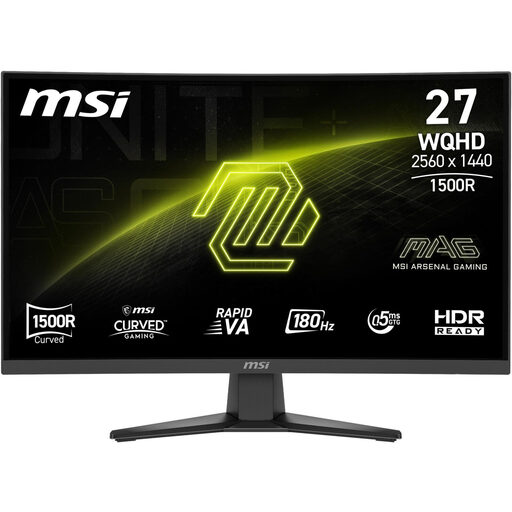
MSI MAG 275CQFDE E18, 27-inch
QHD resolution is an option for reviewing image detail; remember to allow for the 27-inch model’s footprint.
2560 × 1440 pixels, Rapid VA, 16:9, 0.5 ms and F energy efficiency rating according to the product name.
View at Joybuy
 No image available
MSI MAG 244F, 23.8-inch
The compact screen size could be a good fit if space is tight in your shared bedroom.
Full HD, Rapid IPS, 200 Hz, 16:9, plus DisplayPort and HDMI according to the product name.
View at Joybuy
Frequently asked questions
Do I really need 240 Hz or more for recorded tournament footage?
No, not just for reviewing footage. A high monitor refresh rate won’t create extra frames in an existing recording. If you also play fast-paced games on the same monitor, check the refresh rate, resolution and connection together. Dell lists different maximum refresh rates at QHD for the G2725D, depending on the input.
What should I check when setting up a monitor in a shared bedroom?
Measure the space needed for the screen, stand and cables, and check your seating position, reflections and the adjustment options on the specific model. AOC lists a height-adjustable stand for the Q27G4XF. German workplace rules for screen-based work don’t automatically apply to a privately used space in a bedroom.
How can I compare a monitor’s energy consumption?
Compare the EU energy label for the specific monitor. Energy efficiency labelling applies to electronic displays, including monitors; your actual running costs also depend on how you use the monitor and your electricity tariff.
What are my rights when buying a monitor online in Germany?
For a distance sale, you generally have a 14-day right to cancel from the day you receive the goods; exceptions and specific conditions apply. The Verbraucherzentrale distinguishes this right from your statutory rights if goods are faulty. New goods are generally covered by a minimum two-year legal guarantee in the EU; this is separate from any voluntary manufacturer’s warranty.
Can I share tournament footage publicly after analysing it?
Buying a monitor doesn’t give you permission to publish footage. The EUIPO notes that different rights may apply to e-sports content. Before sharing anything publicly, check the rights and terms for the specific event, game and recording.


