A 32-inch 4K monitor is a natural starting point for virtual garden design, as long as your PC can deliver the resolution and refresh rate you want through the connection you’re using. TÜV SÜD recommends considering screen size, viewing distance and PC performance together. If fixed toolbars are often on screen, the risk of burn-in makes an IPS LCD a more suitable choice than OLED. Ultrawide is worth considering if the game you play makes good use of the wider format.
Which monitor is right for you?
Detail-focused garden designers
If you want to see plants, paths and small objects clearly across a large screen while keeping design menus to hand, consider screen size, resolution and PC performance together. TÜV SÜD lists these as factors to weigh up when buying.
Players who plan for long sessions
If toolbars or other fixed elements stay in the same place on screen for long periods, factor this into your choice of panel. RTINGS.com explains the risk of burn-in on OLED screens when static elements remain on screen for extended periods.
Landscape viewers who want a wider view
If a particularly wide view matters to you, check how the specific game you play handles ultrawide and arranges its menus before you buy. MSI lists a 3440 × 1440-pixel panel for the MAG 346CQDE.
What should you look for when buying?
32-inch, 4K and IPS LCD
A good fit if: you want a large 16:9 screen for garden views and frequently used menus.
Things to consider: 4K places greater demands on your PC. Also check which resolution and refresh rate your connection can support.
32-inch, 4K and OLED
A good fit if: contrast and motion handling matter more to you than keeping unchanged toolbars on screen for long periods.
Things to consider: Static elements that remain on screen for extended periods can pose a risk of burn-in, as RTINGS.com notes for OLED.
32-inch, 4K and Mini-LED IPS
A good fit if: you prefer an LCD and are specifically looking for a model with local dimming for HDR scenes.
Things to consider: Features vary by model; the Mini-LED name alone doesn’t tell you how every scene will look.
34-inch, ultrawide and VA
A good fit if: horizontal space for the landscape or side menus matters more to you than the vertical pixel count of a 4K 16:9 screen.
Things to consider: The MSI MAG 346CQDE offers 3440 × 1440 pixels rather than 4K. Check whether your game makes good use of the wider aspect ratio.
| What to consider |
What to check before buying |
Who it matters most to |
| Screen space and resolution |
Consider screen size, native resolution, viewing distance and the refresh rate your PC can achieve together. |
If I want to see plants and small design details clearly across a large screen, I pay close attention to detail. Around 36% of consumers put screen detail first. |
| Panel choice for fixed toolbars |
Think about how long static menus stay on screen; if you’re considering OLED, check the specific warranty terms too. |
If my planning sessions are long and menus often stay in place, I want to choose a panel that suits how I use it. Around 29% of consumers prioritise how a screen handles static interface elements. |
| Wider view |
Check whether the game you play supports the aspect ratio and how it arranges its menus. |
If I want more horizontal space for the garden view or side menus, I look at ultrawide first. Around 21% of consumers put screen width first. |
| Refresh rate |
Check that your PC and the connection you’re using can support the resolution and refresh rate you want. |
If smooth movement as I pan around the garden matters to me, I need a refresh rate my PC can actually deliver. Around 14% of consumers prioritise smooth motion. |
Avoid common buying mistakes
-
Comparing only the highest refresh rate
A high refresh rate requires a suitable frame rate. The ASUS ROG Strix XG32UQ is listed as supporting 160 Hz when overclocked.
First, check which resolution and refresh rate your PC can achieve through the connection you plan to use. Then compare the refresh-rate figures.
-
Choosing OLED without considering fixed menus
Garden and design interfaces can include toolbars that stay in the same place for long periods. RTINGS.com notes the risk of burn-in on OLED screens when elements remain static for extended periods.
Think about how long these elements stay on screen and read the specific warranty terms. If you often work with fixed menus, consider an IPS LCD as an alternative.
-
Assuming ultrawide means 4K
The MSI MAG 346CQDE has 3440 × 1440 pixels, while a 4K 16:9 model such as the MSI MAG 323UPFDE supports up to 3840 × 2160 pixels.
Decide whether horizontal width or vertical detail matters more to you, then check how your game uses the aspect ratio you’ve chosen.
Relevant brands and model examples
The manufacturer details below relate to the specific models named and are not independent performance measurements.
MSI
The models listed offer both a 32-inch 4K option and a wider 34-inch alternative.
- MSI Germany lists 160 Hz for the MAG 323UPFDE and 3440 × 1440 pixels at 180 Hz for the MAG 346CQDE.
- The ultrawide model isn’t a replacement for a 4K 16:9 screen; the right choice depends on the screen space you need.
ASUS
The ROG Strix XG32UQ and ROG Swift PG32UQXR offer different 32-inch 4K LCD configurations.
- ASUS lists 160 Hz as the overclocked refresh rate for the XG32UQ and specifies 576 dimming zones for the PG32UQXR.
- The XG32UQ’s 160 Hz is an overclocked figure. The number of dimming zones alone doesn’t tell you how every HDR scene will look.
Dell Alienware
The AW3225QF is a curved 32-inch 4K QD-OLED monitor.
- Dell lists a 240 Hz refresh rate for this model.
- If static toolbars stay on screen for a long time, bear in mind the risk of burn-in associated with OLED.
LG
The UltraGear 32GS95UE-B is an example of a 32-inch OLED model with switchable picture modes.
- LG lists this model as offering 4K at 240 Hz or Full HD at 480 Hz.
- LG marks the model as no longer available on its German product page, so it’s an example of the technology rather than a confirmed current buying option.
Joybuy products for 32-inch 4K OLED
This selection features 32-inch monitors with 4K resolution and OLED or QD-OLED panels, for detailed garden views and high refresh rates.
 No image available
TCL 32x3A OLED gaming monitor
For a large 4K screen with OLED and a high refresh rate. Bear in mind the risk of OLED burn-in if static elements stay on screen for a long time.
32 inches; 3840 × 2160 pixels; 240 Hz and 480 Hz in FHD mode, according to the product details.
View at Joybuy
 No image available
MSI MPG 322URXDE QD-OLED
For detailed 4K garden views with QD-OLED. If static menus stay on screen for extended periods, bear the risk of OLED burn-in in mind.
32 inches; 3840 × 2160 pixels; 240 Hz, according to the product details.
View at Joybuy
 No image available
ASUS ROG Swift OLED PG32UCDMR
For a large 4K OLED screen. Bear in mind the risk of OLED burn-in if you have long planning sessions with fixed menus on screen.
32 inches; 3840 × 2160 pixels; 240 Hz, according to the product details.
View at Joybuy
 No image available
GIGABYTE MO32U24 OLED
For a flat 32-inch OLED screen with 4K resolution. Weigh up the risk of OLED burn-in if static controls stay on screen for long periods.
32 inches; 3840 × 2160 pixels.
View at Joybuy
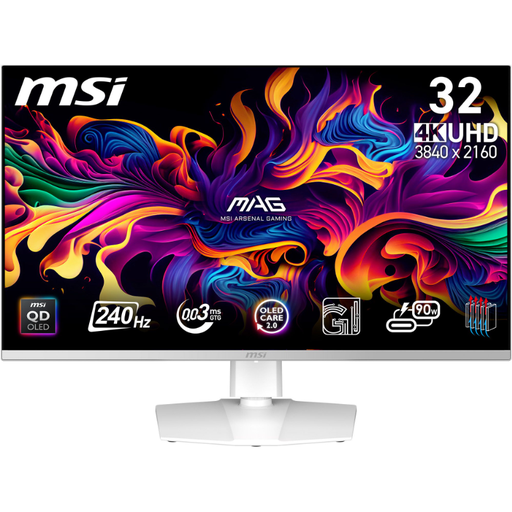 No image available
MSI MPG 321URXWDE QD-OLED
For detailed UHD 4K viewing with QD-OLED. If static interface elements stay on screen for a long time, factor in the risk of OLED burn-in.
31.5 inches; 3840 × 2160 pixels; 240 Hz, according to the product details.
View at Joybuy
Frequently asked questions
For a virtual garden, should I choose 32-inch 4K or 34-inch ultrawide?
A 32-inch 4K screen is a better fit if details and vertical workspace on a 16:9 display matter to you. Ultrawide is an option if you prioritise horizontal space and your game displays the view and menus appropriately. The MSI MAG 346CQDE has 3440 × 1440 pixels, so it isn’t a 4K model.
What should I set up after connecting the monitor?
Set your monitor’s native resolution on your PC, along with the refresh rate supported by the connection you’re using. TÜV SÜD recommends considering PC performance and screen size together when buying. Also check that your monitor and graphics card are compatible if you want to use variable refresh rate.
What do warranty and statutory rights mean when buying a monitor in Germany?
As Verbraucherzentrale explains, statutory rights for a new faulty product apply to the seller and can be claimed within two years. A warranty is an additional voluntary promise with its own terms. If you’re buying OLED, pay particular attention to what it covers.
What should I know about energy use and an old monitor?
For monitors covered by EU rules, the energy label shows the efficiency class, among other information. Don’t put an old monitor in your household rubbish; return it separately instead. The Umweltbundesamt recommends disposing of electrical equipment separately.


