Which monitor is right for you?

Practising wet-weather racing lines

If you want to judge changes in the track surface, puddles, reflections and spray, assess the monitor in the game you play rather than choosing solely by its maximum frame rate. iRacing describes these wet-weather and visibility conditions in its simulation; this doesn’t guarantee how a particular display will perform.

Sim racers who make quick changes of focus

If you want to see track edges and vehicles clearly during fast movement, consider the refresh rate, pixel response and VRR together. RTINGS explains that slow pixel response can cause blur or inverse ghosting, while VRR can reduce tearing when the frame rate fluctuates.

Drivers using a cockpit and headphones

If you want to fit the monitor into a cockpit and play with headphones, decide whether to connect them to your source device or directly to the monitor. For the latter, you’ll need a clearly specified audio output; MSI lists one on the MAG 274QRF QD E2, for example.

What should you look for when buying?

16:9 WQHD LCD

A good fit if: You want to judge the track surface and braking points on PC and prefer a more compact format.

Consider: Check the model’s actual motion handling; a stated response time in milliseconds is no substitute for a measurement.

Ultrawide

A good fit if: Your racing game makes good use of the wider format and the extra horizontal screen space suits your cockpit.

Consider: The format needs more desk space and, at 3440 × 1440 pixels, more graphics performance than WQHD at 2560 × 1440 pixels.

OLED

A good fit if: You care about how bright and dark areas of the image look and are prepared to follow the care guidance for your chosen model.

Consider: Fixed racing-game displays can pose a burn-in risk during long sessions; protective features don’t rule this out entirely.

Priority What to check when buying Who it matters most to
Visibility on wet roads Check the resolution, screen size and how bright and dark scenes look in the game you play. Don’t assume HDR support means a particular level of HDR performance. If you want to judge puddles, reflections and spray, look for clearly visible track details; around 36% of consumers are likely to put road visibility first.
Motion handling Check independent measurements of pixel response and overshoot, VRR support, and the frame rate available through the input you plan to use. If you make quick changes of focus, you’ll want to follow track edges and vehicles as clearly as possible; around 29% of consumers are likely to prioritise clear motion handling.
Screen format and cockpit Check that your game supports the format, and compare the monitor’s dimensions and stand with your available space and graphics performance. If you’re planning a screen around your cockpit, weigh up extra horizontal screen space against desk space and processing power; around 21% of consumers are likely to focus on screen format.
Headphones and running costs Decide how you’ll connect your headphones. If you plan to connect them directly to the monitor, check that it has a specified audio output. Use the model’s EU energy label to assess power consumption. If you want to connect your headphones directly to the screen, check the specific output and operating data; around 14% of consumers are likely to prioritise connectivity and running costs.

Common misconceptions when buying a monitor

  • The maximum frame rate is the same on every connection

    For the MSI MAG 274QRF QD E2, the specifications list up to 180 Hz at WQHD via DisplayPort or USB-C, but up to 144 Hz via HDMI. The frame rate you can achieve therefore also depends on the input you use.

    Check the resolution and maximum frame rate for the connection you plan to use, as well as the capabilities of your source device.

    You may not be able to use the full advertised frame rate through your chosen input.

  • HDR10 guarantees a particular HDR experience

    VESA distinguishes between a general HDR claim and a DisplayHDR performance level with defined criteria. The HDR10 label alone doesn’t show how well a particular monitor displays HDR content.

    Check whether the specific model has DisplayHDR certification and look for meaningful test results. Don’t assume these guarantee an advantage when identifying a racing line in the rain.

  • OLED needs no special consideration with a fixed racing-game HUD

    Samsung notes that OLED elements left in the same position for long periods can pose a burn-in risk, and gives a rev counter as an example.

    Check the care guidance and warranty terms for the specific model. If you want to avoid the extra care, consider LCD models too.

    During long sessions with an unchanged HUD, consider the potential burn-in risk and the model-specific care requirements.

  • Every gaming monitor has a headphone output

    A specified audio output is a feature of a particular model; it doesn’t automatically come with the gaming monitor label.

    Before buying, decide whether you want sound to come through the monitor or your source device, and check the connections on the model you choose.

Key brands at a glance

ASUS

The TUF Gaming range includes the VG27AQ3A, a 27-inch WQHD LCD option.

  • ASUS lists Fast IPS, 180 Hz and ELMB Sync for this model.
  • The manufacturer’s claims about ghosting aren’t an independent test of the model. HDR10 alone doesn’t guarantee a particular level of HDR picture quality.

MSI

The models featured cover different WQHD options: the MAG 274QRF QD E2 LCD monitor and the MPG 271QRXDE QD-OLED monitor.

  • MSI lists up to 180 Hz via DisplayPort or USB-C, up to 144 Hz via HDMI and a headphone output for the MAG 274QRF QD E2. For the MPG 271QRXDE, MSI lists 360 Hz and DisplayHDR True Black 400.
  • OLED Care 2.0 is a manufacturer claim and doesn’t rule out burn-in risk.

Samsung

The Odyssey models listed range from the 34-inch G5 LCD to the 27-inch G81SF QD-OLED.

  • Samsung lists 3440 × 1440 pixels, 21:9 and 165 Hz for the G5 LC34G55TWWPXEN, and 4K QD-OLED and 240 Hz for the G81SF LS27FG814SUXEN.
  • Samsung warns that OLED monitors can be at risk of burn-in from fixed images displayed for long periods. These specifications apply to the models listed, not necessarily to the entire range.

LG

The UltraGear 27GX790B-B is an OLED model with QHD resolution.

  • LG lists 540 Hz at QHD and 720 Hz in HD Dual Mode.
  • These two figures apply to different resolution modes. The higher figure alone doesn’t guarantee an advantage when practising a racing line in the rain.

Monitors for racing simulations at Joybuy

This selection at Joybuy includes WQHD monitors for fast-paced racing, with LCD and OLED models as well as devices listed with a headphone output.

Z-Edge AGEX 27-inch QHD gaming monitor

Z-Edge AGEX 27-inch QHD gaming monitor

An option if you want to use WQHD on PC and connect your headphones directly to the monitor.

Specifications listed: 2560 × 1440 pixels, 144 Hz, Fast IPS and FreeSync. The title also mentions a height-adjustable stand, while the description lists a 3.5 mm audio output. HDR10 is a specification, but not proof of a particular HDR experience.

View at Joybuy

Gigabyte GS27QCA 27-inch curved QHD gaming monitor

Gigabyte GS27QCA 27-inch curved QHD gaming monitor

An option if you’re looking for a curved 27-inch display with QHD resolution and a specified headphone socket.

The product details list 2560 × 1440 pixels, 180 Hz, AMD FreeSync and 1500R curvature. The description lists a headphone socket; assess the picture quality in the context of your game and settings.

View at Joybuy

INNOCN 2751S PLUS 27-inch Mini-LED QHD gaming monitor

INNOCN 2751S PLUS 27-inch Mini-LED QHD gaming monitor

An option if you want to compare a 27-inch QHD model with a high stated refresh rate and Mini-LED technology.

The product details list 2560 × 1440 pixels, 275 Hz, Mini-LED and 1152 dimming zones. These advertised specifications are no substitute for independent measurements of motion handling or HDR performance.

View at Joybuy
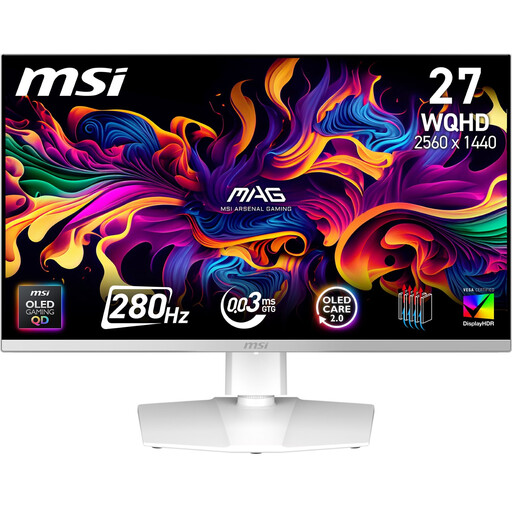
MSI MAG 272QPWDE QD-OLED X28 27-inch gaming monitor

MSI MAG 272QPWDE QD-OLED X28 27-inch gaming monitor

An option if you want to explore QD-OLED and connect your headphones directly to the monitor.

The description lists WQHD at 2560 × 1440 pixels, 280 Hz, Adaptive Sync and a headphone output. For long sessions with a fixed HUD, consider the care guidance and potential burn-in risk.

View at Joybuy
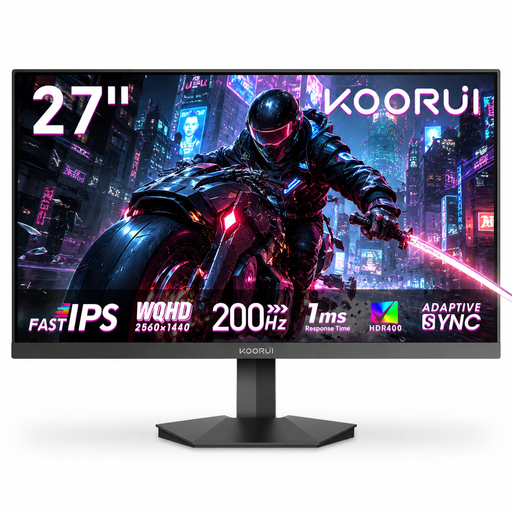
KOORUI G2721P 27-inch QHD gaming monitor

KOORUI G2721P 27-inch QHD gaming monitor

An option if you want to compare WQHD with a stated refresh rate of 200 Hz and an audio output.

The description lists 2560 × 1440 pixels, Fast IPS, 200 Hz, Adaptive Sync and a 3.5 mm audio output. The product details say the stand tilts; height adjustment isn’t mentioned.

View at Joybuy

Frequently asked questions

Do I need HDR or OLED to see a racing line in the rain?

No. The available information doesn’t suggest that either is essential. iRacing describes puddles, reflections and spray, so assess how they look in the game and setup you use. An HDR10 label isn’t the same as a particular DisplayHDR performance level.

How do I set up frame rate and VRR?

First, check the capabilities of the monitor input and source device. For the MSI MAG 274QRF QD E2, the specifications list up to 180 Hz at WQHD via DisplayPort or USB-C and up to 144 Hz via HDMI. On a PS5, you can use the 1440p output test for 60 Hz, 120 Hz and VRR; 120 Hz output requires a compatible game and display.

Do I have to connect my headphones to the monitor?

No, you can also send the audio through your source device. If you want to connect your headphones to the monitor, check that the specific model has an audio output; MSI lists a headphone output on the MAG 274QRF QD E2, for example. You should also check compatibility with your headphones and source device.

What should I consider when using OLED monitors for long racing sessions?

Follow the care guidance for the specific model and consider the potential burn-in risk. Samsung specifically gives a rev counter that remains in the same position as an example of a racing-game display. Care features vary by model and software version.

How can I compare electricity costs, and what rights apply to online purchases in Germany?

You can compare the EU energy label and model data in EPREL to assess power consumption. To calculate an individual cost in euros, you’ll also need your usage time and electricity tariff. In Germany, consumer purchases from retailers are generally covered by a statutory warranty of at least two years from receipt of the goods. Online purchases usually come with a 14-day right to cancel; this is separate from your rights if the goods are faulty.