Team players who use voice chat
You practise coordinating in-game and want to keep an eye on both the game and the chat. Check audio input and output separately; Discord Support recommends connecting your microphone or headset correctly.


For team chat, work and gaming at the same desk, a gaming monitor is a good fit when you can comfortably use text and chat windows on its screen, and its refresh rate and connections suit your computer. The monitor won’t automatically take care of voice chat: check your microphone, audio output and device settings in the app you use separately.
You practise coordinating in-game and want to keep an eye on both the game and the chat. Check audio input and output separately; Discord Support recommends connecting your microphone or headset correctly.
You read longer texts or use meeting windows during the day, then play games in the same spot. Readability and positioning are good starting points before you compare additional gaming features.
You switch between a work computer and a gaming computer at the same desk. Check that KVM and the connections you need are compatible with your devices, rather than assuming the feature is included just because it’s described as a gaming monitor.
| What matters | What to check before buying | Who it matters most to |
|---|---|---|
| Voice chat with your setup | Check your microphone, audio output and device selection in the chat app separately. | If I need to hear and speak reliably while practising, I check my microphone and audio output separately. Working voice chat is the top buying consideration for around 33% of consumers. |
| Text and work windows | Check the screen size, native resolution, desk space required and height adjustment on the specific model. | If you use games, chat and meeting windows in the same place, you need a display that suits your viewing distance. Around 27% of consumers put text and work windows first. |
| Usable refresh rate | Compare the refresh rate available through each input, along with the relevant resolution and connection requirements. ASUS Germany lists a maximum of 144 Hz over HDMI and 180 Hz over DisplayPort for the VG27AQ3A. | If fast-paced games matter to me, I want to know what refresh rate my computer can actually output through the connection I plan to use. This is the top consideration for around 27% of consumers. |
| Switching between two computers | Check KVM, video inputs and USB connections against your devices. | If you use a work computer and a gaming computer at the same desk, you’ll want to use your keyboard and mouse with both. Around 13% of consumers prioritise switching between devices. |
Speakers play audio, but their presence doesn’t prove that there’s a microphone or that one is selected correctly in your chat app.
Check which audio devices you already have and test your microphone and audio output in the app you use before choosing a monitor.
For the ASUS VG27AQ3A, ASUS Germany lists different maximum rates: up to 144 Hz over HDMI and up to 180 Hz over DisplayPort.
Check the input you plan to use and the specifications for that specific model against your computer’s connection.
LG Germany notes that OLED displays may show image retention after displaying unchanged images for a long time. This information shouldn’t be applied to IPS models.
Check the panel technology and current warranty terms for the specific model. If you spend long periods working with static windows, you could also compare it with an IPS monitor.
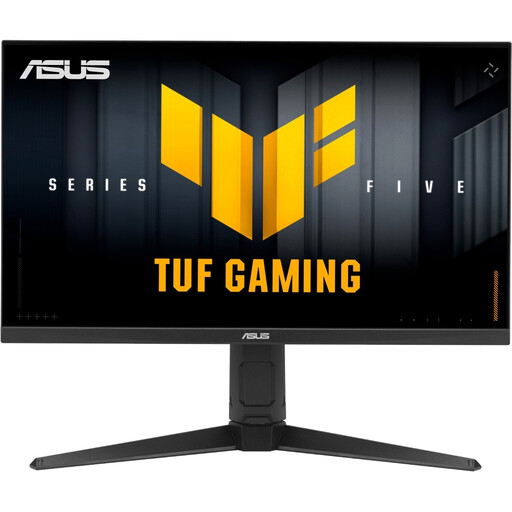
The TUF Gaming VG27AQ3A is an example of a 27-inch QHD IPS monitor with a manufacturer-listed maximum refresh rate of 180 Hz.
The UltraGear 27GP850P-B is an example of a 27-inch QHD monitor with an adjustable stand.
The MAG 274QRFDE QD E2 is a specific example to consider if you want to check out QHD and KVM for the same workspace.
The MOBIUZ EX271Q is a specific model whose manufacturer lists KVM compatibility.
The S2722DZ is an alternative to compare if built-in video-conferencing features matter more to you than a dedicated gaming focus.
The Joybuy models below include gaming monitors for a mix of work and play, as well as a KVM option for using two computers.
 No image available
For gaming and work windows on the same screen, if you want to adjust its position to suit your desk.
QHD at 144 Hz, a Fast IPS panel and a height-adjustable stand. The description specifies a DisplayPort cable and a compatible dedicated graphics card for QHD at 144 Hz.
 No image available
For gaming and work windows on one screen, if you’d also like to use picture-in-picture or picture-by-picture features.
QHD, a Fast IPS panel, up to 275 Hz, Mini LED with 1152 zones, built-in speakers and a height-adjustable stand.
 No image available
For a workspace with two computers, if you want to use KVM and USB-C with over 65 W of power delivery.
4K at 160 Hz or FHD at 320 Hz, a Fast IPS panel and KVM. The 320 Hz figure applies to FHD mode; 4K is listed at 160 Hz. The stand is height-adjustable.
 No image available
For gaming and work windows on one screen, if you want to adjust the stand’s height and orientation.
QHD at a standard 240 Hz, or 275 Hz in overclocking mode, with a Fast IPS panel and a height-adjustable stand with pivot. The overclocked figure isn’t the standard refresh rate.
 No image available
For gaming and work windows in the same place, if you want to position the screen to suit the way you sit.
WQHD, a Fast IPS panel and 210 Hz as an overclocked refresh rate. The description also lists height adjustment, pivot, swivel and tilt.
No. Speakers play audio, but their presence doesn’t mean there’s a microphone. Check whether you have a built-in or separate microphone, then select the right input and output devices in your chat app; Discord Support explains how to test a microphone.
First, check which input you’re using and the refresh rate you’ve selected. ASUS Germany lists a maximum of 180 Hz over DisplayPort and 144 Hz over HDMI for the VG27AQ3A; LG Germany lists 180 Hz as an overclocked rate for the 27GP850P-B.
Check that you can position the monitor to suit your workspace, and follow the manufacturer’s care instructions. According to the Federal Institute for Occupational Safety and Health, ASR A6 covers, among other things, display-screen workstations in suitably equipped telework settings. Whether it applies to a private workspace depends on how it is set up and the relevant conditions.
For eligible online consumer purchases, you generally have a 14-day right to cancel; exceptions and the circumstances of the purchase should be taken into account. Your Europe states that goods in the EU are covered by a legal guarantee of at least two years from the date of receipt. These rights are separate from a voluntary manufacturer’s warranty.