Competitive gamers at a desk
If you use the same screen for fast-paced matches and work windows, consider refresh rate, motion handling and readability together – not just the highest advertised figure.


For squad matches and working from home, an adjustable 27-inch QHD LCD is a sensible starting point, provided the screen and stand fit on your desk and your gaming device can output the resolution and refresh rate you want through your chosen connection. If space is limited, a compact Full HD LCD is worth considering. OLED can offer high refresh rates, but if you spend long hours working with the same windows open, you’ll need to weigh up the risk of burn-in.
If you use the same screen for fast-paced matches and work windows, consider refresh rate, motion handling and readability together – not just the highest advertised figure.
On a small desk, screen size, stand and adjustment options all matter. Check that the entire monitor fits in the space available.
If you’re considering OLED and high refresh rates, also think about whether the same windows or interface elements will remain on screen for long periods during the day.
First, check which resolution and refresh rate your gaming device supports through the connection you plan to use. Then you can choose a screen size, setup and panel type to suit your working day.
| Buying consideration | What to check | Who is it most important for? |
|---|---|---|
| Motion handling | Check the refresh rate and supported modes of your gaming device at the input you’ll use; consult independent tests of the exact model. | If I want to follow fast movement clearly in matches, more than an advertised response time matters to me. Consumers who put match pace first make up around 28%. |
| Readability and resolution | Consider screen size, resolution, viewing distance and available desk space together. | If you use the same screen for game interfaces and work windows, you’ll want both to be easy to read at your preferred display settings. Consumers who prioritise readability for work make up around 22%. |
| Desk space and positioning | Measure the width and depth, including the stand; check whether the specific model offers height adjustment and, if needed, VESA mounting. | With a limited desk, I want to position the screen comfortably without the stand taking up too much of my workspace. Consumers who care most about space and positioning make up around 22%. |
| Connection and refresh rate | Compare the resolution and refresh rate available through each input with your gaming device and the cable you plan to use. | If I want to keep using my existing PC or console, the mode I want must work through the connection available. Consumers who check device compatibility first make up around 17%. |
| Panel for long working hours | If windows often stay open for long periods, weigh up LCD and OLED; with OLED, check the specific model’s protective features and warranty terms. | If you leave the same work content on screen for long periods during the day, you’ll want to consider the panel’s risks before choosing. Consumers who put this risk first make up around 11%. |
The refresh rate you can achieve may vary depending on the resolution and connection mode. ASUS lists up to 144 Hz over HDMI and up to 180 Hz over DisplayPort for the VG27AQ3A. LG lists 720 Hz at HD and 540 Hz at QHD for the 27GX790B-B.
Compare the figures for the exact resolution and connection mode you intend to use.
GtG refers to a pixel transition; it is not the same as total input lag. RTINGS assesses motion handling and input lag separately for the Samsung Odyssey G50D. Those results do not automatically apply to other models.
Look for tests of the exact monitor, using the settings that matter to you.
Samsung identifies content left on screen for long periods as a burn-in risk for OLED monitors. A manufacturer’s screen-protection features do not prove that there is no risk during long working hours.
If you often leave the same windows open during the day, weigh up LCD and OLED, and check the guidance and warranty terms for the specific model.
The stand and the monitor’s full external dimensions also determine how much space it needs. According to the manufacturer, the supplied stand for the ASUS VG27AQ3A is not height-adjustable; VESA mounting is supported.
Measure the available width and depth, and check the adjustment options for the model before buying.
The 24G4XE and Q27G4XF offer different formats: compact Full HD and 27-inch QHD.
The TUF Gaming VG27AQ3A is a 27-inch QHD model where connection mode and stand features are worth considering.
The UltraGear models mentioned here include a QHD Nano IPS monitor and a QHD OLED monitor with dual mode.
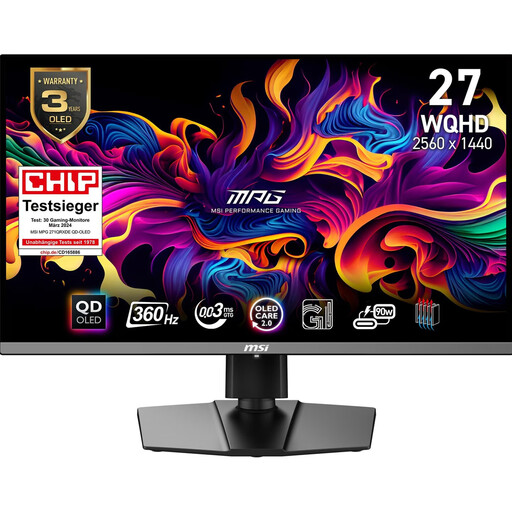
The MPG 271QRXDE QD-OLED is a WQHD option for buyers considering OLED and high refresh rates.
The 27-inch Odyssey OLED G81SF is a 4K/240 Hz option; the Odyssey G50D is a separate 27-inch QHD IPS model.
This selection includes 27-inch QHD LCD monitors for gaming and work, as well as a 26.5-inch WQHD QD-OLED monitor for buyers who prioritise high refresh rates.
 No image available
QHD is an option if you want to use the same screen for games and work.
QHD, 144 Hz, Fast IPS and Adaptive Sync.
The product name also lists a height-adjustable stand, DisplayPort and HDMI.
 No image available
The curved QHD format is worth considering if you think it will suit both gaming and work.
QHD, 180 Hz and AMD FreeSync.
The product name also lists HDR and a tilt-adjustable stand.
 No image available
This 27-inch QHD monitor is designed for gaming and work on the same screen.
Mini-LED, 1152 dimming zones, QHD and 275 Hz.
The product name also lists FreeSync and a height-adjustable stand.
 No image available
Its QHD resolution is designed for gaming and work on a shared screen.
SS-IPS, QHD and 200 Hz; the product name lists 210 Hz in overclocking mode.
The product name also lists G-SYNC Compatible, FreeSync Premium Pro and a height-adjustable stand.
 No image available
This model is an option if you prioritise OLED and high refresh rates; if you work long hours with static content on screen, you’ll still need to weigh up the risk of burn-in.
WQHD, QD-OLED and 360 Hz.
The product name also lists a 16:9 aspect ratio. MSI describes OLED Care 2.0 as a protective feature, not a guarantee that there is no risk.
Not on its own. Check what refresh rate your gaming device can output through the input you’ll actually use. ASUS lists different maximum figures for HDMI and DisplayPort on the VG27AQ3A. A test of the exact monitor can also help you assess motion handling and input lag.
First, check the space available and the adjustment options on the specific model. Position the screen and lighting to minimise distracting reflections. The ASR A6 sets out requirements for screen-based work within its scope; it is not a blanket rule for gaming at home.
With OLED, content left on screen for long periods presents a relevant burn-in risk. Samsung describes protective features for its OLED monitors and advises against displaying still images for long periods. If the same work windows are often on screen during the day, check the manual and warranty terms for your chosen model; guidance for Samsung devices does not automatically apply to other models.
For consumer purchases online in Germany, you generally have a 14-day right to cancel. Your statutory rights against the seller if goods are faulty are separate; an additional guarantee is voluntary and comes with its own terms. Check the applicable deadlines and conditions for your specific purchase.
Under EU rules, computer monitors are generally classed as electronic displays and require an energy label. The label shows an efficiency class on a scale from A to G, among other information. You can also check specific devices in the EU’s EPREL product database to compare them.