Cyclists short on space
If there’s little room beside your indoor bike, you’ll need to consider the combined footprint of the screen and stand. Your line of sight from the bike matters too.


If space is limited, a compact Full HD LCD monitor is a sensible place to start. If you have the room and a suitable video source, a 27-inch QHD LCD gives you more pixels for your ride view. Also check the stand’s dimensions, brightness controls and private audio output. The monitor displays the climb, but with Zwift you’ll only feel the gradient if you connect a compatible smart trainer as a resistance device.
If there’s little room beside your indoor bike, you’ll need to consider the combined footprint of the screen and stand. Your line of sight from the bike matters too.
If you want to see your ride and gradient information clearly, check that the screen size and video source suit your riding position and the app you use.
If someone else uses the room, adjustable screen brightness and a private audio option may be key considerations.
First, compare the space available with your riding position. Then check that the video source, connections and audio setup will work with your arrangement.
| Consideration | What to check before buying | Who it matters most to |
|---|---|---|
| Space | Compare the overall width and stand depth with the space available, and check your line of sight from the bike. | When there’s little room beside my indoor bike, the whole setup needs to fit, not just the panel. Space is the main concern for around 33% of consumers. |
| Readability | Check how ride and gradient information looks from your planned riding position, and make sure your video source can support the resolution. | I want to be able to read route and gradient information from my riding position. Readability is the main concern for around 25% of consumers. |
| Lighting and audio | Try the brightness controls in the room where you’ll use the monitor, and check the audio output and headphone connection across your setup. | If I share the bedroom, I look for adjustable brightness and a private audio option. Around 25% of consumers prioritise being considerate of the people they live with. |
| Connection and refresh rate | Check that your PC or other device’s video output, cable and monitor input are all compatible. | I want to know whether my device can actually support the connection and refresh rate I’ve chosen. Connection compatibility is the main concern for around 17% of consumers. |
A high refresh rate won’t make virtual climbs feel more realistic. The monitor displays the image; you’ll need a compatible smart trainer connected to control resistance.
First check which refresh rate your video source can output through the connection you plan to use. Then check separately how to pair your trainer.
The screen and stand need to fit both the space available and your line of sight from the bike. A mount is a suitable alternative only if its VESA size and weight capacity are compatible with the specific model.
Before buying, compare the monitor’s full dimensions with the space where you’ll set it up, and check the viewing position from the bike.
Dell Support notes that certain Alienware OLED models may develop permanent image retention if an unchanged image is displayed for a long time. This doesn’t apply to every OLED model.
If training information will stay on screen for long periods, check the care features and warranty terms for the specific model.
The example models include a more compact Full HD option and a larger QHD alternative.
The G274QPF E2 is a 27-inch QHD model with documented height adjustment.
The Odyssey G50D LS27DG500EUXEN is a 27-inch QHD model with a documented headphone socket.
The G2725D shows how the stated refresh rate can vary depending on the input.
The models below include compact Full HD screens and a 27-inch QHD option for virtual ride views. Before you buy, check that the dimensions, connections and brightness controls suit your training space.
 No image available
A compact Full HD option if screen dimensions and placement beside your training equipment are important.
24 inches; 1920 × 1080 pixels; IPS; 120 Hz; HDMI and VGA; VESA 100 × 100 mm; tilt-adjustable.
Check that the monitor’s full dimensions and stand will fit in the space you have in mind.
 No image available
A 24-inch Full HD option if you’re looking for a compact ride view and a headphone socket.
24 inches; 1920 × 1080 pixels; IPS; 144 Hz; HDMI and DisplayPort; headphone socket; tilt-adjustable.
Your video source and connection both need to support the output you want.
 No image available
A compact Full HD monitor with a headphone output, worth considering for a shared room.
23.8 inches; 1920 × 1080 pixels; Rapid IPS; 200 Hz; DisplayPort and HDMI; VESA 100 × 100 mm; headphone output.
Check that your video source supports the refresh rate you want through the selected input.
 No image available
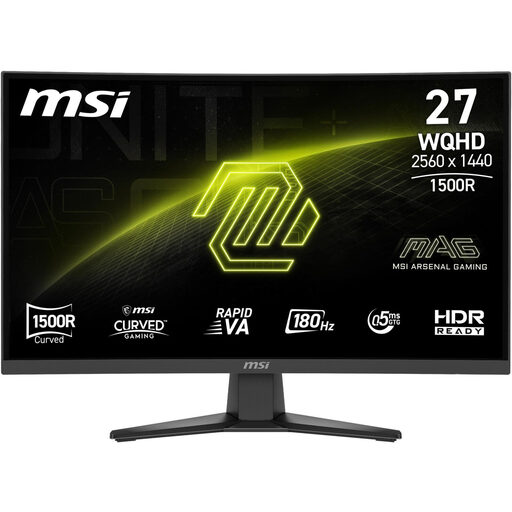
A 27-inch QHD option if you have enough room in your training area for a larger ride view.
27 inches; 2560 × 1440 pixels; Rapid VA; 180 Hz; DisplayPort and HDMI; headphone output; adjustable brightness.
Check that your video source can output QHD through the connection you plan to use.
 No image available
A compact Full HD option with an adjustable stand if you want to change the viewing angle in your training area.
24.5 inches; Full HD; 320 Hz; 1 ms; 450 Nits; tilt- and swivel-adjustable stand.
Check which resolution and refresh rate your video source can actually output through the connection you plan to use.
No. With Zwift, the monitor displays your ride. To control resistance, including on climbs, you’ll also need to connect a suitable smart trainer as a resistance device. Zwift Support also explains that in ERG mode during training intervals, resistance is based on your target wattage, not the road gradient.
No. Your video source and the input you use need to support the output you want. For example, Dell lists up to 180 Hz via DisplayPort and up to 144 Hz via HDMI for the G2725D. Zwift also notes that graphics performance depends on the device.
Check compatibility with the specific Apple TV model and the sensor connections available. Zwift Support says that a maximum of three BLE devices can be connected at once, including the remote. Under the conditions described by Zwift, the Companion app can act as a bridge.
EU energy labelling and ecodesign requirements apply to electronic displays such as computer monitors; the European Commission lists these product requirements. For a consumer purchase made at a distance, there is generally a right to cancel under § 312g BGB; § 355 BGB sets a 14-day period. The specific contract and any statutory exceptions apply.