Which monitor matters for you?

Gamers playing near a window

If you play during the day, reflections and the visibility of ordinary content matter more than getting the highest possible refresh rate. RTINGS.com notes that matte coatings can reduce mirror-like reflections, but they won’t necessarily prevent all glare.

Explorers of richly detailed game worlds

If you want to make out architecture, landscapes, maps and menus clearly, weigh QHD resolution and screen size against the space available and your gaming device’s performance. AOC Deutschland, for example, lists the Q27G3XMN/BK with QHD resolution.

Fans of atmospheric night scenes

If dark interiors and light sources are especially important to you, compare Mini-LED and OLED, including their coatings and potential drawbacks. RTINGS.com outlines the trade-offs between the technologies; some tested LCD models can also show motion artefacts.

What to consider and check before buying

QHD gaming LCD with IPS panel

A good fit if: You want to see menus and environmental details clearly in a bright room.

Trade-off: An IPS LCD won’t automatically deliver strong HDR contrast; check the specific model’s coating and brightness.

QHD Mini-LED LCD with VA panel

A good fit if: You value contrast and local dimming in HDR games.

Trade-off: RTINGS.com reports some smearing on fast-moving objects and VRR flicker when the frame rate changes on the AOC Q27G3XMN it tested.

OLED gaming monitor

A good fit if: Dark scenes and contrast matter most to you, and you can avoid distracting reflections where you’ll set it up.

Trade-off: Glossy surfaces can reflect light sources; if you display static elements for long periods, you should also consider the potential risk of burn-in.

Priority What to check before buying Who it matters most to
Daylight and reflections The specific model’s coating, reflection handling and SDR brightness. RTINGS.com notes that “matte” alone doesn’t guarantee good visibility. If you play during the day, dark scenes should remain visible despite light from windows or lamps. Around 36% of consumers put daylight visibility first.
Detail and readability Native resolution, screen size, viewing distance and your gaming device’s output. Higher resolutions need suitable graphics performance. If you want to see landscapes, architecture, maps or menus clearly, the resolution and screen size should suit your space and gaming device. Around 29% of consumers prioritise detail.
Motion and connections The supported resolution and refresh-rate combinations for each input. Dell lists the G2725D as supporting up to 180 Hz at QHD over DisplayPort and up to 144 Hz over HDMI. If smooth camera movement matters to you, your PC or console, input and cable must all support the signal you want. Around 21% of consumers put motion and connection compatibility first.
Atmosphere and HDR contrast SDR and HDR specifications, reflections, local dimming and motion handling on the specific model. RTINGS.com explains the differences between Mini-LED and OLED. If you want to enjoy atmospheric dark interiors and bright light sources, weigh contrast against reflections and potential image artefacts. Around 14% of consumers prioritise atmosphere and contrast.

Common misconceptions

  • “Matte” or “HDR1000” automatically means good visibility near a window

    Coatings handle reflections in different ways. HDR specifications alone don’t tell you how clearly you’ll see ordinary content in daylight.

    Compare reflection tests and SDR specifications for the specific model, and take the position of windows and lamps into account.

  • The highest refresh rate is available regardless of the connection

    Dell lists different QHD limits for DisplayPort and HDMI on the G2725D.

    Check the complete signal chain against your monitor and gaming device’s specifications, including the input and cable.

    Depending on the connections you have available, you may need to use another compatible port or a suitable cable.

  • You can judge OLED or Mini-LED by the panel name alone

    In a bright room, reflections and brightness matter too. Some Mini-LED LCDs can show motion artefacts, while OLED can carry a burn-in risk if static content is displayed for long periods.

    When choosing, consider where you’ll set up the monitor, dark scenes, fixed on-screen elements and tests of the exact model.

Brands and models to consider

AOC

The Q27G3XMN/BK is a specific example of a QHD Mini-LED monitor with a Fast VA panel.

  • AOC Deutschland lists 336 dimming zones, 180 Hz and HDR1000 for this model.
  • In its review, RTINGS.com reports some smearing on fast-moving objects and VRR flicker when the frame rate changes.

MSI

The G274QPF E2 and G274QPFDE E2 model family is an example of a QHD gaming monitor with an IPS panel.

  • MSI Deutschland lists 180 Hz for this model family and shows regional variants separately.
  • Check the coating and brightness of the specific variant before deciding how well it will perform near a window.

ASUS ROG

The ROG Strix OLED XG27AQWMG is a specific OLED model that you can compare with an LCD option.

  • ASUS ROG Deutschland lists QHD, 280 Hz, a TrueBlack Glossy surface and OLED Care features for this model.
  • Check the glossy surface for reflections if you have windows or lamps nearby; protective features don’t eliminate the risk of burn-in.

Dell

The G2725D is an example of a QHD gaming LCD with a Fast IPS panel and different limits for each connection.

  • Dell Deutschland lists 400 cd/m² for the model, along with up to 180 Hz at QHD over DisplayPort and 144 Hz over HDMI.
  • These connection specifications apply to this model and shouldn’t be assumed to apply to other monitors.

LG UltraGear

The 27GS95QE-B is an example of a QHD OLED monitor in this model range.

  • LG Deutschland gives a typical brightness of 275 cd/m² and a refresh rate of 240 Hz for this exact model.
  • The brightness specification doesn’t measure reflection handling and can’t be applied to other UltraGear models.

Joybuy products for different monitor needs

The following Joybuy products include OLED, Mini-LED and IPS LCD options, as well as QHD, UWQHD and 4K resolutions. For each model, check that the screen finish, connections and signal format suit your setup and gaming device.

TCL 32x3A 32-inch OLED monitor

TCL 32x3A, 32-inch OLED monitor

For richly detailed game worlds in 4K with an anti-glare display; still check how light sources affect the screen where you’ll set it up.

4K UHD with 3840 × 2160 pixels, OLED, 240 Hz and 480 Hz in FHD mode; according to the product title, it also offers 1,300 Nits, 0,03 ms GtG and Burn-in Protection.

OLED can carry a burn-in risk if static elements remain on screen for long periods; the stated burn-in protection doesn’t eliminate this risk.

View at Joybuy

TCL 27P2A Pro, 27-inch Mini-LED monitor

TCL 27P2A Pro, 27-inch Mini-LED monitor

For QHD game worlds with Mini-LED; check how clearly you can see the screen in your room’s window light rather than judging by the HDR specification alone.

QHD with 2560 × 1440 pixels, HFS IPS panel, 320 Hz and VESA DisplayHDR 600; the stated response time is 1 ms GTG.

View at Joybuy
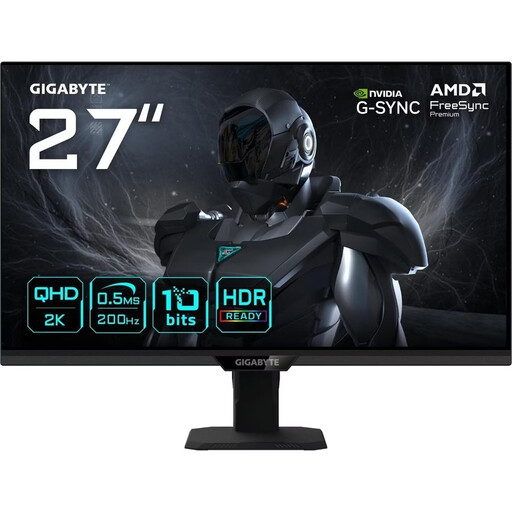
GIGABYTE G27Q20T, 27-inch QHD gaming monitor

GIGABYTE G27Q20T, 27-inch QHD gaming monitor

For richly detailed game worlds on a 27-inch screen; the anti-glare surface and stated brightness are worth checking in your room’s ambient light.

QHD with 2560 × 1440 pixels, SuperSpeed IPS and 200 Hz, overclocked to 210 Hz; also 0,5 ms GTG, HDR10, anti-glare and 350 cd/m² according to the product description.

View at Joybuy

INNOCN E34A1R, 34-inch curved gaming monitor

INNOCN E34A1R, 34-inch curved gaming monitor

For wide UWQHD game worlds; check that your game and graphics card support 3440 × 1440 pixels.

UWQHD with 3440 × 1440 pixels, VA panel, 200 Hz, 21:9 aspect ratio and 1500R; the product description also lists an anti-glare coating and a height-adjustable stand.

View at Joybuy

INNOCN 2751S PLUS, 27-inch Mini-LED gaming monitor

INNOCN 2751S PLUS, 27-inch Mini-LED gaming monitor

For QHD detail and local Mini-LED dimming; also compare SDR brightness and reflections where you’ll set it up.

QHD resolution, IPS panel, 1.152 dimming zones and up to 275 Hz; the description lists 450 cd/m² for SDR, 1.000 cd/m² for HDR and an AG surface.

View at Joybuy

Frequently asked questions

Is an HDR logo enough to make historical games look good during the day?

No. An HDR logo alone doesn’t tell you how clearly you’ll be able to see the monitor in your room. Compare reflections and the brightness of ordinary SDR content too. A matte coating can reduce mirror-like reflections, but it may spread light across the screen.

Why isn’t my monitor showing the advertised maximum refresh rate?

Check the resolution, your gaming device’s output, the monitor input, cable and display settings. Dell lists the G2725D as supporting up to 180 Hz at QHD over DisplayPort and up to 144 Hz over HDMI; other models have their own connection specifications.

What should I bear in mind when using an OLED monitor day to day?

Follow the guidance and OLED protection features provided by the specific manufacturer, particularly if menus and other fixed elements stay on screen for a long time. OLED can carry a burn-in risk with static content displayed for long periods; ASUS lists protection features for the XG27AQWMG, but they don’t eliminate this risk.

Which label helps me compare energy consumption?

The EU energy label for electronic displays rates monitors on a scale from A to G, as explained by the European Commission. Compare the energy label and product information for the specific model.

What are my rights if a monitor I bought online is faulty?

Your statutory rights for faulty goods generally apply against the seller; a manufacturer’s warranty is separate, as explained by Verbraucherzentrale. Many online purchases also normally come with a 14-day right to cancel, starting from the day you receive the goods. The exact deadline and conditions depend on the purchase.