For a small desk, a well-positioned 24-inch Full HD monitor is a sensible starting point; TÜV SÜD considers Full HD suitable for small desks at sizes up to around 24 inches. If you have more room for cards and extra windows, a 27-inch QHD model could be a good option, provided it suits your desk, viewing distance and computer. IPS is worth considering if people will be viewing the screen from the side, while VA typically offers higher contrast. With OLED, weigh up the risk from static elements that remain on screen for long periods. A high refresh rate alone won’t solve problems with space or readability.
Which monitor is right for you?
Card game players with a small desk
You share a room and want the screen and stand to fit the space you have available. TÜV SÜD considers Full HD suitable for small desks at sizes up to around 24 inches; also measure the footprint of the specific model.
Players with lots of cards and windows
You want to keep cards, text and extra windows in view at the same time, and can make room for a larger screen. Check that the screen size, resolution and viewing distance work for your desk.
Players in rooms with changing light
You play in daylight and in the evening, or someone else watches from the side. RTINGS.com describes IPS panels as typically offering wider viewing angles and VA panels as typically offering higher contrast. The German Social Accident Insurance (DGUV) notes that reflections can make text and symbols harder to see.
What should you look for when buying?
First, measure the available desk space, including room for the stand. Then decide whether extra space for cards and windows matters, and consider the lighting and viewing conditions your screen needs to suit.
| Buying consideration |
What to look for |
Who is this important to? |
| Space in the bedroom |
Measure the width and depth of your desk and compare them with the monitor’s dimensions, including the stand. TÜV SÜD considers Full HD suitable for small desks at sizes up to around 24 inches. |
If my desk is small, I want to be able to set up the screen without taking up more shared space than necessary. Around 31% of consumers put having free desk space first. |
| Reading cards and text |
Compare the screen size and native resolution, and check how the text looks from your usual seating position. TÜV SÜD cites a 27-inch QHD model as a specific size and resolution option for more screen space. |
If I want to keep cards and companion windows in view at the same time, a larger display could work for me, as long as there’s enough room. Around 31% of consumers prioritise readability. |
| Light and viewing angles |
Check whether windows or lamps are reflected on the screen, and whether other people will be watching from the side. RTINGS.com compares the typical viewing angle and contrast characteristics of IPS and VA; the German Social Accident Insurance (DGUV) explains how reflections can make text and symbols harder to see. |
If I play in changing light or someone watches from the side, I want to check for reflections and viewing angles from my actual seating position. Around 23% of consumers prioritise lighting and viewing angles. |
| Energy use and static images |
Compare the information on the EU energy label. If you’re considering OLED, also think about how long cards, menus or other static elements will stay on screen; RTINGS.com describes a potential risk of burn-in. |
If my monitor often displays the same cards or menus for long periods, I want to take energy use and potential long-term panel risks into account when choosing. Around 15% of consumers prioritise ongoing energy use and this risk associated with how the monitor is used. |
Which buying decisions could lead you astray?
-
Making the highest refresh rate your top priority
For a static view of cards, a higher refresh rate won’t make small text easier to read or free up desk space.
Start by comparing screen size, resolution, stand and connections. Then factor in the refresh rate if you also play other games and your hardware can make the most of it.
-
Choosing a panel type without considering the lighting and other players
IPS and VA panels typically differ in their viewing angles and contrast. With OLED, static elements left on screen for long periods can pose a risk of burn-in.
Check your seating position, the direction of the light and any potential viewing positions from the side. Don’t assume general panel comparisons apply to every individual model.
-
Comparing screen size alone
Even if the screen size is right, the stand could take up too much desk space.
Measure the space you have and compare it with the manufacturer’s dimensions, including the stand, for the exact model variant.
Which brands are useful points of reference?
ASUS
The TUF Gaming VG249QL3A is a useful example of a compact 23.8-inch Full HD monitor.
- ASUS lists an adjustable-height stand and 180 Hz for this model.
- The refresh rate doesn’t demonstrate any particular advantage for card games. On the product page, ASUS marked the advertised G-Sync compatibility as still being certified.
Samsung
The Odyssey G5 G50F, LS27FG502EUXEN, is a useful example of a 27-inch QHD monitor.
- Samsung lists QHD, IPS and 180 Hz for this model.
- Check that the monitor fits your desk and that its connections and video output are compatible with your computer. A high refresh rate alone won’t tell you how easy your cards will be to read.
MSI
The G274QPF E2 is an example of a 27-inch WQHD model with Rapid IPS.
- MSI lists up to 180 Hz over DisplayPort at 2560 × 1440 and up to 144 Hz over HDMI at the same resolution.
- MSI notes that variants differ by country. Check these details against the exact version you’re planning to buy.
AOC
The Q27G4XF is a useful comparison point for a 27-inch QHD monitor with Fast IPS.
- The manufacturer’s details for the regional version found list an adjustable-height stand.
- These details are from AOC’s Serbian website and don’t confirm that the German version is identical or available in Germany.
Joybuy products for card games
This selection includes compact Full HD monitors and larger QHD or UHD models. As well as the space available, consider resolution, panel type and how the monitor will fit on your desk for card games.
 Image unavailable
KTC H24B9S, 24 inches, Full HD, IPS, 144 Hz
The 24-inch size is a compact starting point if desk space is limited.
Full HD, IPS and 144 Hz.
View at Joybuy
 Image unavailable
MSI MAG 274UPDFDE E16M, 27 inches, UHD, Rapid IPS, Mini-LED
This 27-inch model could be worth considering if your desk has room for a larger display.
The product name lists UHD, 160 Hz at UHD and 320 Hz at FHD.
View at Joybuy
 Image unavailable
GIGABYTE G27Q26, 27 inches, QHD, SuperSpeed IPS, 260 Hz
A larger QHD option if you can make room for more space for cards and extra windows.
2560 × 1440 pixels; the product name lists 260 Hz and 275 Hz in OC mode.
View at Joybuy
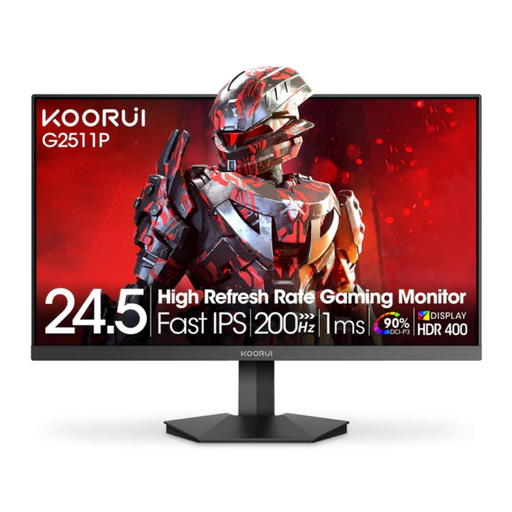 Image unavailable
KOORUI G2511P, 25 inches, Full HD, Fast IPS, 200 Hz
The 25-inch size is a compact alternative to larger displays; check how much desk space the stand needs before you buy.
Full HD and 200 Hz. The finish is listed as glossy; incoming or reflected light can make the screen harder to see.
View at Joybuy
 Image unavailable
Samsung Odyssey G5 G50F, 32 inches, QHD, IPS, 180 Hz
The 32-inch size is only worth considering if you can make enough room on your desk.
QHD at 2560 × 1440 pixels, IPS and 180 Hz.
View at Joybuy
Frequently asked questions
Do I need 180 Hz or more for digital card games?
No, not just because of the type of game. A higher refresh rate can make movement look smoother, but your computer needs to support the right video output. Check readability, desk space and connections first; there’s no required refresh rate for card games.
How should I position my monitor if light comes in from the side?
Check the picture from your actual seating position and, where possible, position the screen and light to avoid distracting reflections. An anti-glare display could be an option. The German Social Accident Insurance (DGUV) discusses how reflections affect the legibility of text and symbols as workplace guidance, not as a special rule for private gaming rooms.
How can I compare the energy use of two monitors?
Compare the information on each display’s EU energy label. To work out the cost, you’ll also need to know how long you use each monitor and your current electricity tariff. The European Commission describes the A to G energy efficiency scale for electronic displays.
What are my rights when ordering online in Germany?
Distance contracts generally come with a 14-day right to cancel from the date of delivery; statutory exceptions may apply, as explained by the European Commission. The Verbraucherzentrale also explains that your statutory rights if goods are faulty are separate from any additional manufacturer’s guarantee. Check the terms of your specific purchase.


