What matters when buying
First compare the size and resolution with your desk and the readability you want. Then check the refresh rate and connections for your PC.
| Buying priority |
What to check before buying |
Who it matters to |
| Reading maps and menus |
Match the screen size and native resolution to your viewing distance and the in-game scaling. |
If I want to see the map and menus clearly at the same time, I look for enough screen space and readable scaling. Around 36% of consumers put map and menu readability first. |
| Image smoothness and gaming performance |
Check the refresh rate in the game you play, and the combination of resolution, refresh rate and the HDMI or DisplayPort input you plan to use. |
If smooth visuals matter to me, they need to suit what my PC and game can deliver. Around 29% of consumers prioritise gaming performance and smooth visuals. |
| Workspace and positioning |
Check the stand’s dimensions and adjustment options. If you’re using a monitor arm, also check the VESA size and weight capacity. |
If you work and play at the same desk every day, you need a setup that suits your available space. Around 21% of consumers put workstation ergonomics first. |
| Connections and switching between devices |
Check the video inputs, USB-C features and charging power, as well as KVM support if applicable, for the exact model variant. |
If I use my work and gaming PCs with shared peripherals, the right connections and switching features matter. Around 14% of consumers prioritise switching between devices. |
Joybuy products for city-building games and home working
These models cover QHD and 4K screens, as well as an ultrawide and an OLED option for gaming and working at the same desk.
 No image available
MSI MAG 274UPDFDE E16M 27-inch UHD 160 Hz/FHD 320 Hz Mini-LED
The 4K resolution could be a good choice for fine details on maps and text. Check whether your PC can output the resolution you want in the game you play.
The product specifications list 3.840 × 2.160 pixels, Adaptive Sync and a height-adjustable stand that swivels, tilts and pivots. The refresh-rate figures differ between UHD at 160 Hz and FHD at 320 Hz.
Joybuy
 No image available
INNOCN 2751S PLUS 27-inch QHD Mini-LED gaming monitor
QHD resolution is an option for maps and menus on a 27-inch screen. Check that they’re easy to read with your preferred scaling.
The product specifications list QHD at 2.560 × 1.440 pixels, IPS, 275 Hz, 1.152 dimming zones and an anti-glare surface. Height adjustment, tilt, swivel and pivot are also listed.
Joybuy
 No image available
INNOCN CB27U1 27-inch 4K UHD IPS monitor
If you’re considering a higher resolution for maps and text, make sure it suits your PC’s graphics performance and preferred scaling.
The listed specifications include 3.840 × 2.160 pixels, IPS and 120 Hz. The product details also list USB-C with up to 90 W Power Delivery, FreeSync, and picture-in-picture and picture-by-picture features.
Joybuy
 No image available
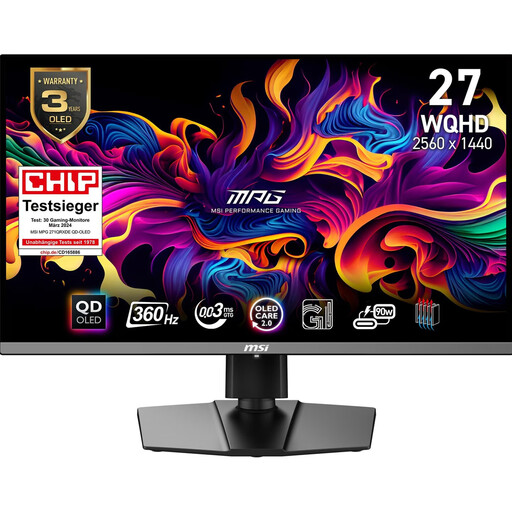
MSI MPG 271QRXDE QD-OLED 26.5-inch WQHD 360 Hz
This QD-OLED option combines WQHD with a high stated refresh rate. Check that your PC, game and connection support the combination you want.
The product specifications list 2.560 × 1.440 pixels, 360 Hz, Adaptive Sync and a height-adjustable stand with pivot, tilt and swivel functions.
Joybuy
 No image available
Xiaomi G34WQi 34-inch ultrawide gaming monitor
The wide format could suit you if you want extra horizontal space for maps or work windows. Check the space it needs and whether the game supports the format.
The listed specifications include UWQHD at 3.440 × 1.440 pixels in a 21:9 format, 180 Hz and FreeSync. The stand tilts; a VESA mount may be needed for further ergonomic adjustments.
Joybuy
Frequently asked questions
Do I need a monitor with a particularly high refresh rate for city-building games?
No. A monitor’s maximum refresh rate isn’t automatically the same as your game’s frame rate. First compare the resolution and readability with your PC’s performance, then check the combination supported by the connection you plan to use. Paradox Interactive offers a benchmark for Cities: Skylines II, so you can check performance in the game itself.
What should I look for in a monitor for work and gaming at the same desk?
Check that the screen and stand fit your actual workspace and offer the adjustments you want. If you need a monitor arm, check the VESA size and weight capacity. The German Social Accident Insurance (DGUV) provides guidance on setting up ergonomic screen-based workstations, but there is no single screen size that suits every home workspace.
What should I know about OLED if I often have spreadsheets or game menus on screen?
LG notes that leaving a still image on screen for a long time can cause burn-in, and that the risk cannot be completely ruled out, even with proper use. Consider how often you use static content and check the care and warranty terms for the specific monitor. LG’s information does not automatically apply to other brands’ warranty terms.
How can I compare the running costs of different monitors?
Compare the details for the specific model on the EU energy label or in EPREL. The European Commission notes that energy consumption can differ between SDR and HDR display modes. To work out the cost, you’ll also need your actual usage time and electricity tariff.
What rights apply when buying a monitor online in Germany?
The Verbraucherzentrale distinguishes between your statutory rights against the seller and a voluntary guarantee. For online orders, you generally have 14 days from delivery to notify the seller that you’re cancelling. Check the specific contract terms and any exceptions.


