Clue and text seekers
If you want to make out small clues and subtitles clearly on a large screen, compare screen size and native resolution together. Dell Germany and MSI Germany list 31.5- to 32-inch models with 4K resolution.


If you want to spot clues and subtitles clearly on a large screen, compare the native resolution of monitors around 32 inches first: 4K has more pixels than QHD. OLED can be appealing for dark scenes, but you’ll need to pay attention to care guidance and warranty terms. A 34-inch ultrawide is worth considering if your specific game displays the wider format properly. Also check that your device, connection and game all support your chosen resolution and refresh rate.
If you want to make out small clues and subtitles clearly on a large screen, compare screen size and native resolution together. Dell Germany and MSI Germany list 31.5- to 32-inch models with 4K resolution.
If contrast matters more to you than the highest refresh rate in atmospheric adventure games, OLED may be worth considering. MSI describes OLED Care 2.0 as a feature that reduces the risk of burn-in, not one that eliminates it.
If you prefer a wider picture on your PC, check how your specific game handles the aspect ratio before you buy. LG and ViewSonic list 34-inch models with 3,440 × 1,440 pixels.
A good fit if: You prioritise high native resolution for clues and text at around 32 inches, and want to avoid OLED care requirements.
Trade-off: Dell lists a typical contrast ratio of 1000:1 for the G3223Q; this figure does not apply to all LCD models.
A good fit if: Contrast and dark scenes matter more to you than the highest possible refresh rate.
Trade-off: MSI describes OLED Care 2.0 as reducing risk; care guidance and the warranty terms for the specific model still matter.
A good fit if: You want more horizontal screen space on your PC and your adventure game supports the wider format as you’d expect.
Trade-off: The listed 3,440 × 1,440 pixels are not the same native resolution as 3,840 × 2,160 pixels in 4K.
| Buying priority | What to check | Who it matters most to |
|---|---|---|
| Details on a large screen | Screen size and native resolution; viewing distance and in-game text size. | If you want to read small clues and subtitles clearly on a large screen, the combination of screen size and resolution matters. Around 33% of consumers say details and text are their main priority. |
| Contrast in dark scenes | Panel type and stated HDR features; OLED care guidance and warranty terms. | If you often play games with dark scenes, panel contrast may matter more to you than the maximum refresh rate. Around 27% of consumers prioritise dark scenes. |
| Wide aspect ratio | Aspect ratio and native resolution; ultrawide settings in the specific game. | If you prefer a wider single-screen picture on your PC, check in advance how your adventure game displays the format. Around 20% of consumers prioritise screen width. |
| Connections and running costs | PC or console output and compatible monitor inputs; the EU energy label for the exact model. | If you want to connect existing devices and compare energy consumption, the source, input and supported output all need to match. Around 20% of consumers prioritise device compatibility and ongoing use. |
PlayStation notes that 120 Hz output requires a compatible game. On a PC, too, the game, output device and connection must all support your chosen frame rate. The European Commission also notes that the EU energy label includes efficiency information for HDR content.
A large screen diagonal alone doesn’t tell you how sharply clues and text will appear. The documented models differ in both aspect ratio and native resolution.
Compare screen size, format and native resolution together, and take your viewing distance into account. If you’re considering an ultrawide, also check how it looks in the specific game.
A monitor’s maximum specification doesn’t prove that a particular adventure game or console can output that frame rate.
Check the game, output device, input and video settings as part of the same signal chain.
MSI describes OLED Care 2.0 for the MPG 322URXDE as a way to reduce the risk of burn-in, not eliminate it.
Read the care guidance and the warranty terms that apply to the model on offer before buying.
The MPG 322URXDE QD-OLED is a 31.5-inch 4K OLED option for buyers looking to balance detail and contrast.
The UltraGear 34GX90SA-W is a 34-inch OLED model with a wide format, for buyers who prefer more horizontal screen space.
The G3223Q combines the documented specifications of 32 inches, 4K and Fast IPS, while the G3223D offers a 32-inch QHD alternative.
The AGON PRO AG326UD is a 31.5-inch UHD QD-OLED option.
The VX3418C-2K is a 34-inch ultrawide with a curved screen, offering an alternative to the 16:9 4K format.
The following Joybuy products are 32-inch monitors listed with 4K UHD; several models specify OLED or QD-OLED.
 No image available
Could suit you if you’re looking for a large 4K monitor listed with OLED technology.
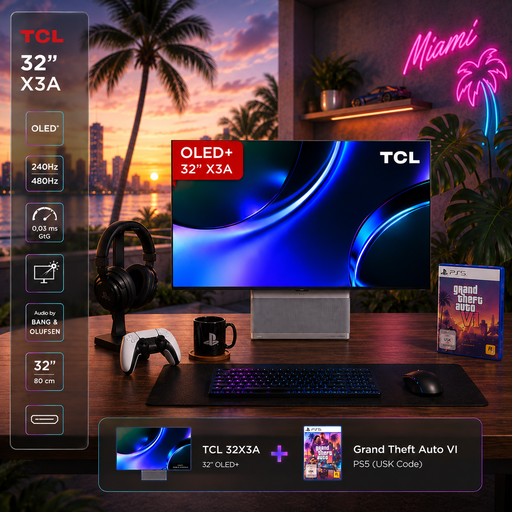
Listed in the product title: 32 inches, 4K UHD (3840 × 2160), OLED+, 240 Hz and 480 Hz in FHD mode, 1,300 nits, 0.03 ms GtG, AMD FreeSync Premium and anti-glare.
The title also mentions burn-in protection; check the care and warranty information for the specific model before buying.
 No image available
Could suit you if you’re looking for a large 4K monitor listed with OLED technology as part of a bundle.
Listed in the product title: 32 inches, 4K UHD (3840 × 2160), OLED+, 240 Hz and 480 Hz in FHD mode, 1,300 nits, 0.03 ms GtG, AMD FreeSync Premium and anti-glare.
The title mentions burn-in protection; check the care and warranty information for the specific model before buying.
 No image available
Could suit you if you’re looking for 4K resolution at 32 inches with a VA panel rather than OLED technology listed in the title.
Listed in the product title: 3000R curvature, VA display, 3840 × 2160, HDR10 and Adaptive Sync.
 No image available
Could suit you if you want to prioritise QD-OLED and dark scenes in a large 4K monitor.
Listed in the product title: 4K UHD (3840 × 2160), 240 Hz, DisplayHDR True Black 400, G-SYNC Compatible, HDMI 2.1, DP 2.1a and USB-C with 98 W Power Delivery.
MSI describes OLED Care 2.0 as reducing the risk of burn-in, not eliminating it; follow the care guidance and check the specific warranty terms.
 No image available
Could suit you if you’re considering a large 4K OLED monitor with a USB-C connection.
Listed in the product title: 32 inches, 3840 × 2160, 240 Hz, 16:9, G-Sync, FreeSync, AdaptiveSync, DisplayHDR 400, DP 2.1, HDMI 2.1, USB-C with 90 W and USB hub.
No. According to PlayStation, 120 Hz output requires a game that supports this refresh rate. On a PS5, also check the information about the connected HDMI device under ‘Settings > Screen and Video > Video Output’; on a PC, the game output and connection must also be compatible with the monitor.
Check the care features and warranty terms for the specific model. MSI describes OLED Care 2.0 on the MPG 322URXDE as a way to reduce the risk of burn-in, not as a guarantee that it won’t happen.
First, compare the figures for the exact models on the EU energy label or in EPREL. The European Commission notes that the label also shows efficiency for HDR content; your personal cost in euros will also depend on usage time, operating mode and your electricity tariff.
For a consumer purchase from a business seller in the EU, you generally have a statutory right to a minimum two-year legal guarantee from the date you receive the goods, with the seller. An additional manufacturer’s warranty does not replace this right; whether a particular issue counts as a covered fault depends on the circumstances.
The German Environment Agency advises against putting old electrical equipment in household rubbish. Take it to a recycling centre or use a suitable take-back scheme, and check the specific arrangements for your old device.