Indoor hill climbers
If you ride climbs on an indoor trainer, your route and training data should be easy to read from your riding position. Check what your cycling app can actually display on additional screens and how the trainer connects.


First, decide whether a clear, easy-to-read main monitor with additional displays is enough, or whether a supported racing simulation should show one continuous image across three screens. For indoor cycling, positioning, the app and the source device’s connections are key. A triple setup also requires game support, consistent screen geometry, mounting and graphics performance. A high refresh rate or 4K resolution alone won’t make a difference if the app, computer or long periods of static content limit the benefits.
If you ride climbs on an indoor trainer, your route and training data should be easy to read from your riding position. Check what your cycling app can actually display on additional screens and how the trainer connects.
If your racing simulation supports a view across three monitors, you’ll need to plan the screen geometry, graphics outputs and mounting together. iRacing Support describes setup options for three monitors.
If you want to keep using your existing screens, first decide whether you want to show additional content alongside the main image or stretch a game across multiple displays. AMD distinguishes between an extended desktop and a combined display surface.
A good fit if: you want to see your route and training data clearly at your training station.
The trade-off: An extended desktop gives you more screen space, but doesn’t guarantee that an app will display one continuous image across multiple monitors.
A good fit if: your specific simulation supports a triple-screen view and you want a wider field of view.
The trade-off: Three displays need suitable mounting, the right display settings and sufficiently capable graphics outputs.
A good fit if: displaying extra content alongside the main image matters more than having one unified game view across multiple screens.
The trade-off: With an extended desktop, displays can have different resolutions and refresh rates. Your simulation needs to be able to handle this.
| What you’re looking for | What to check before buying | Who this matters most to |
|---|---|---|
| How the app is displayed | Decide which content and display mode you want; for racing simulations, check that the specific game supports a triple-screen setup. | If I want to see my route and data while cycling, or enjoy a wide view in a simulation, the app needs to support that exact display. Around 29% of consumers put the right app display first. |
| Graphics performance and connections | Check the graphics card model, the outputs you can use at the same time and the monitor inputs; make sure the resolution and refresh rate are supported by the connection you plan to use. | If you want to keep using your existing computer, check in advance whether it can run your planned displays in the mode you want. Around 29% of consumers prioritise computer compatibility. |
| Readability and mounting | Measure the available width and depth at your training station; check that the stand or VESA dimensions work with your planned mounting setup. | If I want to see the display clearly from my riding position and fit in several devices, positioning and mounting are key. Around 24% of consumers pay particular attention to space and readability. |
| Panel care and energy use | For OLED, read the care and warranty information for the specific model; compare the energy details for the displays you’re considering. | For long sessions with training information on screen throughout, I want to factor in panel care and ongoing energy use. Around 18% of consumers focus on long-term use and running costs. |
An extended desktop and a simulation image stretched across multiple monitors are different display setups. What matters is what the app you actually use supports.
Before buying, decide what you want to see on each screen, then check which display mode you need.
Extra displays take up more space and may need a suitable mount.
For the ASUS VG27AQ3A, ASUS lists different maximum refresh rates for HDMI and DisplayPort. Zwift Support also notes that the GPU affects image quality and frame rate.
Make sure your monitor connection, graphics output and performance in the app are all compatible.
ASUS describes a risk of burn-in when high-contrast static images remain on screen for long periods. Protective features don’t change the fact that care guidance and terms vary by model.
Before buying, read the care and warranty information for the specific OLED model and consider whether an IPS display would better suit your needs.
If you often use fixed displays, you may need to spend extra time looking after the panel.
The AOC Q27G4XF is a 27-inch QHD Fast IPS model to consider as a main display or as part of a group of matching screens.
The flat 27-inch QHD TUF Gaming VG27AQ3A is an option if you’re planning to use a suitable separate mount.
The UltraGear 27GS75QX-B is a 27-inch QHD IPS model for buyers looking at IPS rather than OLED.
The MPG 271QRXDE QD-OLED and 322URXDE QD-OLED models offer different sizes and resolutions: 27-inch WQHD and 32-inch UHD, respectively.
The MOBIUZ EX271UZ is a 27-inch 4K QD-OLED model for buyers who value high resolution on a single main display.
This selection includes gaming monitors for a main display at your training station, as well as options to consider for a custom multi-monitor setup.
 No image available
Consider this model as your main display at the training station, based on its listed size and resolution.
32 inches; QHD 2560 × 1440; IPS; 180 Hz; 1 ms; HDR10; DisplayPort and HDMI.
The listed stand supports height adjustment, tilt and swivel; VESA 100 × 100 mm is specified.
 No image available
Consider this model as a gaming main display, taking its Full HD resolution and listed connection options into account.
27 inches; Full HD 1920 × 1080; IPS; 180 Hz; 1 ms; DisplayPort and HDMI.
The listed stand offers height adjustment, swivel, tilt and pivot.
 No image available
Consider this model as a QHD main display at your training station or as part of a planned multi-monitor setup.
27 inches; QHD 2560 × 1440; Mini-LED with 1152 zones; up to 275 Hz; HDMI and DisplayPort.
A height-adjustable stand and VESA 100 × 100 mm are specified.
 No image available
For a QHD main display, compare this model’s resolution, connections and mounting details with your computer and available space.
27 inches; QHD 2560 × 1440; Fast IPS; 240 Hz, overclockable to 275 Hz; HDMI 2.0 and DisplayPort 1.4.
A height-adjustable stand and VESA 100 × 100 mm are specified.
 No image available
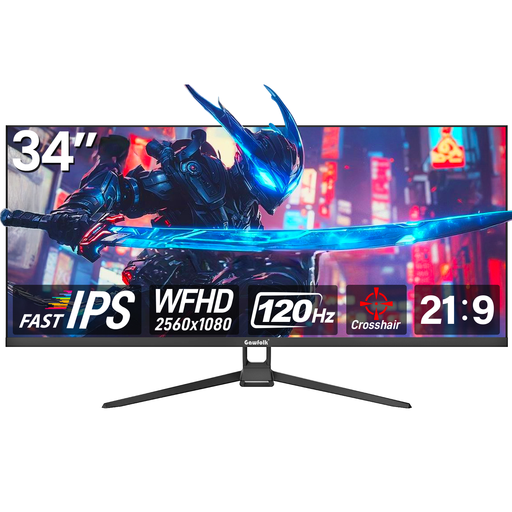
Consider this model as a wider single display if its footprint and aspect ratio suit your training station.
34 inches; 21:9; WFHD 2560 × 1080; Fast IPS; 120 Hz; HDMI and DisplayPort.
Tilt adjustment and wall mounting are specified.
No. In Zwift, resistance control, including gradient changes, is set up through a connected compatible smart trainer; the monitor displays the image. Check the trainer and connection separately from your choice of display.
According to AMD, displays on an extended desktop can have different resolutions and refresh rates. If you want a simulation to span an image across three monitors, check the requirements of the specific game and the shared display settings available. iRacing Support describes dedicated setup options for this.
Check the GPU and external display settings. For certain issues with mirrored screens, Zwift Support suggests matching resolutions or windowed mode as possible steps; this doesn’t guarantee a continuous image across three monitors.
Yes. According to the European Commission, computer monitors are covered by the energy label for electronic displays, which uses a scale from A to G. Compare the EU label and product information for the specific models; the efficiency class alone can’t tell you what your individual electricity bill will be.
Alongside the monitors, factor in suitable mounts and the energy use of the specific models. The Verbraucherzentrale distinguishes the statutory right to cancel an online purchase from warranty rights and voluntary guarantees. Check the applicable terms and warranty conditions before placing your order.