Endurance racers at a desk
If you play for long sessions, the stand and screen dimensions should suit your seating position and the space available. MSI lists a height adjustment range of 0–130 mm for the MAG 274QRF QD E2.


For long virtual kart races at your desk, a QHD IPS monitor with an adjustable stand is a sensible all-round choice, as long as you have enough space and the right connections. You can only make use of high refresh rates if your game, PC or console and connection support the relevant mode. Larger curved models also need more desk space and may call for a different seating position. Response time figures such as 1 ms can’t be compared directly unless they’re based on comparable measurement methods.
If you play for long sessions, the stand and screen dimensions should suit your seating position and the space available. MSI lists a height adjustment range of 0–130 mm for the MAG 274QRF QD E2.
If smooth motion matters to you, check the frame rate your game can actually output via your PC and connection. ASUS lists 180 Hz, FreeSync Premium and ELMB Sync for the TUF Gaming VG27AQ3A.
If you play on a console, the monitor, connection and game must all support the output mode you want. Nintendo states that 4K output on the Switch 2 is limited to a maximum of 60 fps and depends on the game and a compatible display.
Match each percentage to the factor that matters most when buying.
| Priority | What to check before buying | Who is it important to? |
|---|---|---|
| Setup and space | Check the stand’s adjustment options and the monitor’s dimensions against the desk space available. MSI lists a height adjustment range of 0–130 mm for the MAG 274QRF QD E2. | If I’m racing at my desk for long sessions, I want to adjust the screen to suit my seating position and make sure the stand will fit. Around 40 % of consumers would make ease of setup and space their top buying priority. |
| Motion handling | Check the game’s frame rate, the supported connection mode and VRR compatibility. Don’t assume GtG and MPRT figures are directly comparable. | In fast races, I want to follow the action clearly and know whether my PC can output the frame rate I want. Around 30 % of consumers would put motion handling first. |
| Compatibility with a PC or console | Check your device and game, the HDMI or DisplayPort input, and the supported resolution and frame rate combination. Nintendo limits 4K output on the Switch 2 to a maximum of 60 fps. | If I switch between a PC and console, I need a monitor that supports the display mode of the device I actually use. For around 20 % of consumers, this compatibility is likely to be the main priority. |
| Screen size and viewing experience | Compare the screen size, curvature, resolution and monitor dimensions with the space where you plan to sit. Treat claims about immersion as the manufacturer’s description. | I want a screen size and a flat or curved design that suit my viewing distance and desk. Around 10 % of consumers would prioritise screen size and viewing experience above all else. |
Samsung describes the Odyssey G5 G55C’s 1 ms figure as MPRT, measured under its own test conditions and with a specific mode. Other models may list GtG figures.
Only compare response time figures when the measurement methods and conditions match, rather than simply choosing the smallest number.
The monitor, source device and game must all support the display mode you want. On the Nintendo Switch 2, 4K output is limited to a maximum of 60 fps.
First decide which system you’ll use, then check the monitor input and supported output mode you need.
A 32-inch curved monitor and a flat 27-inch monitor take up different amounts of space and suit different seating positions.
Check the monitor’s dimensions and stand against the space you have before choosing a design.
Static game elements displayed for long periods can be a consideration with OLED. The EU energy label also provides model-specific information, including energy consumption in HDR mode.
For OLED models, check the care features and warranty terms for that specific model. For all options, check the energy label.
The models mentioned range from a flat QHD IPS monitor to a 4K QD-OLED model.
The TUF Gaming VG27AQ3A is a flat 27-inch QHD option with motion features highlighted by the manufacturer.
The Odyssey G5 G55C LS32CG554EUXEN is a 32-inch curved QHD monitor with 1000R curvature.
The UltraGear 27GS75QX-B specification sheet describes a flat 27-inch QHD IPS monitor.
According to AOC’s official UK product page, the Q27G4XF is a flat 27-inch QHD IPS model.
The models featured here include curved QHD and 4K displays, as well as a flat QHD monitor. The key things to consider are the space on your desk and the display modes supported by your source device.
 Image unavailable
For anyone specifically looking for a larger curved screen for their gaming setup.
32 inches, QHD, 165 Hz, 1500R and AMD FreeSync; the description also lists VESA mounting compatibility.
 Image unavailable
A curved QHD option for a desk where a 27-inch display is a better fit than a larger model.
27 inches, QHD, 1500R, 180 Hz and AMD FreeSync; the product description also lists an adjustable tilt.
 Image unavailable
For anyone specifically looking for 4K resolution on a larger curved screen.
32 inches, 3840 × 2160, 3000R and a VA display; the description lists HDR10 and Adaptive Sync.
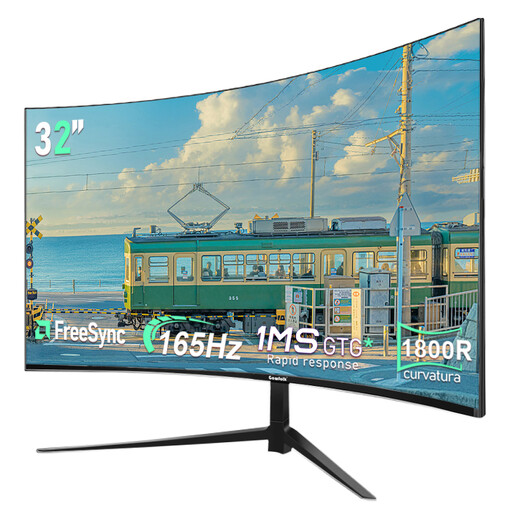 Image unavailable
Another larger curved option, if the screen size works with the depth of your desk.
32 inches, QHD at 2560 × 1440 pixels, 165 Hz and 1800R.
 Image unavailable
A flat QHD option for PC gamers looking for a high stated refresh rate and an adjustable stand.
27 inches, 2560 × 1440, SuperSpeed IPS and 260 Hz; 275 Hz is listed as an OC rate. The description lists height adjustment of up to 13 cm, as well as FreeSync Premium and G-SYNC compatibility.
No. The frame rate your specific game can output via the device and connection you’re using also matters. Nintendo states that 4K output on the Switch 2 is limited to a maximum of 60 fps, and that supported features depend on the game and display.
For TV mode, Nintendo explains how to connect the Switch 2 dock to a display and place the console in the dock. Check which display mode the HDMI input on your chosen monitor supports.
Check whether you can adjust the stand to suit your space. If you’re considering an OLED model, check its care features and warranty terms. MSI describes OLED Care 2.0 for the MPG 272URX. The Federal Institute for Occupational Safety and Health states in ASR A6 that screen use in private settings falls outside the scope of this workplace regulation.
The European Commission describes the EU energy label for electronic displays, which uses efficiency classes from A to G and includes energy consumption figures for HDR. Compare the labels for the specific models rather than looking at screen size alone.