Fans of dark mystery scenes
If you want to take in both the atmosphere and clues hidden in the shadows, look at how well the monitor actually displays dark greys, rather than relying only on HDR or contrast figures.


For mystery games, first check whether dark areas and subtle shadow detail remain visible in your preferred picture mode; a high refresh rate is not automatically the deciding factor. OLED may be worth considering in a dark room, while PRAD sees Fast IPS as a better fit for bright gaming spaces, thanks to its brightness and durability. Choose a resolution and screen size to suit your space and gaming system. If you want to use headphones with the monitor, check the specific audio output and signal path.
If you want to take in both the atmosphere and clues hidden in the shadows, look at how well the monitor actually displays dark greys, rather than relying only on HDR or contrast figures.
If you want to plug your headphones into the monitor, check which output it has and whether your gaming device sends audio to the monitor over the connection.
If you also use the screen in daylight or for other tasks, consider picture quality, resolution and the care requirements of the specific model together.
Check shadow detail and the audio signal path first, then match the resolution, refresh rate and screen size to your room and gaming system.
| What matters | What to check before buying | Who will find this particularly important? |
|---|---|---|
| Dark scenes and shadow detail | Check independent picture tests for greyscale performance and the picture modes available on the specific model. | If I don’t want to miss clues in dark scenes, the picture itself matters more to me than a single contrast figure. Around 36% of consumers focus primarily on shadow detail. |
| Headphone connection and audio signal path | Check the stated headphone output, audio connection and selected audio source. | If I want to plug my headphones into the screen, I want to be sure the audio reaches them and that the connection works with my setup. Around 29% of consumers prioritise the headphone connection and audio signal path. |
| Resolution and refresh rate | Check that the resolution and achievable refresh rate work across the full connection, including your game and hardware. | If I’m weighing up image sharpness against smooth visuals, both need to suit my gaming system. Around 21% of consumers focus first on system compatibility. |
| Room brightness and versatile use | Check how the screen performs in your room, along with the care guidance and warranty terms for the specific model. | If I use the screen in daylight or for other tasks too, I want to make sure it suits my everyday needs and that I’m happy with its care requirements. Around 14% of consumers prioritise versatile use. |
HDMI can carry audio to the monitor, but that doesn’t mean the device has a physical headphone output. LG recommends checking the specific monitor for a headphone socket marked H/P.
Check the connections listed for the exact model and plan the audio path from your gaming device to your headphones.
Depending on your setup, you may need to use a different connection.
In its test of the LG 27GP850-B, PRAD noted that some dark grey shades in the default settings were not distinguishable from black. This finding applies to the model tested; it is not a verdict on all IPS monitors.
Look for tests that assess shadow detail and try the picture modes you plan to use.
GIGABYTE lists a maximum of 280 Hz for the MO27Q2A, while the corresponding Joybuy listing states 240 Hz. The figures differ and do not prove that the variants are identical.
Before buying, compare the full model number and key specifications on the specific listing.
MSI has QD-OLED gaming monitors in its range. According to MSI, the MPG 271QRDE QD-OLED X50 offers WQHD resolution and a maximum refresh rate of 500 Hz.
The UltraGear range includes OLED models such as the 27GS95QE-B, with QHD resolution and a 240 Hz refresh rate.
The Evnia 27M1N5500ZA/00 is a 27-inch QHD IPS monitor with a refresh rate of up to 170 Hz.
The AW2725DF is a QHD QD-OLED model with a 360 Hz refresh rate.
The Odyssey OLED G6 G61SD is a 27-inch QHD gaming monitor with a 240 Hz refresh rate.
These gaming monitors offer a range of OLED and Mini LED options, resolutions and refresh rates. If you want to connect headphones to the screen, check the audio output listed for each model.
 No image available
An OLED option for anyone weighing up 4K resolution and a high refresh rate. The product specifications alone don’t show how clearly subtle shadow detail will appear in your chosen picture mode.
32 inches; 4K UHD with 3840 × 2160 pixels; 240 Hz or 480 Hz in FHD mode; anti-glare display.
 No image available
A Mini LED option to consider if you’re looking for UHD resolution and a specified headphone output. Check that the refresh rate you can achieve is right for your gaming system.
27 inches; UHD at 160 Hz or FHD at 320 Hz; Mini LED; Rapid IPS; Adaptive Sync; headphone output.
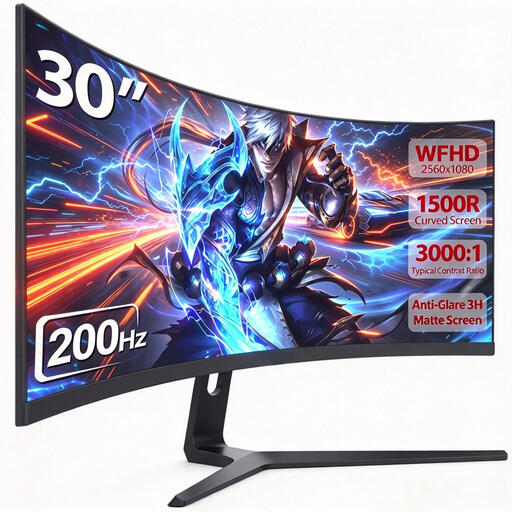 No image available
An ultrawide option if the 21:9 format suits your space and games. Check whether the stated audio output will work with your headphones.
30 inches; 21:9; 2560 × 1080 pixels; 200 Hz; 1500R VA panel; HDMI, DP and audio output.
 No image available
A QHD Mini LED option with a high refresh rate. An HDR specification alone doesn’t prove that subtle clues will remain visible in dark scenes.
27 inches; QHD with 2560 × 1440 pixels; 200 Hz; HFS (IPS) panel; Mini LED; AMD FreeSync Premium.
 No image available
A QD-OLED option if you’re looking for QHD resolution and a specified 3.5 mm audio output. Check the audio signal path and care guidance for the specific model.
27 inches; 2560 × 1440 pixels; 240 Hz; 0.03 ms; Adaptive-Sync; USB-C; 3.5 mm audio output.
No. If the specific model has a headphone output and receives audio over HDMI or DisplayPort, that output can pass the sound through to your headphones. LG recommends looking for a connection marked H/P on the monitor. Also check the selected audio source and volume. Alternatively, you can connect your headphones to a suitable audio source.
Not necessarily. For mystery games, first check whether dark scenes remain visible in your preferred picture mode. How much a high refresh rate matters depends on the game and the refresh rate your system can actually deliver.
Check the care features and warranty terms for the exact model. MSI describes OLED Care 2.0 on the MPG 271QRXDE as a way to reduce the risk of burn-in; this is not a guarantee that burn-in cannot happen. Don’t assume the same applies to other models without checking.
Look for independent tests that assess greyscale performance in dark areas of the picture, and try the picture modes on the specific monitor. PRAD’s test of the LG 27GP850-B found that some dark grey shades in its default settings were difficult to distinguish from black. This finding applies to the model tested, not to all IPS monitors.