Fans of dark puzzle worlds
You often play scenes where shadows and dark areas set the mood, and weigh up contrast specifications against the care guidance for an OLED model. LG notes that burn-in cannot be ruled out, even with proper use.


For narrative puzzle games in a shared bedroom, start by weighing up readability, desk space and your planned audio setup rather than making the highest refresh rate your main priority. A 27-inch WQHD IPS model is one option for clearly readable clues. If dark scenes matter most, compare the specifications of individual models and check the care and warranty terms for OLED displays. Also check the stand, connections and refresh rate available through the input you’ll actually use.
You often play scenes where shadows and dark areas set the mood, and weigh up contrast specifications against the care guidance for an OLED model. LG notes that burn-in cannot be ruled out, even with proper use.
You share a bedroom and want to work out in advance whether you’ll use headphones or the monitor’s speakers, and how much space the screen and stand will take up.
You spend a lot of time reading dialogue and clues, so you compare resolution, screen size, connections and positioning rather than focusing only on the maximum refresh rate. ASUS and Dell list a resolution of 2560 × 1440 pixels for the 27-inch models mentioned here.
Consider picture quality, audio, desk space and connections together: the panel type alone doesn’t tell you everything about a particular model.
A good fit if: You read lots of clues and want a versatile screen. ASUS and Dell list a resolution of 2560 × 1440 pixels for the 27-inch models mentioned here.
The trade-off: IPS doesn’t automatically mean especially deep blacks. ASUS lists a typical contrast ratio of 1000:1 for the VG27AQ3A; according to the manufacturer, its stand isn’t height-adjustable.
A good fit if: You pay particular attention to the contrast specification of the specific model for dark scenes. Acer lists a native contrast ratio of 3000:1 for its 27-inch VA monitor, the VG270 S3.
The trade-off: According to Acer, the VG270 S3 offers Full HD rather than WQHD. The manufacturers’ contrast specifications aren’t based on a like-for-like independent comparison test.
A good fit if: Dark game worlds and HDR are priorities for you, and you’re prepared to consider the care and warranty terms for the specific model. MSI lists WQHD and DisplayHDR True Black 500 for the MPG 271QRDE QD-OLED X50.
The trade-off: MSI lists a 500 Hz refresh rate for this model, but that alone isn’t a reason to buy it for narrative puzzles. LG says burn-in cannot be ruled out on OLED displays, even with proper use.
| Priority | What to check before buying | Who is it most important to? |
|---|---|---|
| Dark scenes | Compare the contrast specifications for the specific model and, for OLED, check the care and warranty terms. | If I want to see dark puzzle scenes clearly, I compare the specifications for each model and check the usage terms for OLED. Around 33% of consumers prioritise contrast. |
| Considerate audio | Check whether the monitor is designed to be used with its speakers, headphones or another suitable audio setup. | In a shared bedroom, I want to know how I can play audio without disturbing others unnecessarily. Around 27% of consumers prioritise considerate audio. |
| Readability and desk space | Consider screen size and resolution together; check the stand’s dimensions and whether it’s height-adjustable. | If I share a desk and need to read clues clearly, I check the screen and stand together. Around 20% of consumers prioritise readability and desk space. |
| Connections and refresh rate | Check the supported resolution and refresh rate through the HDMI or DisplayPort input you plan to use. | With a PC or console, I want to know which input actually supports the refresh rate I’m after. Around 20% of consumers prioritise device connectivity and the refresh rate they can use. |
A general gaming ranking might not suit slower-paced puzzle games or a shared bedroom. On 29 September 2026, PRAD placed the MSI MPG 271QR (DE) X50 at number one in its list of 27-inch gaming monitors. This ranking doesn’t specifically assess how well it suits puzzle games.
Start by checking readability, dark areas of the image, desk space and connections. Don’t treat a general gaming ranking as a ranking for your room.
Audio features vary by model: Dell lists speakers for the S2725DSM, while LG doesn’t list them for the 27GS75QX-B.
Decide before buying whether you want to use headphones or the monitor’s speakers, then check the connections on the specific model and gaming device.
LG notes that burn-in on OLED displays cannot be ruled out, even with proper use.
Read the usage and warranty terms for the specific model, especially if game menus or clues will stay on screen unchanged for long periods.
The TUF Gaming VG27AQ3A is an example of a 27-inch WQHD Fast IPS monitor with a 180 Hz refresh rate and built-in speakers.
According to Dell, the S2725DSM combines a 27-inch WQHD IPS screen, a 144 Hz refresh rate, speakers and height adjustment.
Acer’s German data sheets show different Nitro VG0 models: the VG270 S3 with a Full HD VA panel and the VG270U E with a WQHD IPS panel.
The MPG 271QRDE QD-OLED X50 is a WQHD QD-OLED option for buyers who prioritise dark scenes and high refresh rates.
The 27GS75QX-B is an example of LG’s WQHD IPS gaming monitors; LG also describes its OLED monitors as needing special care.
This selection includes QHD and WQHD gaming monitors with different panel types and screen formats. If you’re sharing a space, pay particular attention to audio connections, the stand and the screen’s width.
 No image available
An option if you’re looking for WQHD resolution and a height-adjustable stand.
27 inches; 2560 × 1440 pixels; 144 Hz; Fast IPS; HDMI and DisplayPort; 3.5 mm audio output.
 No image available
A QD-OLED option if dark game worlds and WQHD are top of your list.
2560 × 1440 pixels; 240 Hz; QD-OLED; 3.5 mm audio output; height-adjustable.
Burn-in cannot be ruled out on OLED displays if the same content stays on screen for long periods. Check this model’s care and warranty terms.
 No image available
An option if you want to compare QHD, local dimming zones and built-in speakers in one model.
2560 × 1440 pixels; 1152 dimming zones; IPS; 275 Hz; HDMI and DisplayPort; built-in speakers; height-adjustable stand.
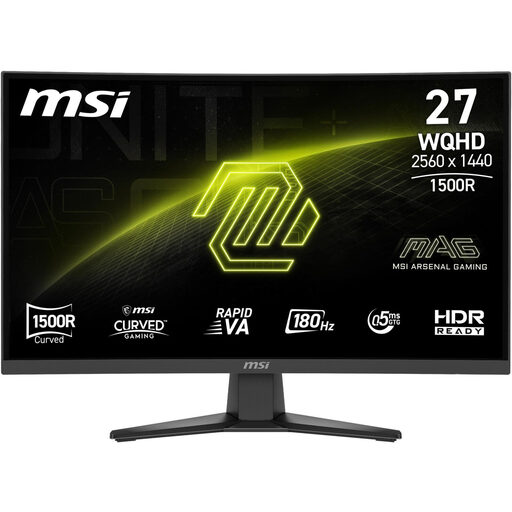 No image available
A VA option if you want to compare the specifications of a specific model for dark scenes.
2560 × 1440 pixels; Rapid VA; 1500R curvature; 180 Hz; stated static contrast ratio of 5000:1; HDMI, DisplayPort and headphone output.
 No image available
This wide format is only worth considering if there’s enough room on the shared desk.
34 inches; 3440 × 1440 pixels; VA panel; 180 Hz; stated contrast ratio of 4000:1. The product information gives a width of around 81,1 cm.
It depends on the monitor and the input you use. ASUS lists vertical frequency ranges of 48–144 Hz over HDMI and 48–180 Hz over DisplayPort for the VG27AQ3A. Also check which output your gaming device supports.
Measure the available desk space, including the stand, and check whether you can adjust the screen to suit your seating position. ASUS doesn’t list height adjustment for the VG27AQ3A, while the Dell S2725DSM is listed as height-adjustable.
Follow the care guidance and terms for the specific model, as burn-in cannot be ruled out on OLED displays, even with proper use. LG highlights this risk; check the warranty terms for the model you choose.
The European Commission rates electronic displays on an energy label scale from A to G. For online purchases, a Verbraucherzentrale article dated 13 August 2026 explains a right to cancel that generally applies for 14 days after the contract is made or the ordered goods are received. In an article dated 28 September 2026, it also distinguishes the statutory rights you have against the seller from a voluntary guarantee.