If your PC consistently delivers high frame rates in your games and fast movement is your priority, a compact Full HD monitor is a sensible place to start. For greater picture clarity and more versatility, consider WQHD models, but bear in mind that they demand more graphics power; TÜV SÜD highlights this difference. Whatever panel you choose, check that the audio socket is actually designed for headphones and find out how to connect your headset microphone.
Which option suits you
Speed-focused ranked players
If you mainly play fast-paced tactical matches, prioritise motion handling and input lag over extra resolution. It’s also important to consider the frame rate your PC can actually deliver. TÜV SÜD and RTINGS explain these selection criteria.
Ranked players looking for an all-rounder
If you play detailed games or use your screen for other tasks as well as ranked matches, it’s worth comparing Full HD and WQHD. TÜV SÜD points out that WQHD requires more graphics power.
Team players who rely on a headset
If you use headphones and voice chat, check separately whether the monitor can power your headphones and where to connect the microphone. Dell Support clearly distinguishes between a suitable headphone socket and a line-out.
What to look for when buying
Compact Full HD: IPS or Fast TN
A good fit if: You have limited desk space, prioritise fast matches and your PC can deliver high frame rates.
The trade-off: Full HD puts less strain on your graphics card than WQHD, but offers fewer pixels. Strobing can reduce brightness and cause flicker.
27-inch WQHD IPS
A good fit if: You want sharper visuals for ranked matches and your PC can reach your desired frame rate at WQHD resolution.
The trade-off: The higher resolution demands more graphics power than Full HD. Check measurements for the mode you plan to use.
WQHD QD-OLED
A good fit if: You want great picture quality for other games as well as fast matches, and are happy to take care of the panel and check the warranty terms.
The trade-off: QD-OLED carries a risk of burn-in. According to the manufacturer, care features can reduce the risk, but there’s no evidence that they eliminate it.
| Buying criterion |
What to check |
Who this matters most to |
| Motion and input lag |
Compare the frame rates in your games, the refresh rate available through the connection you plan to use, and measurements of input lag and motion handling in your chosen mode. |
If I want to see fast movement as clearly as possible and react without unnecessary delay, speed comes first. Around 42% of consumers prioritise motion and low input lag. |
| Sharpness and screen size |
Match the resolution, desk space and viewing distance to the frame rate you can achieve in your games. |
If I also use my monitor for detailed games or other tasks, I want to weigh sharpness against the extra graphics load. Around 25% of consumers prioritise sharpness and versatility. |
| Headphones and microphone |
Check the manual for your exact model to distinguish between a headphone socket and a line-out; check the microphone connection or USB audio separately. |
If I play as part of a team, I want to be able to connect my headphones and voice chat reliably. Around 17% of consumers prioritise headset connectivity. |
| Panel care and protection |
Read the care guidance for the specific OLED model and the terms of any voluntary manufacturer’s warranty. |
If I’m considering an OLED model, I want to factor in burn-in risk, care and warranty terms. Around 16% of consumers prioritise lifespan and protection. |
Common misconceptions
-
Comparing only the advertised refresh rate or millisecond figure
Refresh rate, pixel response time and input lag describe different things. A high advertised refresh rate alone doesn’t tell you what motion handling or input lag you’ll get in a particular game.
First compare the frame rates in your games, then look at independent measurements for the resolution and operating mode you actually plan to use.
-
Assuming a line-out is a complete headset connection
Dell Support notes that some monitor line-outs can’t power headphones in the same way as a socket designed for them. An audio output also doesn’t confirm that the monitor has a microphone input.
Check the manual for your exact model and confirm headphone output, line-out and microphone connectivity separately.
-
Using motion strobing without considering the downsides
According to RTINGS, strobing can reduce motion blur, but it can also lower brightness and cause flicker.
Check the usable refresh-rate range and whether you’re happy with the picture in the mode you plan to use.
-
Assuming OLED care eliminates the risk of burn-in
Philips describes burn-in as a risk with QD-OLED. Care features are designed to reduce the risk, but don’t prove that it can be eliminated; any voluntary warranty is subject to its specific terms.
Before buying, read the care guidance and warranty terms for the exact model, then weigh up OLED against IPS and TN options.
Key brands at a glance
Dell
The SE2426HG is a compact Full HD IPS option with a 240 Hz refresh rate.
- Dell lists the SE2426HG as a 23.8-inch, 240 Hz monitor.
- According to Dell, the stand tilts. Dell Support notes that on certain monitors, the line-out isn’t a suitable headphone socket.
ASUS ROG
The ROG Strix Pulsar XG27AQNGV combines WQHD, 360 Hz and an esports Dual Mode.
- ASUS lists G-SYNC Pulsar and a reduced-size 25-inch gaming mode.
- Advertised comparisons of motion clarity are manufacturer claims and don’t prove that every PC or mode will deliver the same benefit.
BenQ ZOWIE
The XL2566X+ is a Fast TN option with 400 Hz and DyAc 2, designed for tactical FPS games.
- ZOWIE lists height adjustment and motion features.
- Claims about target acquisition or player success are manufacturer claims. If you use motion strobing, consider the impact on brightness and flicker too.
Philips Evnia
The 27M2N8500/00 is a WQHD QD-OLED option with a 360 Hz refresh rate.
- Philips lists a 26.5-inch screen with WQHD resolution.
- Philips highlights the risk of burn-in with QD-OLED. Care guidance is intended to reduce the risk, not prove that it can be eliminated.
MSI
The MAG 274QF X24 offers WQHD at 240 Hz with an IPS panel, while the MAG 272QP QD-OLED X50 takes a different panel approach and offers a higher refresh rate.
- MSI lists WQHD and 240 Hz for the MAG 274QF X24. For the MAG 272QP QD-OLED X50, MSI lists care features and a protection period.
- These details apply to the specific models named. Check the exact model number and variant before assuming that different versions are the same.
Joybuy product selection
This selection covers gaming monitors for fast matches, from Full HD models with high refresh rates to WQHD and OLED options.
 No image available
MSI MAG 274UPDFDE E16M
Dual Mode lets you choose between UHD at 160 Hz and Full HD at 320 Hz, depending on whether you prioritise resolution or refresh rate.
27-inch Mini LED with Rapid IPS. Adaptive Sync is listed in the product description.
View at Joybuy
 No image available
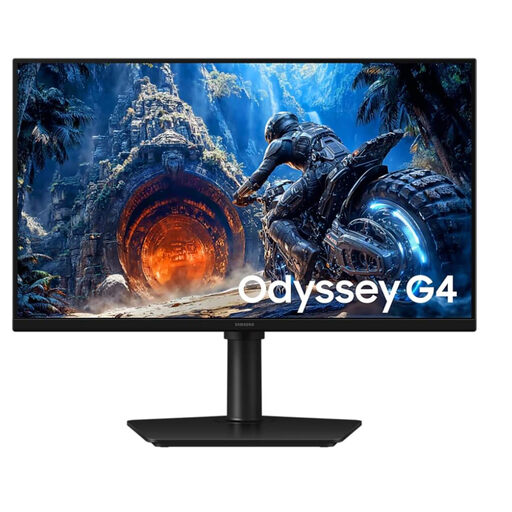
Samsung Odyssey G4 LS25HG402EUXEN
A compact Full HD option for fast games if you value refresh rate more than higher resolution.
25-inch IPS panel with 300 Hz over DisplayPort; according to the product description, it reaches 240 Hz over HDMI. FreeSync Premium and G-Sync compatibility are also listed.
View at Joybuy
 No image available
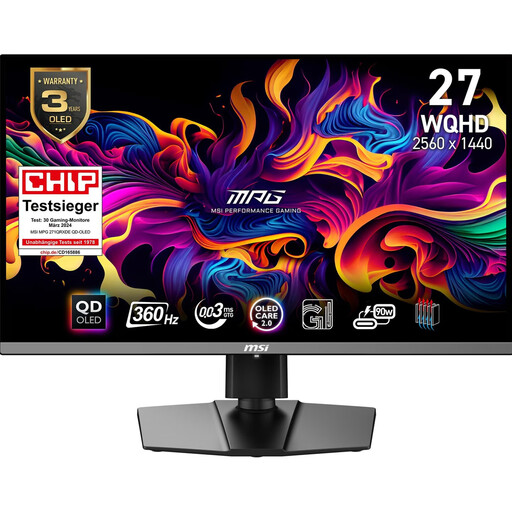
MSI MPG 271QRXDE QD-OLED
A WQHD QD-OLED option for fast games if you’re weighing higher resolution and picture quality against the care needs of an OLED panel.
26.5-inch screen with a 360 Hz refresh rate; Adaptive Sync is listed in the product description. QD-OLED carries a risk of burn-in. According to Philips, care can reduce the risk, but there’s no evidence that it can eliminate it.
View at Joybuy
 No image available
ASUS ROG Strix WOLED XG27AQWMG
A WQHD option for fast games if you want to include a high refresh rate and an OLED panel in your shortlist.
26.5-inch Tandem WOLED panel with a 280 Hz refresh rate. G-SYNC compatibility and FreeSync Premium Pro are listed in the product description.
View at Joybuy
 No image available
KTC H27E6S
A WQHD Fast IPS option for ranked matches if your PC can reach your desired frame rate at the higher resolution.
27-inch screen with a 240 Hz refresh rate, reaching up to 275 Hz when overclocked. FreeSync and G-Sync compatibility are listed in the product description.
View at Joybuy
Frequently asked questions
Is 240 Hz enough for ranked matches?
It depends on the frame rate your PC can reach in the specific game, and whether the connection and selected mode support the monitor’s refresh rate. Also check measurements of input lag and pixel response time taken under comparable conditions.
Will my headset microphone work through the monitor connection?
You can’t tell from an audio output socket alone. Check the connections on your exact model and, if needed, connect the microphone separately to your PC, console or a USB audio device designed for that purpose. A socket labelled line-out may also be unsuitable for headphones.
Which settings should I check after connecting the monitor?
On your PC, check the refresh rate actually selected for your chosen resolution. If you use VRR or motion strobing, check the usable range and whether both features can be used at the same time on your specific model; strobing can reduce brightness.
What should I bear in mind when using an OLED monitor day to day?
Follow the care guidance and warranty terms for your exact model. Philips describes burn-in as a risk with QD-OLED and care features as a way to reduce that risk; this doesn’t mean burn-in is guaranteed to be avoided.


