For replay analysis in a shared bedroom, a compact Full HD monitor is a better fit if fast-moving action and limited desk space are your priorities. QHD or 4K is worth considering if you want to make out small details more clearly. Before buying, check the refresh rate at your chosen resolution for the connection you’ll use, the monitor’s setup options and, for OLED, the care guidance for displaying static images for long periods.
Which monitor is right for you?
FPS replays on a small desk
If you often watch fast-moving action again and have limited space for your monitor and peripherals, compact Full HD models are a good starting point for comparison. AOC lists the 24G4X at 23.8 inches and 180 Hz; BenQ ZOWIE lists the XL2566X+ at 24.1 inches and 400 Hz. These manufacturer specifications don’t prove that replays are easier to analyse.
Analysing details on the same PC
If you also want to compare small on-screen elements or areas of the image in replays and have room for a larger display, pay attention to the resolution and the refresh rate available through each connection. Dell specifies up to 180 Hz over DisplayPort and up to 144 Hz over HDMI for the G2725D in QHD; Samsung lists the 27-inch G81SF variant as 4K UHD.
Using a monitor in a shared bedroom
If you plan to use the monitor in a shared bedroom, check the footprint, stand and adjustment options for the specific model. Care guidance is also relevant if replay menus are left on screen during long breaks, particularly with OLED models such as the MSI MPG 271QRXDE QD-OLED.
What should you consider when choosing?
Compact Full HD LCD
A good fit if: you want to check fast-moving action and space is limited.
The trade-off: Full HD has fewer pixels than QHD for showing small details; a high refresh rate alone doesn’t prove an advantage for analysis.
QHD LCD
A good fit if: you want to assess small replay elements as well as movement and have room for a larger display.
The trade-off: The resolution and refresh rate you can achieve also depend on the connection you use. Check both for your preferred setup.
QHD or 4K OLED
A good fit if: you want to compare OLED technology at QHD or 4K resolution and can follow the care guidance.
The trade-off: Static, high-contrast images displayed for long periods can pose a burn-in risk on OLED screens; protective features don’t guarantee that burn-in can be ruled out completely.
When analysing replays in a shared bedroom, the main trade-offs come down to movement, desk space, image detail and care.
| What matters |
What to check before buying |
Who should pay particular attention |
| Fast-moving action |
Refresh rate at your chosen resolution and through the connection you’ll use; playback settings on your replay source. |
If you want to watch competitive gameplay repeatedly and make sense of movement, refresh rate is a key consideration. Around 36% of consumers prioritise fast-moving action in replays. |
| Setting up in a bedroom |
Space required, including the stand, plus height adjustment and suitable picture settings on the specific model. |
If you share a desk and room, you’ll want to save space and adjust the screen to suit your sitting position. Around 29% of consumers put setup and picture adjustment first. |
| Fine image detail |
Full HD, QHD or 4K at your planned screen size; also consider your PC’s output and replay software. |
If you want to compare small on-screen elements or areas of the image in replays, visible detail matters more to you than a smaller footprint. Around 21% of consumers prioritise fine image detail and legible replay interfaces. |
| Care and ongoing costs |
For OLED, check the protection and warranty terms for the specific model; for EU monitors, check the energy label. The European Commission lists energy efficiency classes from A to G for monitors. |
If you want to factor in OLED care, energy information and your rights after purchase, check these points before deciding. Around 14% of consumers focus on care and ongoing costs. |
Common mistakes when buying a monitor
-
Choosing the highest refresh rate without checking the resolution it applies to
LG states that the 27GX790B-B supports 540 Hz at QHD and 720 Hz at HD. The connection you use can also limit the refresh rate and resolution available together.
Compare the resolution, refresh rate and connection you’ll actually use.
-
Assuming models in the same series have the same screen size
Samsung specifies the 27-inch Odyssey OLED G8 G81SF as the LS27FG814SUXEN. A different screen size may indicate a different variant.
Before buying, check the full model number and screen size rather than relying on specifications for another model.
-
Assuming OLED protection rules out burn-in
ASUS describes a burn-in risk when high-contrast static images are displayed for long periods. Protective features are designed to reduce the risk.
Check the care guidance and the terms of any voluntary OLED warranty for the specific model.
Key brands at a glance
BenQ ZOWIE
The XL2566X+ is a compact, FPS-focused example, with a 24.1-inch Fast TN panel, 400 Hz, DyAc 2 and height adjustment.
- ZOWIE provides specific details on screen size, panel type, refresh rate and height adjustment.
- Manufacturer claims about target acquisition or motion clarity aren’t independent measurements for replay analysis. Full HD also doesn’t replace checking how clearly small details appear.
AOC
The 24G4X is a compact Fast IPS option, with a 23.8-inch Full HD display and a 180 Hz refresh rate.
- AOC lists the screen size, resolution and panel type for this model.
- Check the specific listing to make sure the stand, connections and setup suit your room.
Dell
The G2725D is an example of a 27-inch QHD IPS monitor with different refresh rate limits for each input.
- Dell specifies QHD at up to 180 Hz over DisplayPort and up to 144 Hz over HDMI.
- Dell lists this specific model as unavailable on its German product page, so these specifications are included here for technical comparison only.
MSI
According to MSI, the MPG 271QRXDE QD-OLED combines QHD with a 360 Hz refresh rate and OLED Care 2.0.
- MSI lists the resolution, refresh rate and protective feature for this model.
- OLED care guidance still matters if you display static images for long periods; protective features don’t prove that burn-in risk has been eliminated completely.
LG
The 27GX790B-B is a 27-inch OLED model with two listed resolution and refresh rate modes.
- LG specifies 540 Hz at QHD and 720 Hz at HD.
- The 720 Hz HD specification doesn’t apply to QHD; OLED care remains an important consideration.
Samsung
The Odyssey OLED G8 G81SF LS27FG814SUXEN is a 27-inch QD-OLED model with 4K UHD and a 240 Hz refresh rate.
- Samsung lists these specifications for the 27-inch variant.
- Check the full model number and screen size when comparing monitors, so you don’t confuse different variants.
Joybuy monitors for replay analysis
The Joybuy models below include compact Full HD options, as well as QHD and 4K models. Compare image detail, desk space and the refresh rate supported by each connection.
 No image available
Z-Edge AGEX 27-inch QHD monitor
If you want to check small replay details on a larger display, this QHD model is a useful option to compare.
27 inches, 2560 × 1440, Fast IPS and 144 Hz. The product description states that DisplayPort and a compatible graphics card are required for the quoted maximum refresh rate. A height-adjustable stand and VESA mounting are also listed.
View at Joybuy
 No image available
INNOCN 2751S PLUS 27-inch QHD monitor
If you want to view small replay details and fast-moving scenes on a 27-inch display, compare this QHD model with the limits of the connections you’ll use in mind.
QHD, IPS and up to 275 Hz are listed. The product description says the stand can be adjusted for height, tilt and swivel. For FreeSync, it lists 48–144 Hz over HDMI and 48–275 Hz over DisplayPort.
View at Joybuy
 No image available
KTC M27P6 27-inch 4K monitor
If you want to check fine replay details on a 27-inch display, compare the two modes to see which one suits your preferred resolution.
The title lists 4K at 160 Hz or FHD at 320 Hz, as well as Fast IPS. Height, tilt and swivel adjustment are also listed.
View at Joybuy
 No image available
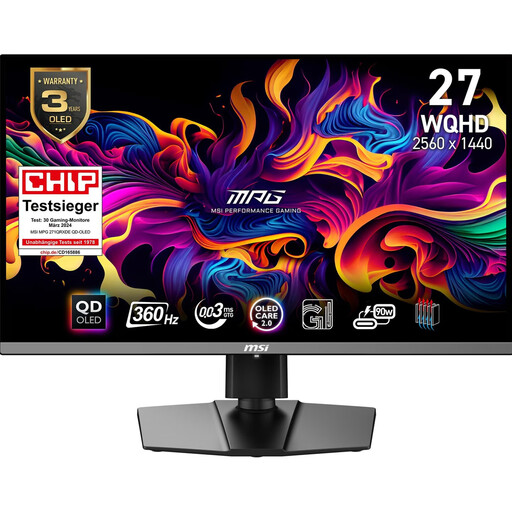
MSI MPG 271QRXDE QD-OLED
If you want to compare QHD detail on a QD-OLED panel, remember to factor in screen care during replay breaks.
This model is listed as 26.5 inches, WQHD and 360 Hz; MSI also specifies OLED Care 2.0. Burn-in risk remains a consideration when displaying high-contrast static images for long periods. Height, pivot, tilt and swivel adjustment are described.
View at Joybuy
 No image available
MSI MAG 244F 23.8-inch Full HD monitor
If desk space is limited and you want to check fast-moving action, this compact Full HD model is worth comparing.
23.8 inches, Full HD, Rapid IPS and 200 Hz are listed. The product description says DisplayPort and compatible graphics card settings are required for the maximum refresh rate. Full HD has fewer pixels than QHD for showing small replay details.
View at Joybuy
Frequently asked questions
Are the advertised refresh rates enough to choose a monitor for replay analysis?
No. Check the refresh rate and resolution together for the input you’ll use. Dell specifies QHD at up to 180 Hz over DisplayPort and up to 144 Hz over HDMI for the G2725D; LG’s 27GX790B-B supports 720 Hz at HD, not QHD.
What should I bear in mind when setting up the monitor and taking longer breaks during replays?
Measure the available space, including the stand, and check the adjustment options for the specific model. If the same high-contrast menu stays on an OLED monitor for a long time, follow the care guidance and use the protective features. ASUS describes a burn-in risk with static images like these.
Which energy and service information should I check in Germany?
Compare the EU energy labels for monitors and check the relevant information if you use HDR. The Verbraucherzentrale distinguishes statutory consumer rights against the seller from a voluntary manufacturer’s warranty. Online purchases generally come with a 14-day right to cancel; check the legal requirements and exceptions.


