What to consider when buying
First, check that the monitor and stand will fit on your shared desk. Then make sure the resolution and refresh rate are compatible with your gaming device and the connection you intend to use.
| Criteria |
What to look for when buying |
Who it matters most to |
| Smooth motion |
Check the resolution, maximum refresh rate for each input and the frame rate your gaming device can deliver together. |
If I want to track movement clearly in fast-paced matches, I compare the refresh rate, input and in-game frame rate together. Around 36% of consumers put smooth motion first. |
| Desk space |
Measure the desk’s surface area and depth to allow for the stand, peripherals and viewing distance; check the dimensions of the specific model. |
If the monitor needs to fit in a shared bedroom, the actual space it takes up matters to me more than screen size alone. Around 29% of consumers prioritise available space. |
| Detail and contrast |
Check whether your hardware can output QHD. With OLED, consider use with static displays, as well as the care and warranty terms. |
If detail or contrast in dark game scenes matters most to me, I compare QHD IPS and OLED, along with their trade-offs. Around 21% of consumers prioritise image detail or contrast. |
| Connections and running costs |
Check the refresh rate limits of the input you’ll use, as well as what’s included and the specific model’s EU energy label. |
If I want to connect my existing devices and compare power consumption, I check the connections and energy label. Around 14% of consumers prioritise connectivity and running costs. |
The percentages reflect a consistent breakdown based on the main buying priority for this topic; they are not measured market shares.
Gaming monitors at Joybuy
The selection includes compact Full HD models as well as larger QHD and UHD monitors. When choosing, compare the space available, the resolution you want and the connections on your gaming device.
 No image available
MSI MAG 274UPDFDE E16M
For fast-paced matches where you may want to switch between resolution and refresh rate: the product title lists UHD at 160 Hz and FHD at 320 Hz.
27 inches, Rapid IPS with Mini-LED and 1,152 dimming zones; the product description also lists Adaptive Sync, HDMI 2.1 and DisplayPort 1.4a.
Joybuy
 No image available
ASUS ROG Strix WOLED XG27AQWMG
For dark game scenes, if you’re considering an OLED panel: according to the product title, this model offers WQHD at 280 Hz.
27 inches, 2560 × 1440 and 0.03 ms GtG, according to the product title. ASUS describes OLED care features designed to reduce the risk of burn-in; check the care and warranty terms for the specific model.
Joybuy
 No image available
INNOCN 2751S PLUS
If you’re looking for QHD and a high nominal refresh rate, the product title lists 275 Hz for this Mini-LED model.
IPS display, 1,152 dimming zones, plus HDMI and DisplayPort, according to the product description; the stand is height-adjustable. The product description warns against using it on a bed, sofa, blanket or similar surface; place it somewhere suitable with good ventilation.
Joybuy
 No image available
KTC H24B9S
For a more compact Full HD option when space is limited, the product title lists a 24-inch screen and a 144 Hz refresh rate.
IPS display, 1920 × 1080 and a 5 ms response time, according to the product description; Adaptive Sync, HDMI and DisplayPort are also listed. The stand tilts and a VESA mount is specified.
Joybuy
 No image available
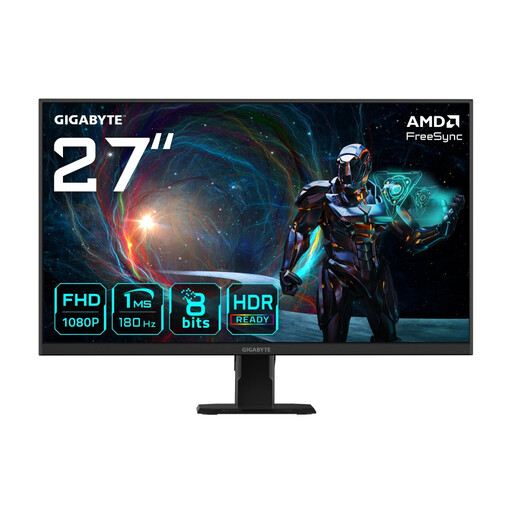
GIGABYTE GS27FA
If you’re comparing 27-inch Full HD monitors for fast-paced matches, the product title lists a 180 Hz refresh rate.
IPS display, 1920 × 1080 and FreeSync, according to the product description; HDMI 2.0 and DisplayPort are listed. The dimensions with the stand are 61.9 × 44.7 × 17.2 cm, according to the product description.
Joybuy
Frequently asked questions
Does a 180 Hz specification guarantee 180 Hz while gaming?
No. The refresh rate you can achieve also depends on the resolution, input and gaming device. For the G2725D at QHD, Dell lists up to 180 Hz via DisplayPort and up to 144 Hz via the HDMI connections listed.
What should I measure before setting up in a shared bedroom?
Measure the usable desk space, including room for the stand and peripherals, and compare it with the dimensions of the specific model. The 23.8-inch and 27-inch sizes listed by ASUS and Dell are screen diagonals; on their own, they don’t tell you how much desk space the monitor needs.
What should I bear in mind when using an OLED monitor for long periods?
Follow the care guidance and check the warranty terms for the specific model. ASUS describes features on the XG27AQWMG designed to reduce the risk of burn-in; that does not mean burn-in is impossible.
How can I compare the power consumption of gaming monitors?
Compare the EU energy label or EPREL entry for each specific model. The European Commission explains that electronic displays must be labelled; to compare costs, you’ll also need the relevant energy consumption figures and your expected usage time.
What are my rights when buying a monitor online in Germany?
For a typical online purchase from a business seller, you generally have a 14-day right of withdrawal, which you need to notify the seller about. If the goods are faulty, you have statutory consumer rights against the seller; Your Europe states that EU purchases are covered by a minimum two-year period from receipt. A manufacturer’s warranty is separate; exceptions and the seller’s status should be considered in each case.


