For a small, shared desk, a well-positioned 27-inch WQHD monitor is a sensible starting point. Also look for independent motion tests and check whether your gaming device and connection support the frame rate and variable refresh rate you want. A larger screen or more contrast could suit you, provided the space, game support and trade-offs work for the way you play.
Who this monitor comparison is for
Drivers practising laps and focusing on motion
If you drive the same sections repeatedly, look for clear motion at the frame rates your gaming device can actually output. A high maximum refresh rate alone doesn’t tell you how motion looks on a particular model.
Gamers sharing a desk
If you also use the screen for other tasks, consider its footprint, stand depth and adjustability as well as its size. Think about whether several people will be viewing the screen from different angles, too.
Evening racers who want good contrast
If you often play with little ambient light, how dark areas look may matter. With OLED, also consider how long static racing displays such as the cockpit and HUD remain on screen.
What to look for when buying
First, measure the available space, including the stand, then check which resolution and frame rate your gaming device can output through the connection you plan to use. You can then weigh up motion, contrast and other features according to the way you play.
| Buying priority |
What to check |
Who is it most important for? |
| Motion and control |
Check motion tests at suitable frame rates, and compare VRR support and connections on the monitor and gaming device. |
If I’m taking corners repeatedly, I want to see motion clearly and get an immediate response to my controls. Around 29% of consumers put motion and responsiveness first. |
| Desk space and shared use |
Compare the width and depth with the stand fitted, as well as height adjustment or VESA measurements, against the space you have. |
If I share my desk, I need a setup that leaves room and works for everyone using it. Space takes priority for around 29% of consumers. |
| Dark areas on screen |
Check independent tests of contrast and motion. With OLED, also read about how static content is handled and check the warranty terms. |
If I often race in the evening, I want to make out dark sections of the track while bearing in mind any potential panel drawbacks. Around 18% of consumers put contrast first. |
| Connection and ongoing use |
Check the resolution, frame rate and VRR supported by the specific input and your gaming device; look up the EU energy label for the exact model. |
I want the monitor to work as intended with my existing setup, and to understand its energy information and the terms of purchase. Compatibility and ongoing conditions are a priority for around 24% of consumers. |
Gaming monitor buying pitfalls
-
Assuming “1 ms” means low input lag
Pixel response time, MPRT and input lag are different measurements. An MPRT figure, such as the one quoted for the Samsung Odyssey G5 G55C LS32CG554EUXEN, doesn’t show how quickly the monitor processes an input signal.
Check how the measurement is defined and look for independent motion tests at the frame rates that matter to you. Consider overshoot and input lag separately.
-
Comparing screen size alone
A 27-inch monitor can still take up a lot of desk depth once you include the stand. According to the manufacturer, the GIGABYTE GS27QCA doesn’t have height adjustment.
Compare the width and depth with the stand fitted, adjustability and, if you’re mounting it on an arm, the VESA measurement against your desk. You’ll need a compatible mount to attach it to an arm.
If you want to replace the stand with a monitor arm, you’ll also need a compatible VESA mount.
-
Choosing OLED or HDR based on the label alone
With OLED, static elements that stay on screen for long periods can pose a risk of burn-in. An HDR logo alone doesn’t tell you how a particular model will perform with a particular game.
If your racing game displays a static HUD for long periods, check the usage and warranty terms for the specific OLED model. For HDR, look for tests of the model with suitable content.
-
Assuming similarly named versions are identical
Listings for the GIGABYTE GS27QCA quote different refresh rates. A similar model name isn’t enough to identify the exact version with confidence.
Check the full model number and specifications on the product page against the manufacturer’s information.
Brands to consider
MSI
The MAG 274QRFDE QD E2 is a 27-inch WQHD option with Rapid IPS, suited to a desk used for both racing games and other tasks.
- MSI quotes up to 180 Hz, Adaptive Sync and 1 ms GtG. These are manufacturer specifications, not independent motion test results.
- Check the dimensions, adjustability and motion tests for the specific version before choosing it for a shared workspace.
AOC
According to AOC, the Q27G3XMN/BK combines a 27-inch WQHD VA panel with Mini LED backlighting.
- AOC quotes 336 dimming zones, up to 180 Hz and a height-adjustable stand.
- The advertised HDR performance is a manufacturer claim. Check tests of the specific model to see how the picture and motion perform.
GIGABYTE
According to GIGABYTE, the GS27QCA is a curved 27-inch WQHD monitor with a VA panel and a refresh rate of up to 180 Hz.
- GIGABYTE lists the dimensions as 610.5 × 441 × 208 mm with the stand fitted, and VESA 100 × 100 mm.
- It doesn’t have height adjustment. The quoted 1 ms refers to MPRT, not measured input lag.
Samsung
The Odyssey G5 G55C LS32CG554EUXEN is a larger, curved 32-inch WQHD option with a refresh rate of up to 165 Hz.
- Samsung lists 1000R and FreeSync for this model.
- According to Samsung, the advertised 1 ms is based on MPRT under its internal test conditions in “Extreme Mode”. Check that the screen size and curve suit your available space and viewing distance.
Joybuy monitors for your desk
The Joybuy models below are 27-inch QHD options with different panel types, refresh rates and stand features. Check that the specific version suits your available space and the signal from your gaming device.
 No image available
Z-Edge AGEX 27-inch QHD gaming monitor
An option for a shared desk if you’re looking for a height-adjustable stand.
QHD, Fast IPS, 144 Hz, FreeSync and a height-adjustable stand, according to the product title.
The product title also quotes 1 ms MPRT; this shouldn’t be confused with input lag.
View at Joybuy
 No image available
INNOCN 2751S PLUS 27-inch Mini LED gaming monitor
A good fit if you’re looking for Mini LED and a height-adjustable stand in a 27-inch model.
QHD, IPS, 275 Hz, FreeSync and Mini LED with 1,152 zones, according to the product details.
Check how the specific model performs rather than judging its HDR performance by the number of zones alone.
View at Joybuy
 No image available
KTC H27E6S 27-inch QHD gaming monitor
An option if you’re looking for a high quoted refresh rate and a height-adjustable stand on a QHD monitor.
Fast IPS and 240 Hz; the product title quotes up to 275 Hz when overclocked. It also lists FreeSync, G-Sync compatibility and VESA 100 × 100.
Check what refresh rate your gaming device can actually output through the connection you plan to use.
View at Joybuy
 No image available
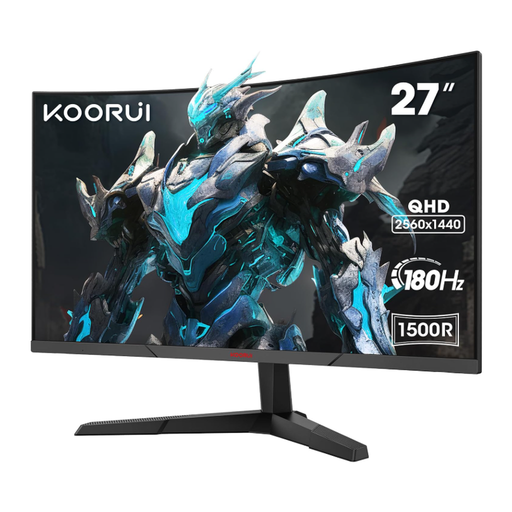
KOORUI MG27A12QV3 27-inch curved QHD gaming monitor
Could suit a small desk if you prefer a curved VA model with tilt adjustment.
VA panel, QHD and 180 Hz according to the product title; the stand is tilt-adjustable.
Compare the curve and overall dimensions with your viewing distance and available space.
View at Joybuy
 No image available
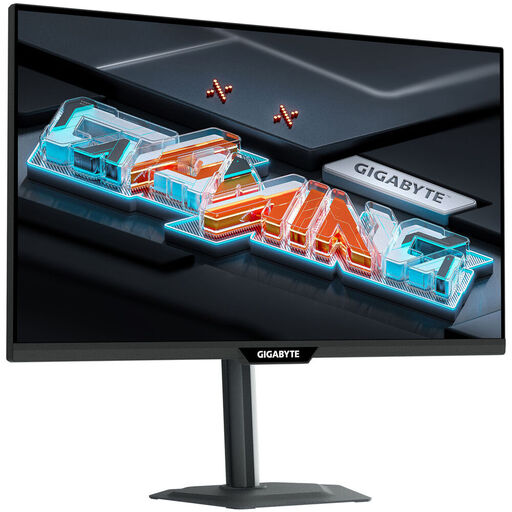
GIGABYTE M27QS 27-inch QHD IPS gaming monitor
An IPS option for QHD gaming at your desk if you want to use the stated FreeSync feature.
IPS, 170 Hz and FreeSync Premium Pro, according to the product title.
Check the refresh rate and connection against your gaming device, and confirm the dimensions of the specific version.
View at Joybuy
Frequently asked questions
Are 180 Hz and “1 ms” enough to see corners clearly?
No. The maximum refresh rate depends on receiving a suitable signal, and “1 ms” may refer to a differently defined manufacturer specification such as MPRT. RTINGS.com distinguishes between motion tests and input lag; check both separately, and look out for overshoot in motion tests, too.
What should I adjust after connecting the monitor?
Check which resolution and refresh rate are actually active in your system and game. With compatible AMD hardware and a suitable monitor, FreeSync can synchronise the refresh rate with the frame rate. Check the settings on the monitor and in the driver.
Will an ultrawide monitor show more of the track in every racing game?
No, it depends on the game and platform. Electronic Arts confirms ultrawide support on track for the PC version of F1 25; according to Electronic Arts, the user interface and cutscenes are centred in 16:9. A large display format also requires sufficient graphics memory.
Is OLED suitable for a racing game with a permanently visible HUD?
That depends on how long static elements remain on screen and the usage terms for the specific model. RTINGS.com highlights the risk of burn-in from static elements displayed for long periods. If you use a cockpit view or HUD that stays on screen, check the manufacturer’s information and warranty terms before buying.
How can I compare the energy use of different monitors?
For monitors covered by the scheme, compare the EU energy label for the exact model and check the operating modes listed. The European Commission includes computer monitors within the scope of electronic display labelling. An energy class alone doesn’t tell you whether a monitor is suitable for racing games.


