With a small desk, first check whether the monitor and stand leave enough room for your keyboard. Then decide whether Full HD on a screen of around 24 inches is enough for you, or whether you’d prefer QHD in a compact format. AOC and LG list specific models with these different resolutions, while Dell offers a 27-inch QHD model as a larger alternative. More pixels or a higher refresh rate don’t, by themselves, guarantee better readability in any given game.
Who plays at a small desk?
Players with very little desk space
You need to fit the monitor and stand without losing room for your keyboard or a comfortable seating position. The BAuA emphasises that, for screen-based work, the screen should be positioned to suit the user; this is not a requirement for gaming at home.
Players who read maps and menus
You spend a lot of time looking at overviews and control panels, so you’ll need to weigh up the extra pixels against the readability of small text. AOC lists QHD at 23.8 inches, while LG offers Full HD in the 24-inch class.
Players who enjoy a mix of games
You play faster-paced games as well as management sims, so you’ll also want to check the refresh rate and connections. LG distinguishes between native and overclocked refresh rates on one specific model; Dell lists different QHD limits for a model depending on the connection.
What matters when buying?
Around 24 inches, Full HD
A good fit if: desk space is limited and Full HD is easy to read at your viewing distance.
The trade-off: Full HD displays fewer pixels than QHD; the LG 24G411A-B is listed at 120 Hz native and 144 Hz overclocked.
Around 24 inches, QHD
A good fit if: you want more pixels on a compact screen and can check text size in the game you play.
The trade-off: AOC lists 2560 × 1440 at 23.8 inches; this doesn’t guarantee that small menus will be easier for you to read.
27 inches, QHD
A good fit if: your desk space, viewing distance and seating position can accommodate a larger screen.
The trade-off: 27 inches takes up more room than 23.8 inches; Dell lists up to 180 Hz over DisplayPort and 144 Hz over HDMI for the G2725D at QHD.
| Buying priority |
What to check before buying |
Who it matters most to |
| Desk space and screen position |
Check the width, depth and height of the specific monitor with its stand against your desk and keyboard position. |
If my desk is short on space, I want to fit the screen without losing working space or a comfortable seating position. Around 36% of consumers put desk space and screen position first. |
| Readability of maps and menus |
Check the game you actually play at your intended resolution and with the available display settings. |
If I read lots of maps and control panels, I want the text to be clear from my usual seating distance. Around 29% of consumers prioritise the readability of the game interface. |
| Upfront and running costs |
Compare the specific energy label and stated consumption; factor in any accessories you may need. |
If I consider the purchase price, any accessories and electricity use together, I want to include the ongoing costs. Around 21% of consumers pay particular attention to total costs. |
| Connection and refresh rate |
Check your PC’s output, the monitor’s input, the cable and the manufacturer’s figures for your chosen resolution and refresh rate. |
If I also play faster-paced games, I want to know which refresh rate the connection I’m using supports. Around 14% of consumers prioritise connection and refresh rate. |
Common buying mistakes
-
Comparing screen size alone
The diagonal measurement doesn’t tell you how deep the stand is or where the screen will sit on your desk.
Check the dimensions of the complete setup against your desk and preferred keyboard position. If you’re using a monitor arm, also check the mounting options and compatibility.
Depending on your setup, you may need an additional mount or have less free desk space.
-
Assuming QHD at 24 inches is automatically easier to read
AOC lists 2560 × 1440 at 23.8 inches. However, the pixel count alone doesn’t tell you whether menus in a particular game will be easy to read from your viewing distance.
Check the game interface at your intended resolution, and keep Full HD in mind as an alternative.
-
Taking the advertised refresh rate at face value
For the 24G411A-B, LG distinguishes between 120 Hz native and 144 Hz overclocked. Dell lists different maximum QHD refresh rates for the G2725D over DisplayPort and HDMI.
Check the manufacturer’s figures for the resolution and input you actually plan to use.
Depending on the connection, you may need an additional compatible cable.
Key brands at a glance
AOC
The Q24G2A/BK is a listed 23.8-inch QHD option with a height-adjustable stand.
- AOC lists IPS, 2560 × 1440 and 165 Hz for this model.
- These are manufacturer specifications, not an independent assessment of readability in management sims. Check the stand dimensions and text size for your setup.
LG
The UltraGear 24G411A-B is a Full HD alternative in the 24-inch class.
- LG lists IPS and 1920 × 1080 for this model.
- According to LG, the advertised 144 Hz is overclocked; the native refresh rate is listed as 120 Hz. These specifications apply to this specific model.
BenQ
The MOBIUZ EX240N is a 23.8-inch gaming option with built-in speakers, according to the German product page.
- BenQ lists 165 Hz and promotes its own HDRi picture adjustment.
- This doesn’t independently confirm how HDRi performs in management sims. Check the features and stand of the specific offer.
Philips
According to the German product page, the Evnia 24M2N3200A/00 is a 23.8-inch Full HD gaming monitor.
- Philips lists IPS and 180 Hz for this model.
- The manufacturer’s claims about an improved gaming experience aren’t independent evidence; a high refresh rate doesn’t replace checking menu readability.
Dell
The G2725D is an example of a 27-inch QHD alternative for setups with enough space.
- Dell lists up to 180 Hz at QHD over DisplayPort and up to 144 Hz over HDMI.
- The figures vary depending on the connection. Also check that the screen and stand will fit your desk.
Joybuy product selection
This selection mainly features Full HD monitors around 24 inches, along with one 25-inch option. Compare the dimensions of the specific model and check whether Full HD meets your needs for maps and menus.
 No image available
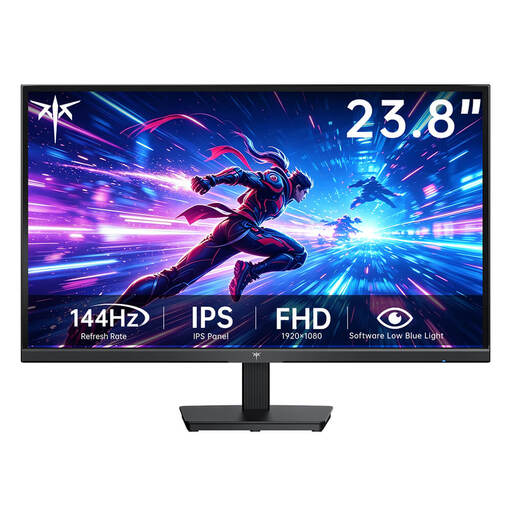
KTC H24B9S-2
A compact Full HD option if a screen of around 24 inches is big enough for you.
23.8 inches; Fast IPS; 1920 × 1080; 144 Hz.
View at Joybuy
 No image available
KOORUI MB24V29FS4
A 24-inch Full HD option if the size and resolution suit your desk and the games you play.
24 inches; IPS; 1920 × 1080; 120 Hz; 5 ms response time; HDMI and VGA; VESA 100 × 100 mm; tilt-adjustable.
View at Joybuy
 No image available
TCL 25G54
At 25 inches, this is a slightly larger alternative to the 24-inch models. Measure your available space first.
25 inches; Mini LED; IPS; 1920 × 1080; 144 Hz; 450 Nits.
View at Joybuy
 No image available
KTC H24B9S
A 24-inch Full HD option if you can check the connections on the specific offer against your PC.
24 inches; IPS; 1920 × 1080; 144 Hz; HDMI and DisplayPort; tilt-adjustable.
View at Joybuy
 No image available
ASUS VY249HF-W
A 24-inch Full HD option if the size and resolution suit the management sims you play.
24 inches; IPS; 1920 × 1080; 100 Hz; Adaptive-Sync; VESA 100 × 100 mm; HDMI.
View at Joybuy
Frequently asked questions
Do you need 144 or 180 Hz for management sims?
The published specifications for these models don’t indicate that either is required. If you also play faster-paced games, compare the native and overclocked figures, as well as the maximum refresh rate supported by the connection you use. LG lists 120 Hz native and 144 Hz overclocked for the 24G411A-B; Dell lists different QHD limits for DisplayPort and HDMI on the G2725D.
How do I set up a monitor on a cramped desk?
Position the screen to suit your posture and eyesight, and check that the stand and keyboard fit on your desk. The BAuA discusses screen positioning in the context of screen-based work, not as a requirement for gaming at home.
What do statutory rights and a voluntary guarantee mean when buying online?
According to consumer information from the European Union, when you buy from a trader as a consumer, faulty goods are generally covered by a statutory minimum guarantee of two years. This is separate from any additional manufacturer’s guarantee. Online purchases generally come with a 14-day cancellation period. Terms and possible exceptions depend on the specific purchase.
Which energy details should I compare when choosing a monitor?
For the specific model, compare the energy label and product information sheet, including the stated energy consumption. EU energy-labelling rules generally cover electronic displays, including monitors; they don’t set a minimum efficiency class that buyers must meet for gaming at home.


