Gamers with limited desk space
If you need room for a joystick, mouse or keyboard as well as your screen, start by checking the monitor’s width and depth, including its stand.


When space is tight, a 24-inch Full HD monitor is a sensible starting point. If you want more pixels for maps and text, consider a 27-inch WQHD model, provided the screen and stand will fit on your desk. LG lists a resolution of 1.920 × 1.080 pixels for the 24G411A-B, while ASUS lists 2.560 × 1.440 pixels and dimensions of 61,48 × 21,88 cm with the stand for the ROG Strix XG27ACS. A 34-inch ultrawide calls for a check of both desk space and game support. If you’re considering OLED, also bear in mind Samsung’s warning that static on-screen elements displayed for long periods may cause burn-in.
If you need room for a joystick, mouse or keyboard as well as your screen, start by checking the monitor’s width and depth, including its stand.
If you want to make out instruments, trading information and small text clearly, consider screen size, resolution and your usual viewing distance together.
A wide screen or OLED for dark scenes may be worth considering if the available space, game support and characteristics of the panel technology suit the way you play.
First check your desk space and viewing distance. Then consider whether you need extra detail or a wider view, and finally check which resolution and refresh rate your PC can output through the connection you plan to use.
| Criterion | What to check before buying | Who should pay particular attention |
|---|---|---|
| Desk space and room to move | Measure the available width and depth, including the stand. ASUS lists dimensions of 61,48 × 21,88 cm (W × D) with the stand for the ROG Strix XG27ACS. | If your screen and controls need to share a small desk, every centimetre counts. Around 36% of consumers prioritise the space a monitor takes up. |
| Readability of cockpit displays and maps | Consider resolution, screen size and viewing distance together. LG lists Full HD at 1.920 × 1.080 pixels for the 24G411A-B, while ASUS lists WQHD at 2.560 × 1.440 pixels for the XG27ACS. | If I want to read instruments and trading text from my usual seat, I look for detail without losing sight of the space available on my desk. Around 29% of consumers prioritise readability. |
| A wider view when flying | Check whether the specific game can display a 21:9 format and arrange its interface appropriately. Samsung lists a 21:9 format with a resolution of 3.440 × 1.440 pixels for the Odyssey G5 LC34G55TWWPXEN. | If you want a wider view from the cockpit, check the available space and how the game outputs its display beforehand. Around 21% of consumers prioritise screen width. |
| Dark scenes and static displays | Choose between LCD and OLED based on your picture preferences. Samsung notes that static game elements displayed for long periods may cause burn-in on OLED monitors. Check the care features and conditions for the specific model. | If dark-scene performance matters to me, I also consider static cockpit displays during longer gaming sessions. Around 14% of consumers prioritise dark-scene performance. |
Even a 27-inch monitor with its stand can take up a lot of desk depth. You’ll also need enough room beside it to use your controls.
Compare your available desk space with the width and depth of the specific monitor, including its stand. Only plan to use a monitor arm once you’ve confirmed that the mount, weight capacity and desk fixing are compatible.
A monitor arm may require a compatible mount and a suitable way to attach it to your desk.
The LG 24G411A-B is listed at 120 Hz natively and 144 Hz in overclocking mode. ASUS lists different maximum refresh rates for the XG27ACS depending on the input, while Samsung’s 1 ms figure for the Odyssey G5 is an MPRT measurement, not measured input lag.
Check the exact model to see whether the figure is native or overclocked, which connection it requires and how response time is defined.
A 21:9 format doesn’t guarantee that a particular game will show more cockpit information or arrange its interface appropriately.
Check how your game displays on the screen and measure the space you’ll need before choosing a wide model.
Samsung notes that static game elements displayed for long periods may cause burn-in. Statutory rights for faulty goods are also different from a voluntary warranty; the Verbraucherzentrale explains the distinction.
Consider how you use your monitor and read the care guidance and warranty terms for the specific OLED model.
The UltraGear 24G411A-B is one example of a 24-inch Full HD IPS monitor.
The ROG Strix XG27ACS is a specific 27-inch WQHD IPS example with listed stand dimensions.
The Odyssey G5 LC34G55TWWPXEN is a 34-inch example of a curved 21:9 VA display.
The Alienware AW2725Q is a specific example of a 27-inch 4K QD-OLED monitor.
This selection includes 24-inch models for a more compact screen size and 27-inch QHD options with more pixels for cockpit and trading information. Before deciding, measure the space needed for the screen, stand and controls.
 No image available
A 24-inch Full HD option if you’d like to start by looking at a more compact screen size for a smaller desk.
The product title lists a resolution of 1.920 × 1.080 pixels, IPS, 144 Hz, Adaptive Sync, HDMI and DisplayPort.
 No image available
A 24-inch model in a more compact screen size, if you’re weighing up desk space and how the monitor can be positioned.
This model is listed with Full HD, IPS, 120 Hz, DisplayPort, HDMI and VESA 100 × 100 mm. Height adjustment and pivot are also listed.
 No image available
A 27-inch QHD option if you want more pixels for maps and trading text and have room for the monitor on your desk.
Listed specifications include 2.560 × 1.440 pixels, 144 Hz, Fast IPS, FreeSync and a 1 ms MPRT response time. According to the product description, the maximum listed refresh rate at QHD requires DisplayPort and a compatible dedicated graphics card.
 No image available
A 27-inch QHD model if you need more screen detail for cockpit and trading information.
Listed specifications include 2.560 × 1.440 pixels, IPS, 120 Hz, Adaptive Sync, HDMI, DisplayPort and VESA compatibility.
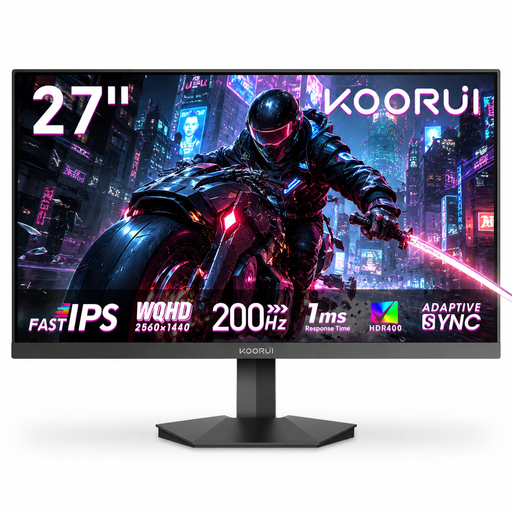 No image available
A 27-inch QHD option if you’d like more screen detail and the flexibility to tilt your monitor.
Listed specifications include Fast IPS, 200 Hz, Adaptive Sync and VESA 75 × 75 mm. The stand tilts but isn’t height-adjustable.
If space is limited, start by checking the dimensions of a 24-inch monitor. If a 27-inch monitor, its stand and your controls will all fit on your desk, and you’d like more pixels for text and maps, consider WQHD at your usual viewing distance. Screen size and resolution alone don’t determine which text size will feel comfortable for you.
The maximum refresh rate of the ASUS ROG Strix XG27ACS can vary depending on the input: ASUS lists up to 180 Hz via DisplayPort or USB-C and up to 144 Hz via HDMI. Also check the PC, game and monitor settings for the connection you’re using.
Samsung notes that static game elements displayed for long periods may cause burn-in on OLED monitors, and explains care features on certain Samsung models. Check the features and warranty terms for the specific monitor; don’t assume that guidance for Samsung products applies to other brands.
Many online purchases are generally covered by a 14-day right of withdrawal, although the requirements and exceptions depend on the circumstances. If a product is faulty, you have statutory rights against the seller; these are separate from a voluntary manufacturer’s warranty. The Verbraucherzentrale explains these rights and the difference between them.
The European Commission includes computer monitors among products covered by energy labelling, so check the energy label for the specific model. The German Environment Agency advises against putting old electrical equipment in household waste; instead, use a suitable return point or local collection centre.