Space gamers looking for immersion
If you want a wider field of view, check whether your game supports 21:9 or 32:9 and whether the monitor will fit on your desk. Dell, LG and Samsung offer these wide formats on selected models.


For exploring a simulated star system, a 27-inch 16:9 monitor is a more space-saving starting point. An ultrawide is a better fit if your particular game makes good use of the wider format and you have enough desk space. OLED may appeal if you play a lot of dark scenes, but you’ll need to check the care guidance and warranty terms. Also compare the resolution and refresh rate with your PC or console and the connection you’ll actually use.
If you want a wider field of view, check whether your game supports 21:9 or 32:9 and whether the monitor will fit on your desk. Dell, LG and Samsung offer these wide formats on selected models.
If dark scenes are a priority for you, OLED models are worth considering. ASUS describes OLED Care Pro as a way to reduce the risk of burn-in, not as a guarantee against it.
If you’re looking for a 27-inch main monitor, compare the resolution and refresh rate available through the connection you need. ASUS lists the VG27AQ3A as a 27-inch QHD monitor with up to 180 Hz over DisplayPort.
When exploring a simulated star system, the key considerations are the game’s format, how dark scenes are displayed, the connection you can actually use and the space available on your desk.
A good fit if: Your particular game makes good use of the wider format and you have room on your desk for a 34-inch monitor.
What to consider: Check game support and desk space first. Dell lists different maximum refresh rates for the AW3423DWF depending on the connection.
A good fit if: An especially wide view is your main priority and your game, hardware and available space can accommodate it.
What to consider: Samsung’s G95C is 49 inches wide, so measure the space you have available and check how your game looks on this format.
A good fit if: You’re looking for a more compact main monitor and want to weigh up IPS and OLED according to your priorities.
What to consider: For an OLED model, check its care guidance and warranty terms. A manufacturer feature alone doesn’t prove it will offer an advantage in your game.
| Buying priority | What should you look for? | Who is this especially important to? |
|---|---|---|
| Wide field of view and game format | Check whether your particular game supports 21:9 or 32:9, and measure the space available. | If I want as much horizontal screen space as possible for exploring, I’ll check the game format and available room first. Around 33% of consumers prioritise a wider field of view. |
| How dark scenes are displayed | Compare panel types and the specific HDR details; for OLED, read the model’s care guidance and warranty terms. | If dark scenes matter more than having extra width, I want to weigh up the panel type and terms carefully. Around 27% of consumers prioritise this. |
| Refresh rate through your connection | Compare the input, cable and graphics output, as well as the resolution and refresh rate combination listed for that connection. | If I want smooth visuals through the connection I already have, I’ll check the refresh rate it can achieve. Around 20% of consumers have this as their main priority. |
| Desk space and setup | Check your desk’s width and depth, the stand and your seating position; also check VESA mounting if needed. | If space in my gaming room is limited, I want to know first whether the monitor and stand will fit where I plan to put them. Around 20% of consumers put available space first. |
The same monitor may have different maximum refresh rates listed for HDMI and DisplayPort.
Check the specifications for the input and resolution you actually plan to use.
A monitor’s aspect ratio doesn’t tell you how a particular game will display its image or menus.
Check that your game supports the format and measure the available space before choosing 21:9 or 32:9.
ASUS describes OLED Care Pro as a feature that reduces the risk of burn-in, not one that eliminates it. Your statutory rights and a voluntary warranty are separate forms of protection.
Read the care guidance and warranty terms for the exact model before making your decision.
The models mentioned cover 27-inch QHD monitors with both IPS and OLED panels.
The AW3423DWF combines a 34-inch QD-OLED panel with a 21:9 format.
The UltraGear 34GS95QE-B combines a 34-inch screen, a 21:9 format and OLED technology.
The Odyssey G9 G95C is an especially wide 49-inch option in a 32:9 format.
The MAG 274QRFDE QD E2 is a 27-inch WQHD option.
This Joybuy selection ranges from 27-inch QHD models to larger and ultrawide gaming monitors. Before buying, check that your preferred game format is supported and that the monitor will fit where you plan to put it.
 No image available
A compact 27-inch option if you’re looking for a QHD monitor in a 16:9 format.
The product title lists 144 Hz, a Fast IPS panel, FreeSync and HDR10.
 No image available
The larger curved screen is worth considering if you have enough room on your desk.
The product title lists 2650 × 1440 pixels, 165 Hz and a 1500R curve.
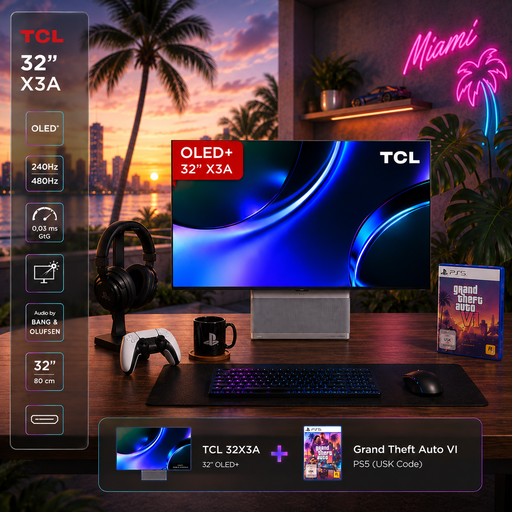 No image available
An option to consider if you’re looking for a 32-inch OLED+ display with 4K UHD.
The product title lists 3840 × 2160 pixels and up to 240 Hz at 4K or 480 Hz at FHD.
 No image available
This ultrawide format is worth considering if your game supports it and you have enough space.
The product title lists 3440 × 1440 pixels, 165 Hz, a VA panel and a 1500R curve.
 No image available
This model is worth considering if you’re looking for a 27-inch QD-OLED monitor with QHD resolution.
The product title lists 2560 × 1440 pixels, 240 Hz, Adaptive-Sync and USB-C.
No. Check the specifications for the input you actually plan to use: Dell lists 165 Hz over DisplayPort and 100 Hz over HDMI for the AW3423DWF. ASUS also lists different maximum refresh rates for DisplayPort and HDMI on the VG27AQ3A.
Check the care features and warranty terms for the specific model. ASUS describes OLED Care Pro on the XG27AQWMG as a way to reduce the risk of burn-in, not to eliminate it.
For consumer purchases of goods in the EU, a statutory two-year legal guarantee from the seller generally applies; this is separate from any voluntary manufacturer’s warranty. Online purchases are also generally covered by a 14-day right to withdraw, subject to the relevant conditions and exceptions. Your Europe explains these EU-wide rules.
Compare the energy label and product information sheet for the specific models rather than looking at screen size alone. The European Commission covers electronic displays, including computer monitors, under EU energy labelling and ecodesign rules.